Skip to content

Circumventing Systems Policy: Why Google Ads Suspends Accounts and What Fixing It Involves
 Gianluca Catinella, Director, Ad Restore LtdPublished on 21 min read
Your account violated the Circumventing Systems policy
The notice wording is as advertisers report it.
A Circumventing Systems suspension means Google’s systems concluded that something about the account was arranged to get around its review processes. The notice names the policy but never the section of it, and it identifies no ad and no landing page. The appeal is therefore not judged on intent — it is judged on whether you can show what Google’s systems actually saw, and what has changed since.
Your campaigns stopped overnight, the account is flagged, and the notification gives you one sentence: your account violated the Circumventing Systems policy. There is no list of the ads involved and no landing page named. For most businesses that land here, the honest first reaction is that the label describes somebody else, because the conduct the label names is not something anyone in the building recognises.
That reaction is understandable, and it is also beside the point. This article sets out where the policy sits, what it names, which ordinary technical configurations produce it by accident, and what evidence an appeal under it has to carry.
Policy positions in this article were checked against Google’s published documentation in September 2026. Google’s advertising policies change without notice, so verify any detail against the linked pages before relying on it.
At a glance
No warning first
Google says accounts are suspended upon detection and without prior warning.
Read the second half of the label
“Cloaking” points at your destination. “Multiple Account Abuse” points first at your accounts.
Ordinary set-ups can trigger it
CDN and bot rules, testing tools, redirects and stale company records can produce the finding by accident.
Don’t open a new account
Google names creating new accounts to re-enter the system after a suspension as prohibited conduct.
The appeal bar
Accounts are reinstated in compelling circumstances, such as a mistake: a demonstrated cause and a demonstrated fix.
On this page15 sections
The notice, and the half of the label that matters
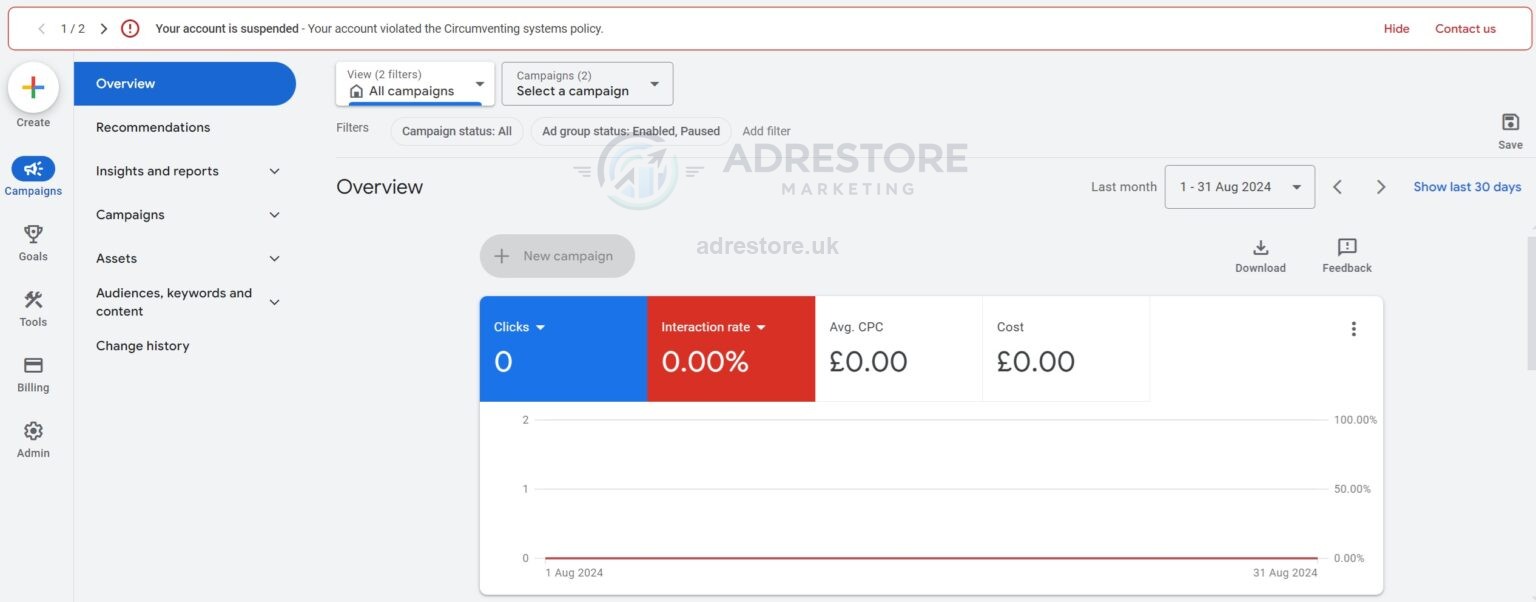
The in-account notification and the email that follows it are short. The wording clients bring to Ad Restore Ltd is a variation on “your account has been suspended”, followed by “your account violated the Circumventing Systems policy”. What matters far more than that sentence is whether a second half is attached to the label.
The two second halves we see most often in the accounts we work on are:
- Circumventing Systems: Cloaking — the finding concerns what was served at the ad destination, and specifically whether Google’s review systems were served the same thing as users.
- Circumventing Systems: Multiple Account Abuse — the finding points first at account and entity relationships rather than at page-serving behaviour. This exact label wording appears in Google Ads Help community threads.
The second half narrows the investigation. A cloaking label means your web infrastructure, CDN, tag manager and landing page logic are in scope and your account structure probably is not. A multiple account abuse label means the reverse: you need a map of every account, email address, payment method and manager account that has ever touched this business. It does not put your website entirely out of scope, because Google’s own multiple-violations example includes creating new websites or accounts to show ads similar to ones already disapproved — but the account map is where the work starts. Where no sub-label is given, you are diagnosing across the whole policy and you have to work all five of the areas below.
Capture the starting state first.
Before anything is changed, capture the evidence of the starting state: a full screenshot of the notification including the date it appeared, the account ID, the exact label text, and the email. We do not start work on an appeal without it, because the notice defines what has to be answered.
Where this policy sits in Google’s rulebook
Circumventing systems is not a standalone policy. It is one of seven sub-policies under the parent Abusing the ad network policy. The full set is:
- Malicious software
- Compromised sites
- Unwanted software
- Unfair advantage
- Evasive ad content
- Circumventing systems
- Spam policies for Google Web Search
Knowing the parent tells you something practical. Everything in this bucket is about the integrity of the advertising network itself — malware, hijacked sites, manipulated ad components, traffic advantage — rather than about whether the thing you sell is acceptable. That is why a perfectly ordinary business selling perfectly ordinary services can end up here. The finding is about how the account, its ads or its destinations interacted with Google’s systems. It is not a judgement on your product, and an appeal that spends three paragraphs explaining how legitimate your business is has answered a question nobody asked. If you want the wider map of how the enforcement categories relate to each other, our overview of understanding Google Ads suspension policies covers the neighbouring buckets.
Evasive ad content is the sibling most often confused with Circumventing Systems, and it is the one that comes with a seven-day warning before any suspension. Our guide to evasive ad content in Google Ads covers what triggers it and what to do before the deadline.
What the policy prohibits
Google’s Circumventing systems page states that Google Ads does not allow advertisers to run ads, content or destinations that attempt to trick or circumvent its ad review processes. It then gives six examples of prohibited conduct. Four of them, in Google’s own words, are the ones this article works through:
- “Bypassing enforcement mechanisms and detection by creating variations of ads, domains or content that have been disapproved…”
- “After a previous suspension decision, attempting to use the Google Ads system again by creating new accounts to re-enter the system”
- “Abusing Google Ads product features to show policy non-compliant content to users or gain additional traffic”
- “Submitting false information as part of our verification programmes”
The fifth example covers having multiple ad policy violations across several of your accounts, either gradually or all at once, and it carries three sub-points of its own: duplicate sites or accounts showing ads similar to ones already disapproved, spreading violating ads across two or more accounts, and using several accounts to promote products or services you are not certified for. That example is the one behind most Multiple Account Abuse labels, and it is worked through in its own section below. The sixth covers failing to re-certify, or misusing certification, under the Gambling and games policy after a material change; it is outside the scope of this article, and gambling advertisers should read that policy directly.
Read the list as a diagnostic checklist rather than a description of you. Each item has a mundane, unintentional counterpart: a disapproved ad rewritten and relaunched several times without the underlying issue being fixed; a second account opened by a colleague or an agency while the first was under review; a feature such as dynamic ad destinations, tracking templates or dynamic keyword insertion producing a combination nobody reviewed; a verification submission built from stale company records. In each case the outcome Google observed is what the policy addresses, and the remediation is to remove the divergence and be able to document it.
Cloaking, and the line Google actually draws
Google defines cloaking on the same policy page as showing different content on your website to different people, or to Google, to try to hide things that might break its rules. The important half of the definition is the half most write-ups omit: Google explicitly permits variation. Its wording allows a landing page or ad destination in different languages, different special offers, or adjustment for geographical location or slower internet speeds — with the hinge condition that the promoted product or service needs to be the same for everyone.
That single sentence is the line. Serving a French visitor French, a mobile visitor a lighter page, a Scottish visitor a Scottish delivery message, or one region a seasonal promotion is not the problem — Google names different special offers as permitted variation. What the policy addresses is divergence in the promoted product or service itself: one audience being shown a materially different offering, or materially different substantive claims about it, from the version Google’s reviewers can see.
Systems that routinely cross that line without anyone deciding to:
- A/B and landing-page testing tools. A split test in which one variant promotes a materially different product or service means there is no single version of the destination to review.
- Personalisation and audience engines. Rules keyed on referrer, cookie state, returning-visitor status or CRM segment can leave a first-time, cookie-less crawler on a stripped-down page that no human customer ever sees.
- Paywalls, registration walls and age gates. If the substance of the advertised offering sits behind the gate, the reviewable version and the user version diverge.
- Device-conditional content. Mobile and desktop templates that have drifted apart over time until the mobile page advertises something the desktop page does not.
- Geo-routing at the edge. Covered below, because it is easy to introduce without noticing.
The action here is an inventory. List every system in your stack that is capable of changing what is served for the same URL — CDN workers, edge rules, testing tools, tag manager, plugins, server-side rendering rules — and for each one record what condition triggers the change and what the variant contains.
For the technical causes we see behind cloaking findings on legitimate sites, from CDN bot rules to ad URLs that redirect, and the evidence a cloaking appeal needs, see Circumventing systems: Cloaking in Google Ads.
When your own infrastructure is the cause
Google’s Destination requirements policy requires that ad destinations are crawlable by Google’s AdsBot crawlers. The dedicated Destination not crawlable page states the requirement is so Google can verify that users are led to a destination relevant to the ad they clicked, and names robots.txt exclusions, unreachable robots.txt files and timeouts as causes. The companion Destination not accessible page adds HTTP errors such as 404 and 403 returned to AdsBot, access-limitation messages in the targeted location, and server-side configurations that prevent AdsBot from reaching the page.
Three configuration details to check first:
To check what AdsBot is actually served by your own site, do not rely on loading the page in your own browser from your own office. Request your own live URL with the AdsBot-Google and AdsBot-Google-Mobile user-agent strings from an address outside your network, record the HTTP status and the full response body, and then search your server, CDN and WAF logs for those user agents to see what your own edge did with the request. This is a test of your own property, and the log line is the evidence; the screenshot is not.
Destination mismatch and redirect chains
Google’s Destination mismatch page names four situations: the domain or domain extension in the display URL not matching the final and mobile URLs; a subdomain that does not clearly distinguish a site from other sites on that domain or from the parent domain; redirects from the final URL taking the user to a different domain; and a tracking template or expanded URL that does not lead to the same content as the final URL.
In practice these surface as:
- Cross-domain redirects. A rebrand where the old domain is still live and 301s to the new one, while ads still carry the old final URL.
- Third-party click trackers. A tracking template that routes through an external measurement domain, then to a shortener, then to the page — a chain with more hops than anyone intended and at least one hop that can fail.
- Stale sitelinks and assets. Account-level sitelinks pointing at pages retired two site migrations ago, often the last thing anyone audits.
- Consent and region gateways. A redirect to a regional sub-site that technically lands the user on a different domain.
Export every final URL, mobile URL, tracking template and asset URL in the account, resolve each one to its terminal destination, and record the full hop chain with status codes. That export is a deliverable in the appeal, not just an internal task.
Multiple Account Abuse and the related-account cascade
Google’s policy consequences page is direct about scope. It states that “any related accounts (for example, accounts using the same payment method) will also be suspended”, and that new accounts created will be automatically suspended. The circumventing systems policy separately names the creation of new accounts after a suspension decision as prohibited conduct, and its multiple-violations example covers creating new websites or accounts to show ads similar to ones already disapproved.
Don’t open a new Google Ads account to get round this.
Opening a new account while the original is suspended works against the appeal, and the circumventing systems policy names it directly as prohibited conduct. Payment method is the linkage example Google publishes; a shared email address, business identity, manager account link or domain is the kind of shared identifier Google’s related-account language covers, so a second account is not a fresh start and it turns a single-account problem into an entity-level one. If someone offers you a rented “agency account” or an aged account instead, read what Google’s rules say about renting or buying an account before you pay.
If accounts have already been opened, they need to be inventoried and disclosed rather than hidden. Our guide to Google Ads suspension appeal best practices goes into how disclosure of that history is handled.
False information in advertiser verification
Google lists the submission of false information as part of its verification programmes as an example under this policy. In November 2025 it added that example explicitly, and Search Engine Roundtable’s 6 November 2025 write-up quotes Google as saying the clarification “reinforces our existing policy that submitting false or fraudulent information through our verification programs is a direct violation of the Circumventing Systems policy and will result in account suspension. There is no change to enforcement of this policy.” The addition was a clarification rather than a new rule, and it was also covered by Search Engine Land.
The accidental version of this is administrative, not dishonest: a legal entity name that differs from the trading name on the payment profile, a registered address never updated after a move, documents belonging to a parent company rather than the advertising entity, or an agency’s details submitted for a client’s account. Reconcile the payment profile, the verification submission and your statutory records so all three name the same entity, then keep copies of what was submitted and when. Advertiser verification support is part of our Google Ads compliance services.
The verification side is covered in more depth, including the task types Google can assign and why verification and a suspension can lock each other, in Circumventing Systems and advertiser verification.
Why there was no warning
Google distinguishes egregious violations, defined on the policy consequences page as a violation so serious that it is unlawful or poses significant harm to users or the digital advertising ecosystem, from violations that receive a warning at least seven days before suspension. Circumventing systems falls in the first group. Checked in September 2026, five of its six siblings under the same parent policy state that a warning will be issued at least seven days before any suspension; only Malicious software shares the no-warning treatment.
Warning before suspension, by sub-policy
| Sub-policy under Abusing the ad network | Warning before suspension? | Google’s stated position |
|---|---|---|
| Circumventing systems | No | Accounts are suspended upon detection and without prior warning |
| Malicious software | No | Suspension upon detection and without prior warning |
| Compromised sites | Yes | A warning will be issued at least 7 days prior to any suspension |
| Unwanted software | Yes | A warning will be issued at least 7 days prior to any suspension |
| Unfair advantage | Yes | A warning will be issued at least 7 days prior to any suspension |
| Evasive ad content | Yes | A warning will be issued at least 7 days prior to any suspension |
| Spam policies for Google Web Search | Yes | A warning will be issued at least 7 days prior to any suspension |
The practical consequence: the absence of a warning is not evidence that the finding is wrong, and arguing that you were never warned is not an appeal argument. It is simply how this classification works.
What an appeal has to demonstrate
Google’s account suspensions overview sets the bar plainly: accounts are reinstated in compelling circumstances, such as in the case of a mistake, and advertisers are asked to be thorough, accurate and honest, including relevant information and an explanation of why the suspension is believed to be incorrect.
“Compelling circumstances, such as in the case of a mistake” is the sentence to write the appeal against. It asks for a demonstrated cause and a demonstrated fix, not a character reference. What that means by sub-type:
- Cloaking findings — destination parity evidence: the response served to a normal user and the response served to AdsBot for the same URL, side by side, showing the same promoted product or service; a list of every conditional-content system with its rules; and confirmation of which rules were removed or neutralised, with dates.
- Crawlability findings — the current robots.txt, the WAF and CDN rule set before and after, and server or edge log extracts showing AdsBot requests receiving a 200 response.
- Destination mismatch findings — a redirect audit: every final URL, mobile URL, tracking template, sitelink and asset URL with its full hop chain and terminal domain, and the corrections applied.
- Multiple account abuse findings — an account and payment-method map: every account ID, the email addresses and manager account links, the payment instruments used, which are closed and which remain, and the entity behind each.
- Verification findings — the corrected records: entity name, registered address and documentation reconciled across companies register, payment profile and verification submission.
Appeal mechanics to know before touching the form
From Google’s own account suspensions documentation, several mechanics are worth knowing before you start:
An illustrative scenario
The following is an illustrative scenario written to show a diagnostic order. It is not a client, and no part of it describes a real business.
A B2B supplier serving the UK and Ireland adds an edge redirect at its CDN so that visitors resolving to Irish IP addresses are sent to a country-specific page with EUR pricing and different delivery terms. The reason is entirely legitimate. Some months later the account is suspended under Circumventing Systems: Cloaking.
The order of work:
Read the label.
Note that it points at the destination, not the account structure.
Inventory the edge.
Find the geo rule, plus a bot-management rule added by a developer in the same sprint that issues a managed challenge to unverified crawlers.
Reproduce the request.
Run it against the supplier’s own live URL as
AdsBot-Googlefrom outside its network, and confirm that the crawler receives the challenge on one route and the Irish page on another, so no single reviewable version of the advertised product exists.Correct it.
The challenge exception is applied so that AdsBot receives the same page a user receives, and the geo-variant is amended so the promoted product and its substantive terms match across regions, with only currency and delivery wording differing.
Evidence it.
Before-and-after rule exports, log lines showing the crawler receiving a 200, and the two page versions placed side by side to show the same promoted product.
Only then is the appeal written.
A real case, for comparison
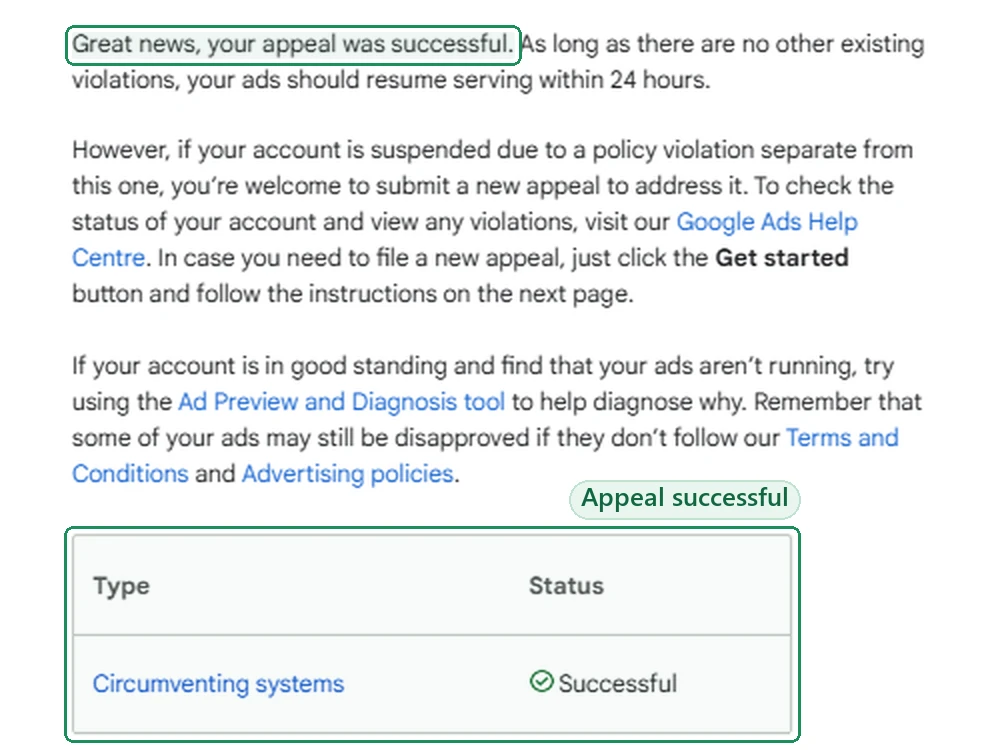
The scenario above is invented. This one isn’t. In November 2024 an Australian food business’s Google Ads account was suspended for Circumventing Systems. Its first appeal was rejected. The second, rewritten and sent with more evidence, succeeded:
A pre-relaunch compliance checklist
Frequently asked questions
What does a Circumventing Systems appeal have to demonstrate?
Google’s account suspensions overview sets the bar plainly: accounts are reinstated in compelling circumstances, such as in the case of a mistake, and advertisers are asked to be thorough, accurate and honest, including relevant information and an explanation of why the suspension is believed to be incorrect.
Why was there no warning before a Circumventing Systems suspension?
Google distinguishes egregious violations, defined on the policy consequences page as a violation so serious that it is unlawful or poses significant harm to users or the digital advertising ecosystem, from violations that receive a warning at least seven days before suspension. Circumventing systems falls in the first group. Checked in September 2026, five of its six siblings under the same parent policy state that a warning will be issued at least seven days before any suspension; only Malicious software shares the no-warning treatment.
Can I open a new Google Ads account while the original is suspended?
Opening a new account while the original is suspended works against the appeal, and the circumventing systems policy names it directly as prohibited conduct. If accounts have already been opened, they need to be inventoried and disclosed rather than hidden. Our guide to Google Ads suspension appeal best practices goes into how disclosure of that history is handled.
How long do I have to appeal a Circumventing Systems suspension?
Advertisers have at least six months from the date of account suspension to submit an appeal. That is time to prepare evidence, not a reason to delay indefinitely.
Does Google allow different versions of a landing page?
Google explicitly permits variation. Its wording allows a landing page or ad destination in different languages, different special offers, or adjustment for geographical location or slower internet speeds — with the hinge condition that the promoted product or service needs to be the same for everyone.