 Skip to content

Google Ads Suspension Appeals: Best Practices That Actually Work
 Gianluca Catinella, Director, Ad Restore LtdPublished on 8 min read
In each appeal, include any relevant information and an explanation of why you believe the suspension is incorrect.
From Google’s account suspensions overview, checked on 2 October 2026. Everything below is about doing exactly that, well.
A Google Ads suspension appeal is a formal request asking Google to review a suspended account after the underlying policy problem has been fixed. Strong appeals have three things in common: they name the exact policy in the suspension notice, they show precisely what changed, and they’re submitted once, through the official form, with evidence attached.
This guide explains how to do that as a business: what to include, what to leave out, and why so many first appeals are rejected. It’s published by Ad Restore Ltd, a UK Google Ads suspension help service registered in Scotland.
Checked against Google’s help pages between 22 September and 2 October 2026. Google changes them without notice, so check the linked page before relying on a detail.
Key takeaways
The policy decides the fix
Identify the policy named in the notice first.
Fix before you write
Change the account and the website before you open the form.
Name, change, evidence
Name the policy, explain the change, attach the evidence, keep it short.
One appeal at a time
Google may not process too many appeals for one suspension.
Never a new account
Google says new accounts you create will be automatically suspended.
On this page9 sections
Start with the suspension notice, not the appeal form
When Google suspends an account, advertisers receive an in-account notification and an email notification, and the email identifies all the policies the account was suspended for. The policy named decides everything that follows, because each one has a different cause and a different fix. The most common for business advertisers are Circumventing Systems, Suspicious Payment Activity, Unacceptable Business Practices, and a failed or incomplete advertiser verification.
It also helps to know what a suspension isn’t. An ad disapproval affects one ad and is fixed by editing it. A suspension stops every ad in the account, and Google says any related accounts (for example, accounts using the same payment method) will also be suspended. For egregious policies Google suspends immediately without prior warning; for others, it says a warning is sent at least seven days before a suspension. Our overview of Google Ads suspension policies covers each family.
Fix the cause before you write a word of the appeal
An appeal that argues the business did nothing wrong almost always fails. In our experience, what Google checks is whether the problem still exists when it looks. Google asks you to make sure all linked (or previously linked) and all related accounts comply before you appeal. The work that gets accounts reinstated happens before the form is opened:
- Circumventing Systems: remove anything that shows Google one thing and users another, including cloaking, conditional redirects and tracking templates that change the destination. Google’s cloaking policy says you can’t show different content on your website to different users, including Google. Identify any related accounts, duplicated campaigns or accounts opened after an earlier enforcement.
- Suspicious Payment Activity: make sure the payments profile matches the business: the cardholder, the registered business name and the billing address should all line up. Clear any unpaid balance or chargeback. Google’s tip is to give details about who owns the payment method and explain any declines or chargebacks.
- Unacceptable Business Practices: Google is asking whether the business is honest about who it is. Add clear contact details, terms, pricing and an address; remove testimonials you can’t back up; make sure the landing page delivers exactly what the ad promised. Google’s advice includes describing your business on your website.
- Advertiser verification: complete every step, using documents that match the legal entity that pays for the ads. See what documents Google wants.
What a strong appeal contains
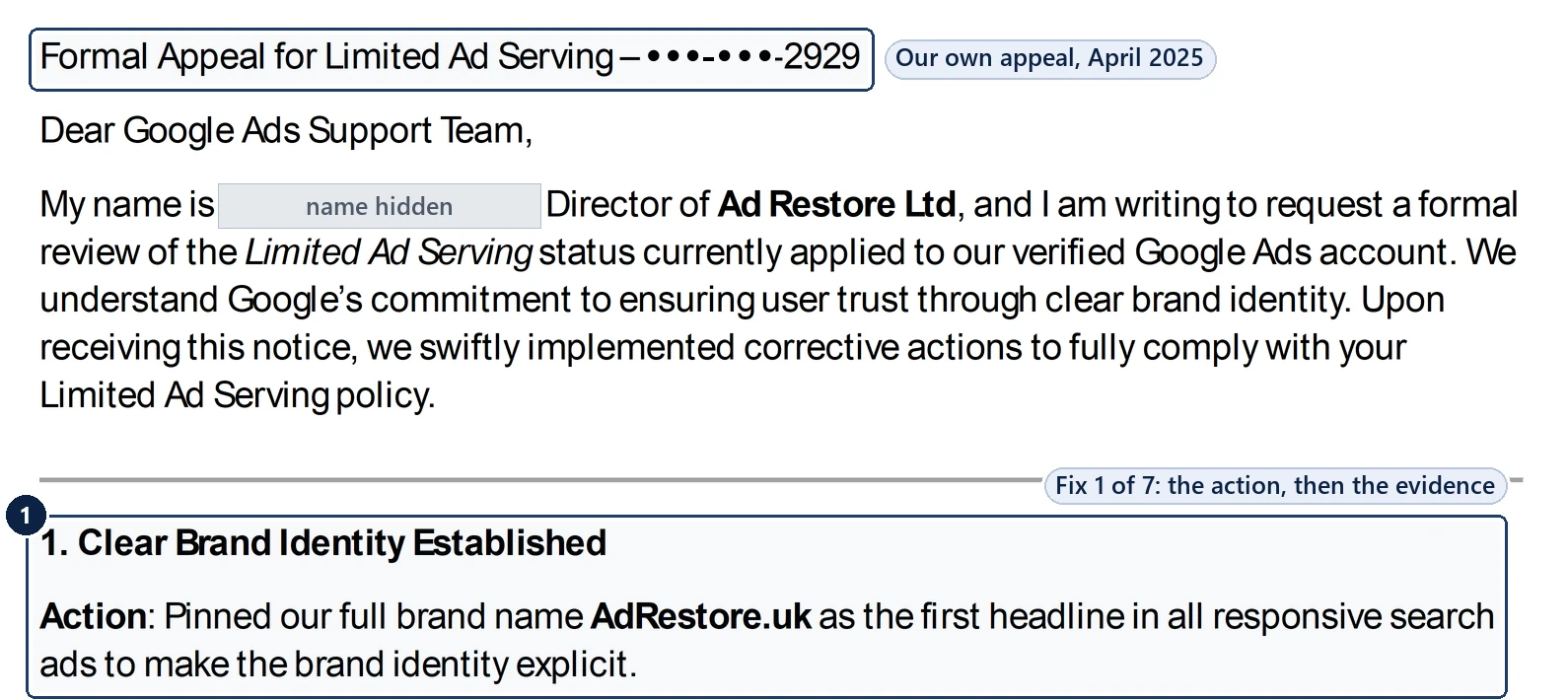
Keep it short, specific and checkable. A good appeal covers five things, in this order:
The policy by name.
Exactly as the notice states it.
What you believe triggered it.
An honest account works better than a denial. Google’s own examples: for cloaking violations, let us know why you were showing different content to Google than to other users.
What has changed, with dates and URLs.
“Removed the redirect script from /landing/ on 4 March” is worth more than “we have fixed the website”.
Evidence.
Screenshots of the corrected page, the company registration, invoices showing the payment method belongs to the business, confirmation that verification is complete. For partnerships, Google suggests contracts, written agreements and public statements confirming the relationship.
A plain compliance statement.
Confirm the account now meets the policy and will continue to.
What to leave out
Leave out anger, references to how much the business has spent with Google, threats to move budget elsewhere, and anything that isn’t strictly true. Google says accounts are only reinstated in compelling circumstances, so take the time to be thorough, accurate and honest.
Don’t send the same appeal repeatedly. Google says that if you file too many appeals for the same account suspension, it may not process them, and that if it sees signs you’re misusing the appeals function, it will suspend processing of certain appeals for seven days.
Don’t open a new Google Ads account while an appeal is pending.
Google’s Circumventing Systems policy names creating new accounts to re-enter the system after a suspension as a violation, and Google says any new accounts that you create will be automatically suspended. In our experience it also makes the original appeal much harder to win. Read why a new account makes things worse.
How to submit, and how long it takes
In your Google Ads account, select the Contact us link in the notification at the top of the screen; it opens the appeal form. It’s worth knowing what the appeal form actually asks before you start writing. Submit one appeal per suspension, and keep the evidence with that submission rather than sending it separately.
Google’s appeal form says a specialist will be assigned to your case, and you’ll receive a response within 3 to 5 working days. In our experience, straightforward cases are often resolved inside a week, while cases involving verification documents or payment investigations can take several weeks. If Google asks for more information, reply promptly. More in how long reinstatement takes.
If the appeal is rejected
A rejection usually means one of three things: the underlying problem wasn’t fully fixed, the evidence didn’t match what Google could see, or the appeal answered the wrong policy. Read the rejection, go back to the account and the website, and resubmit only when something material has changed. Google says you can re-appeal following the same process.
See why Google Ads appeals get rejected and what to do after a rejected appeal. Some suspensions, particularly for egregious violations, are final: Google says that then you will not be allowed to advertise with us again. Our guide to when a suspension can’t be fixed covers those cases.
When it makes sense to get help
Google says suspended accounts cannot run any ads, so for most businesses the cost of a suspension is measured in lost enquiries each day. The question is how quickly the account can be restored, not whether the appeal can be written in-house. A specialist reads the notice, audits the account and the website against the policy named, gets the cause fixed, and builds the appeal with the evidence Google expects. That’s what our Google Ads suspension services cover, and the first step is a free consultation to establish which policy you’re dealing with.
Frequently asked questions
What should a Google Ads suspension appeal include?
The policy named in the notice, what you believe triggered it, what you changed (with dates and URLs), the evidence, and a plain statement that the account now complies. Google asks you to include any relevant information and an explanation of why you believe the suspension is incorrect.
Where do I submit a Google Ads suspension appeal?
In your Google Ads account, select the Contact us link in the notification at the top of the screen. It opens the appeal form.
How long does Google take to answer an appeal?
Google’s appeal form says you’ll receive a response within 3 to 5 working days. In our experience, cases involving verification documents or payment investigations can take longer.
Can I send several appeals to speed it up?
No. Google says it may not process too many appeals for the same suspension, and may suspend processing of certain appeals for seven days if it sees misuse. Send one appeal, with the evidence attached.
Should I mention how much I spend with Google?
No. Spend, frustration and threats to move budget don’t address the policy. Stick to the policy, what changed and the evidence.
Can I open a new account while I wait?
No. Google says new accounts you create will be automatically suspended, and creating new accounts to re-enter the system is a Circumventing Systems violation.














