Skip to content

Google Ads Advertiser Verification: What It Asks For and Why Failing It Can Block Your Appeal
 Gianluca Catinella, Director, Ad Restore LtdPublished on 25 min read
Your account will be paused if you don’t complete advertiser verification by the deadline.
From Google’s page on the tasks required for advertiser verification, under “Given a deadline?”. For a suspended account the same page adds: “You’ll be able to get access to the appeal form only if you complete advertiser verification.”
Google Ads advertiser verification is Google’s process for establishing who is behind the ads, and it splits into two halves: advertiser identity verification, which asks who the legal entity paying for the ads is, and business operations verification, which asks what the business actually does and who delivers the product. For a suspended advertiser it is not an administrative errand running alongside the appeal — for certain advertisers it is the gate standing in front of it, on a 30-day clock Google does not extend.
Your account is suspended, you have gone looking for the appeal form, and what you have been handed instead is a verification task with a deadline attached. Or your account is not suspended at all — it has been paused, which reads like a smaller problem until you notice that nothing you do inside the account will restart it. Either way, you are now in advertiser verification.
This guide sets out what Google actually asks for, what its own documentation says fails, what the accepted UK document set looks like, and the order in which a suspended business should work through it.
Checked against Google’s help pages on 3 October 2026, and the limited company section on 19 October 2026. Google changes them without notice, so check the linked page before relying on a detail.
At a glance
Two halves
Who you are (identity), and what your business does (business operations).
30 days, no extension
Google says the deadline can’t be extended. Miss it and the account is paused.
Allow for the review
Up to 5 business days, depending on the task, Google says.
Exact match, punctuation included
Names, address and country must match your documents and payments profile.
It can gate your appeal
Some suspended advertisers only get the appeal form once they’re verified.
On this page15 sections
What advertiser verification is, and its two halves
Advertiser verification is Google’s process for establishing who is behind the ads. Google frames it as a transparency measure: its Advertiser verification policy invites advertisers to “Build trust, increase transparency, and get access to more features by completing advertiser verification”, and notes that “some of your info will appear in ad disclosures and the Ads Transparency Center, which provides context about an advertiser and their ads.” The verification record, in other words, is not filed away — it is published.
In practice it splits into two halves, and they fail for different reasons.
- Advertiser identity verification. Who is the legal entity paying for these ads? This is where organisation registration documents and government-issued photo ID for an authorised representative are submitted.
- Business operations verification. What does this business actually do, who delivers the product or service to the end customer, and who else has a hand in the account? This half is answered largely through a questionnaire, supported by documents. Our business operations verification guide walks through that form question by question.
Google’s list of verification tasks groups them by account type — all accounts, billing, individuals, organisations, agencies, and certain industries. Read that list before you start, because it tells you which tasks your account will be asked for rather than leaving you to discover them one at a time. Google adds that only a Google Ads account admin can complete the tasks, and that whether your payments profile is set to individual or organisation affects which tasks you’ll need to complete.
Why you were selected, and why selection is not an accusation
Google publishes the reasons an advertiser gets pulled into verification. According to the Advertiser verification policy, they include participation in Google’s transparency efforts, potentially suspicious advertising behaviour or content, running ads in certain industries such as financial services, running ads on brand-related queries, using features that are frequently misused, and having had an account suspended.
Two things follow from that list. First, being selected is not by itself a finding against you — transparency rollout and industry category are on the same list as suspicious behaviour, and Google’s stated direction of travel is that all advertisers will eventually be required to complete advertiser verification. Second, if your account has been suspended, verification is not a coincidence. Suspension is one of the published triggers, and it is the trigger that carries consequences for your appeal.
So do not treat the verification notice as a complaint to argue with. Treat it as a form with a deadline and a very literal set of requirements.
How long do I have to complete Google Ads advertiser verification?
Verification comes with a deadline, shown in the account. Google’s page on Google Ads account pausing sets out the shape of it: “Your account will be paused if you don’t submit documentation within the 30-day notice period, or complete the verification within 30 days.” Meet it and, in Google’s words, “If you submit the required documentation or complete the advertiser verification program within the 30-day timeframe, your account will be unpaused after Google completes the review of your application and successfully verifies your account.”
In the cases Ad Restore Ltd has worked on, the end of the clock is the part that catches businesses out. On Timelines for advertiser verification, Google answers the extension question with a flat no: “the deadline can’t be extended. You’ll need to get verified by the deadline or your account will get paused.” And the account status that results is a pause, not a suspension — “Your Google Ads account was paused, and you’ll be able to unpause your account only if you get verified.”
That distinction matters. There is nothing to appeal against a pause and no case to argue: the route out is completing verification. It also matters for planning, because the review is not instant. Google states on the same page that it can take up to 5 business days, depending on the task, to review what you submit, and, for verification without a deadline, that “in rare cases, review time can take up to 30 days.” If you submit on day 29 of a 30-day window and a document is rejected for being blurred, you have no runway left. Budget the review time inside the deadline, not after it. If the deadline has already gone, see Your verification deadline has passed.
Verification as a gate on the appeal
Here is the sentence that should reorder your to-do list. Google’s account suspensions overview states: “Certain selected advertisers must complete advertiser verification successfully to appeal their account suspension.” And then the harder half: Google limits verification attempts, and an advertiser it can’t verify won’t be allowed to appeal at all.
Read together with the verification policy’s own line — “Your account was suspended and, to submit an appeal, you need to complete verification. In this case, your account will remain suspended until your appeal is granted” — the sequence is unambiguous. Verification first, appeal second, and the number of chances at the identity step is finite.
The practical consequence is that verification is the first task in a suspension response, not the last. A well-researched, well-evidenced appeal narrative is worth nothing if the form it belongs in never opens. If you are working through a suspension methodically, slot verification ahead of everything in your appeal preparation sequence, and do not start submitting documents until the whole pack is assembled and checked. Google limits failed verification attempts, so there is no room for a trial run.
The verification process, step by step
Assembling the pack before you start is most of the work. A workable order of play, particularly if the account is already suspended and verification is standing between you and the appeal form:
Find the deadline first.
Tasks start under Admin > Policy > Account, where Google says you can see your deadline. Note the date and count backwards by at least five business days to allow for review.
Fix the source records before you submit anything.
Pull the exact legal name from Companies House, character for character. Bring the payments profile name, country and address into line with it, and check the account address and website match too.
Assemble the documents.
A clear PDF or photo of the original certificate of incorporation, VAT registration certificate or charity registration certificate, and of the representative’s passport or driving licence: never a photocopy or a screenshot. For the ID, Google’s UK page asks for an original photo of the physical document, recommends the phone’s own camera app because photos taken through third-party apps may not be accepted, and asks for the front and back separately when requested. Legible, all four corners, in colour if the original document is coloured, no glare.
Map the third parties.
Write down every party involved in the business and the account — agencies, freelancers, developers, service providers, the domain owner if different — with names, contact details and the agreement or contract that establishes each relationship. Disclose all of them. Separately, review who currently holds access and revoke anything that is genuinely no longer needed; revoking access later does not remove a party from what Google asked about.
Write the operations answers once, carefully.
Say what the business sells, who fulfils it for the end customer, and how the money flows. Plain, checkable sentences.
Check every string against every other string.
Name, address, country, website, representative. This is the step that saves an attempt.
Submit, then wait.
There is nothing to gain by resubmitting while a review is open.
Only then build the appeal.
Once the appeal form opens, the work of evidencing the underlying compliance fix begins — and that is a separate exercise from verification.
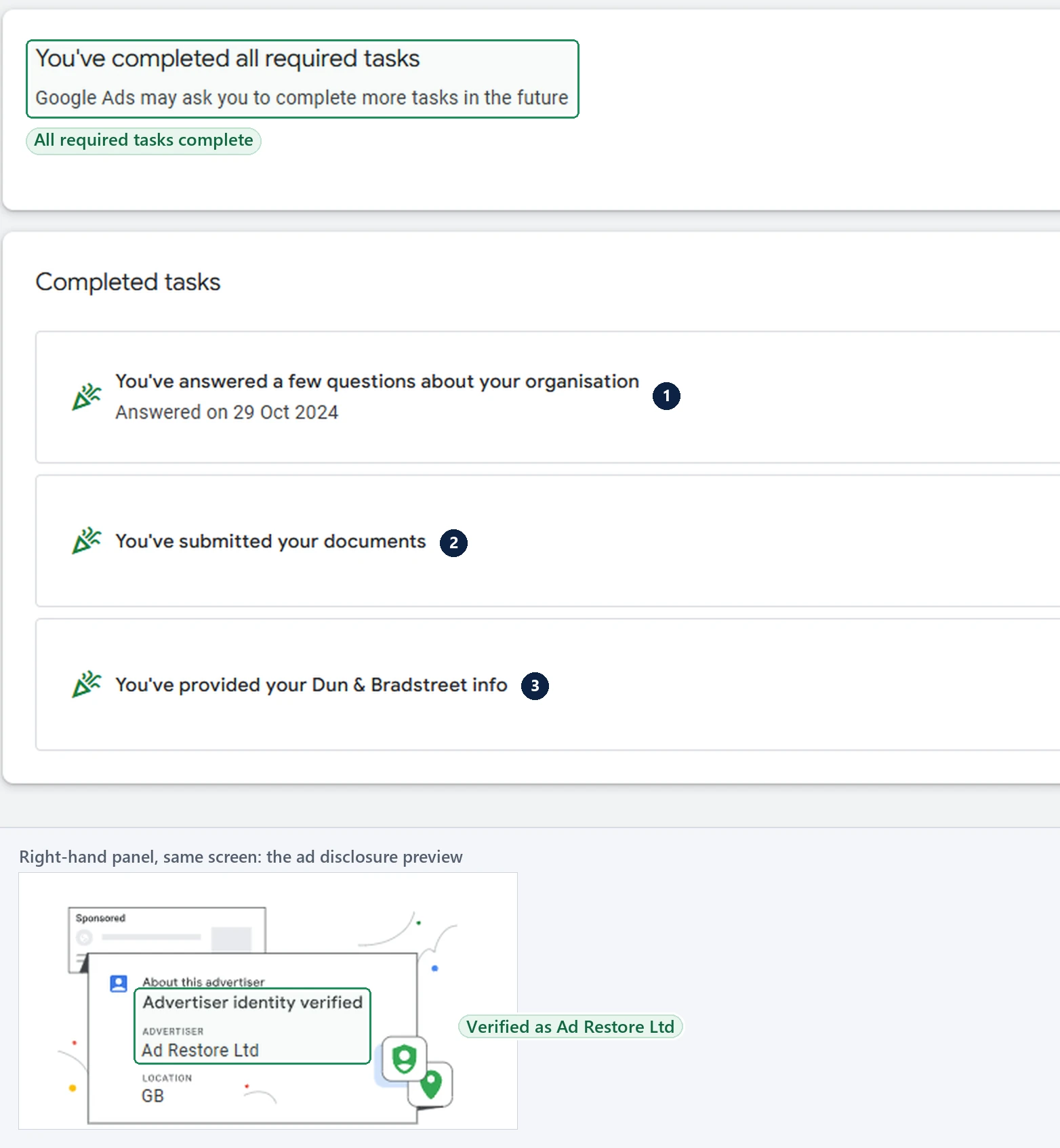
Why does Google reject advertiser verification?
This is the unusually useful part. Google publishes an enumerated list of the reasons verification is rejected — covering both the identity side and the business operations questionnaire — on its page about issues with answering questions about your business operations. It tends to get read after a failure. Read beforehand, it is close to a pre-submission checklist.
- The organisation name does not match exactly. Google’s wording is that the submitted organisation name “doesn’t exactly match the full legal name on the business registration document, including any suffixes or punctuation.” Exactly means exactly. “Ad Restore”, “Ad Restore Ltd” and “Ad Restore Ltd.” are three different strings. Commas before “Limited”, full stops after “Ltd”, ampersands versus “and”, and trading names used in place of registered names all fail on this line.
- The individual’s name does not match the photo ID. Same rule, applied to the authorised representative. Middle names present on the passport but omitted in the form, or a married name in one place and a maiden name in the other, are enough.
- The disclosure name does not match the Ads account. The name given in the verification form has to line up with the name on the Google Ads account itself.
- The payments profile country does not match the documents. Google lists rejection where “the country in the payments profile does not match the country of the submitted registration document and/or government-issued ID.” A UK company billing through a payments profile set to another country will fail here even though every individual document is genuine.
- Addresses do not align. “The address on your account doesn’t align with the address on your submitted documents.” Registered office, trading address and the address in the Ads account can drift apart quietly over years, and Google checks them against each other.
- The website is invalid or not associated with the account. The domain you name has to be the domain the account advertises.
- Undisclosed relationships with agencies or third parties. Google asks for details of other parties involved in operations — marketing agencies accessing the Google Ads account, service providers, and the domain owner if different — with names, contact details and documentation establishing the relationship, such as an official agreement or contract.
- No clear answer on who provides the product or service to the end customer. Resellers, affiliates, lead generators and white-label arrangements all have to say plainly who fulfils the order.
- Documents that fail on quality or format. Google accepts PDF, JPG, JPEG or PNG, requires documents that are clearly visible and legible without glare or blurred text, and specifically rejects screenshots, digital IDs, zipped files, links to folders, and screenshots of webpages. A photograph of a Companies House web page is not a certificate of incorporation.
- Documents that do not establish the advertiser type. Rejection also follows where the pack does not clearly establish whether the advertiser is an individual, a registered organisation or an unregistered business.
- Missing licences in regulated sectors. Regulated industries are asked for the applicable local licences.
What documents does Google accept for UK advertiser verification?
Google publishes accepted documents country by country. For the United Kingdom, the UK document requirements are short and specific.
UK documents Google accepts
| What Google asks for | Accepted in the UK | What it has to match |
|---|---|---|
| Organisation registration document | Certificate of incorporation; VAT registration certificate; certificate of registration of charity (government departments and agencies: an official letter with full name, address and date) | The full legal name, including suffixes and punctuation, and the country of the payments profile |
| Government-issued photo ID for the authorised representative | Passport; identification card; driving licence; permanent residence card | The individual’s name exactly as submitted (Google says the ID can be issued in any country) |
Alongside that list Google states the rule that catches a great many UK companies: “Make sure that the details in the submitted documents exactly match your payments profile info, including the organization name, if applicable.” Google also notes that where there is a mismatch, you can change your payments profile name during the task. The authorised representative is an admin of the Google Ads account and/or the payments profile paying for the ads, and their photo ID can be issued in any country.
That last point about the name answers a problem that comes up repeatedly in our UK casework — the trading name. A British company may well advertise under a brand that is not the registered name on its certificate of incorporation. Verification is not the place to defend the brand: Google says the trade or DBA name and legal name must match the registration document that you submit.
Be precise about where each name belongs, because the two uses are not interchangeable. The registered legal name, exactly as Companies House holds it, goes in three places that all have to agree: the payments profile, the name on the Google Ads account, and the name given in the verification form and the resulting disclosure. A disclosure name that does not match the Ads account is a named rejection reason in its own right, so a trading name in one of those places and the registered name in the other fails on that line even if every document is genuine. The trading name keeps its home in the ad copy and on the website. It is not the account name, and you can’t verify under it on its own: Google says a trade name and the legal name must both match the registration document you submit.
Can a limited company pass advertiser verification?
Yes. A UK limited company verifies under the organisation account type. Google’s page on account types describes the organisation account type as advertising on behalf of a “registered business, corporation, partnership, educational institution or limited liability company”. Its UK document page says organisations “may be required to provide 2 different types of documentation”: a registration document, and photo ID for an authorised representative.
For a UK organisation, the registration document can be a certificate of incorporation, a VAT registration certificate or a certificate of registration of charity. The representative’s photo ID can be a passport, identification card, driving licence or permanent residence card, issued in any country. In our experience, limited companies that pass usually do it with their incorporation documents, and sometimes with a D-U-N-S number (more on that below).
Utility bills and bank statements aren’t on that list. They appear on Google’s business operations verification page, as examples of proof of address. That is a separate task, which Google says most advertisers won’t see, covered in our business operations verification guide.
The names have to match exactly
For organisations, Google says the payments profile name and location “must exactly match your legal name and location on any documents”. Google’s rejection reasons above say exact includes any suffix and punctuation, so treat “Ltd” and “Limited”, or “Ltd.” and “Ltd”, as different names. If you use a trading name in verification, Google says the trade name and the legal name must both match the registration document you submit.
Sole traders and the account type
A sole trader who isn’t registered as a business is usually an individual, not an organisation. Google’s account types page says that applies to most solo business owners, such as freelancers or consultants, who aren’t registered as a business. Its UK page says individuals verify with UK government-issued photo ID.
Google says the documents depend on your account type, and that if the type is wrong you should contact it before you start. It also says the account type can only be changed once.
Where a D-U-N-S number comes in
Organisations may also be offered a D-U-N-S task. Google’s list of verification tasks gives organisations the option to provide a D-U-N-S number, which Google can use to confirm the business details you provide. If the details don’t match, Google asks you to check them and try again, and after repeated failed tries it asks for the organisation’s documents instead. Google’s glossary says a D-U-N-S number isn’t required for advertiser verification, though it may help Google assess applications faster.
If you don’t have a number yet, Google’s D-U-N-S page says Dun & Bradstreet can take up to 30 days to confirm a new one. The verification deadline can’t be extended.
In our experience, when a business gives a phone number instead of a website during verification, Google offers to verify it with a D-U-N-S number. That is what we have seen, not a rule Google publishes.
Why limited companies fail with the right documents
In our experience, limited companies that have the right documents still fail because of:
- Blurry documents. Google’s issue table says “dark or blurry photos won’t be accepted”.
- Inaccurate details. A name, suffix or location that differs from the documents fails the exact-match rule above.
- Documents edited in a PDF editor. If an edit changes what a document says, Google’s rule on false information applies. Its verification policy says “submitting false info will be a violation of the Circumventing systems policy”. That leads to suspension, not just a failed attempt.
If a detail doesn’t match, don’t change the document to fit. See the one mistake that turns a pause into a suspension, below.
The usual limits apply to limited companies too. Google says the account is paused if verification isn’t done by the deadline, and it limits failed verification attempts. Check every detail before you submit.
Agencies, managed accounts and third parties
If an agency, a freelancer, a developer or a lead-generation partner touches the account, verification expects to hear about it. Undisclosed third-party involvement is a named rejection reason, and the disclosure Google asks for is concrete: who they are, how to contact them, and documentation proving the relationship.
Two situations recur. The first is the inherited account — an agency set it up years ago, still has access, and nobody at the business can say so with any precision. The second is a fulfilment chain the form was never told about, where the advertiser generates the enquiry and someone else delivers the work. The form asks directly who provides the products or services to the end customer, so that chain has to be described.
Before you answer, write down every party involved in the business and the account, and separately audit who currently holds access. If an old agency still has access, document the relationship and say so on the form. If the relationship has genuinely ended, revoking the access is good hygiene — but the relationship is still what Google asked about. A verification form that quietly leaves a party out makes the account look less transparent, not more. In our own casework, opaque control of an account is a recurring theme behind Unacceptable Business Practices suspensions; that is our observation from the cases we have handled rather than a ranking Google publishes.
Agencies verifying a client’s account have a rule of their own. Google says that if you manage ads for a client, select Yes for “Is your organization an agency?” for the ad disclosure, “Otherwise, your account may be paused or suspended.” Our guide to agency verification and who pays for client ads covers that set-up.
The one mistake that turns a pause into a suspension
There is a temptation, under a deadline and with a mismatch you cannot immediately fix, to make the answer fit. Do not. Google’s Circumventing Systems policy states plainly that “providing false or fraudulent information as part of our Advertiser verification programs isn’t allowed”, and that where an advertiser does so they will not be verified or will lose verified status, and the account will be suspended. Google added an example to that policy in November 2025 to underline the point, as its change log records — not a new restriction, but a clarification of consequences that were already there.
So a failed verification and a falsified one are different orders of problem. A failed verification pauses the account and can be resubmitted. A falsified one becomes a Circumventing Systems Policy violation, which is a far harder position to argue back from, because the record now contains something that is not true. Where a detail does not match, the fix is to correct the underlying record — the payments profile, the account address, the account name — not the answer on the form.
The same discipline applies to billing detail. Where the payments profile, the billing country or the cardholder do not correspond to the verified entity, you have a mismatch worth resolving on its own merits. In our experience that kind of mismatch also sits underneath a fair number of Suspicious Payment Activity suspensions — again, our read of the cases we have seen rather than a stated Google position. Getting the payments profile genuinely correct serves both purposes at once.
How a verification problem turns into a Circumventing Systems suspension, and why verification and an appeal can lock each other, is covered in Circumventing Systems and advertiser verification.
Don’t open a new Google Ads account to get round this.
Google says that while an account is paused, any new accounts that you try to create may be paused, and that new accounts a suspended advertiser tries to create may also be suspended. Its Circumventing Systems policy names creating new accounts to re-enter the system after a suspension as a violation. Read why a new account makes things worse.
Re-verification after ordinary business change
Verification is not necessarily a one-off. Google publishes a dedicated page on changing name or ownership, which covers resetting verification where the name in the ad disclosure needs to change or the wrong organisation was verified, and notes that “If you had a deadline to complete verification, you’ll get a new deadline after resetting verification.” Resetting is for admins: Google says only a Google Ads account admin can do this.
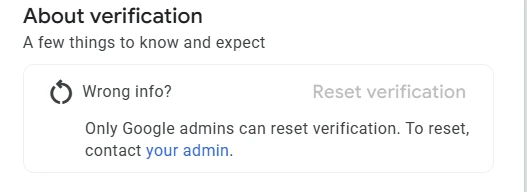
The same page ties the payments profile to the outcome: “For successful advertiser verification, ensure the Legal name and Address in your payments profile exactly match your government-issued ID or business registration documents.” It also flags that a change of payments profile country or ownership is not a self-service edit — “If you want to change your payments profile country or ownership, you’ll need to contact Google Ads support.” Google’s policy page adds that updating the legal name on a billing profile immediately triggers the need for a new advertiser verification. In practice, then, the details worth watching are the ones Google names: the verified organisation, the name shown in the disclosure, and the legal name, address, country and ownership on the payments profile.
Keep a maintained pack: the current certificate of incorporation or VAT registration certificate, current photo ID for the named representative, a note of the exact legal name string including punctuation, the payments profile country and the account address as entered. Review it whenever the business changes shape. A pack that is already current turns a re-verification into a single sitting’s paperwork rather than a scramble against a deadline that cannot be extended — the review time is still Google’s, so the runway still has to be budgeted.
Can it be fixed?
Usually, when the documents exist. Google says a paused account can be unpaused only if you get verified, and in our experience, “once the verification is done, the Google Ads account is active again”.
In the cases we have worked on, the failures have usually not been judgement calls. They have been a full stop after “Ltd”, a payments profile still set to the wrong country from an account opened years ago, or an agency nobody remembered to declare. They are also, with a limited number of identity verification attempts and a deadline that cannot be extended, expensive to discover by trial and error.
The cases we can’t take are the ones our advertiser verification service is upfront about: if every attempt has already been used, or the documents Google needs don’t exist for your business. We tell you that on the free call. That isn’t a promise either way: only Google decides.
If verification fails: the route
- A task came back with an issue? Google says this means it couldn’t verify your information, and that you can resubmit your documents in your Google Ads account. Fix what the issue names first: Google allows a limited number of verification attempts.
- Paused after failed attempts? Google’s pausing page says that if you believe it’s an error, you can contact Google to appeal the decision, and that most appeals are reviewed within 5–7 business days.
- Suspended after a verification issue? Google’s answer is “You should only appeal if you believe this was an error”, using the Fix it link in your account.
- Suspended, with verification in front of the appeal? Verify first: Google says you’ll get access to the appeal form only if you complete advertiser verification.
Before you write an appeal, read what the appeal form asks and why appeals get rejected.
Frequently asked questions
How long do I have to complete Google Ads advertiser verification?
Usually 30 days, and Google shows the deadline on the Account page. Google says your account will be paused if you don’t submit documentation within the 30-day notice period, that the deadline can’t be extended, and that review can take up to 5 business days, depending on the task. Submit well before the date.
What documents does Google accept for UK advertiser verification?
For a UK organisation, a certificate of incorporation, VAT registration certificate or certificate of registration of charity, plus a passport, identification card, driving licence or permanent residence card for an authorised representative: an admin of the Google Ads account or the payments profile. Individuals need UK government-issued photo ID. Google says the details must exactly match your payments profile.
Can a limited company pass Google Ads advertiser verification?
Yes. A UK limited company verifies as an organisation, and Google says organisations may be asked for a registration document and photo ID for an authorised representative. Google’s UK registration documents are a certificate of incorporation, a VAT registration certificate or a certificate of registration of charity. Utility bills and bank statements aren’t on that list. The name and location on your payments profile must exactly match the documents, “Ltd” and punctuation included. In our experience, limited companies that pass usually do it with their incorporation documents.
Why does Google reject advertiser verification?
Google’s published reasons include names that don’t exactly match the documents (suffixes and punctuation included), addresses that don’t align, a website not associated with the account, undisclosed business relationships, no clear answer on who provides the product, a payments profile country that doesn’t match the documents, missing licences in regulated industries, and documents that are blurred, screenshots or the wrong type.
Do I have to be verified before I can appeal a suspension?
Only if Google has asked you to. Google says certain selected advertisers must complete advertiser verification successfully to appeal their suspension, and that an advertiser it can’t verify won’t be allowed to appeal. If your account shows a verification task, do it first.
Who can complete advertiser verification?
An admin. Google says only a Google Ads account admin can complete the tasks, and the authorised representative whose ID you submit must be an admin of the Google Ads account or of the payments profile. An agency can complete the task for a client or send the client a link.
Can I verify under my trading name?
Not on its own. Google says the trade name and legal name must match the registration document you submit, and your payments profile details must exactly match your documents. Keep the trading name in your ads and on your website, and verify under the exact registered name.