
Essential
£800fixed price, paid up front
Bought online: a few details, then sign the agreement and pay by card in one step.
- 1 review request, prepared and submitted by us
- 50% refund if your account isn’t reinstated
 Skip to content
Google Merchant Center policy: Misrepresentation
Google treats three of this policy’s six sections as egregious, and says that for those, your Google Merchant Center accounts will be suspended upon detection and without prior warning (opens in a new tab). We review your store, business details and policies against Google’s rules, give you a written list of fixes, then prepare and submit your review request. Buy online, or call and talk it through first.
When a Merchant Center account is suspended, Google says your products won’t appear across Google (opens in a new tab). That covers more than your Shopping ads.
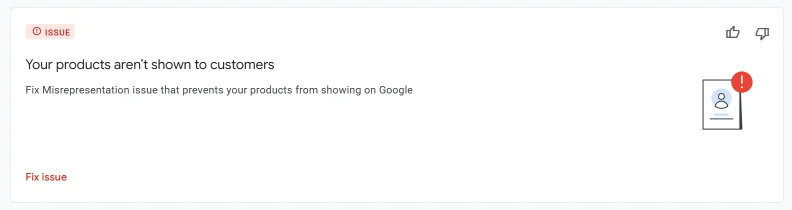
Shopping ads and free product listings stop showing, so shoppers searching for what you sell don’t see you.
Your competitors keep bidding on the searches you used to win, and the leads and sales that were yours go to them.
Google says: “If your issues aren’t resolved by the second review attempt, a one-week cool down period may begin (opens in a new tab).”
Google’s policy has six sections: Unacceptable business practices (opens in a new tab), Coordinated deceptive practices (opens in a new tab), Dishonest pricing and transaction conditions (opens in a new tab), Unavailable offers (opens in a new tab), Manipulated media (opens in a new tab) and Unreliable claims (opens in a new tab). For the last three, Google says a warning will be issued at least seven days prior to any suspension of your account (opens in a new tab).
In practice that often means a shopper can’t easily see who you are, how to contact you, what they’ll pay in total or how returns work, before they buy.
If the status says linked account suspension, the store isn’t the blocker. Google says the Google Ads suspension must be fixed first before your Merchant Center suspension can be reviewed (opens in a new tab), and that unlinking the Ads account won’t unsuspend or resolve your Merchant Center account issue (opens in a new tab).
In that case the right service is a Google Ads appeal, and we’ll tell you so at our first review.
Each unsuccessful request moves you closer to a cool-down, and Google says Google support can’t bypass or shorten the cool down period (opens in a new tab). It also says the cool-down period may increase with each unsuccessful review (opens in a new tab). On disagreeing with an issue, it warns: “You may only have one chance to disagree with the issue” (opens in a new tab).
For the egregious sections, Google also says accounts are only reinstated in compelling circumstances, and when there is good reason (opens in a new tab), so the fixes have to be live and complete before a request goes in.
We find the gaps and write the fix list. You or your developer make the website changes, and we check them before anything is sent to Google.
An in-depth audit of your case, sent to you in writing, by email or however you prefer. We read the account issues with you and check whether a linked Google Ads suspension is the real blocker.
We go through your website, business details, prices, checkout and store policies against the six sections of the Misrepresentation policy.
You get a written list of what has to change. You or your developer make the changes, and we check them once they’re live.
We prepare the review request and submit it as a user on your Merchant Center account, which you add from your own settings. No passwords needed.
Essential includes 1 review request; Professional and Premium include up to 2, because Google can apply a cool-down after the second. If the first is rejected, we tell you honestly whether a second has a realistic chance before it’s sent. With Premium, 14 days of post-reinstatement support is included once your account is reinstated.
Once a review request is in, the decision and its timing are Google’s. Google says: “Account reviews typically take 7 business days, but may take longer for complex reviews (opens in a new tab).”
You speak to a specialist from the first call. The person explaining your case is the person who has looked at your business.
We look at your site the way a reviewer and a shopper would: who you are, how to reach you, what they’ll pay, and what happens if they want to return something.
Feed or data-quality disapprovals, counterfeit goods, and stores that can’t show a real business behind them aren’t cases we take. If Google Ads is the blocker, we say so.
We never help set up a new Merchant Center or Google Ads account for a suspended business. We work on the account you have.
You add us as a user from your own Merchant Center settings, you stay the owner, and you can remove our access at any time.
We have no special channel into Google’s review process: we use the same appeal and verification routes open to every advertiser, and the decision is always Google’s.
Every option has a fixed price, paid up front, and the same refund terms, set out before you pay. All three are bought online: a few details, then you read and sign the agreement and pay by card in one step. Professional adds more review requests and priority handling. Premium adds 14 days of support once your account is reinstated, and a plan to keep your business advertising if Google won’t reinstate it. The £200 audit fee is taken off the price of any service you buy within 30 days of receiving the audit report.
Bought online: a few details, then sign the agreement and pay by card in one step.
Bought online: a few details, then sign the agreement and pay by card in one step.
Bought online: a few details, then sign the agreement and pay by card in one step.
Prices in GBP. No VAT is added: Ad Restore Ltd is not VAT registered. The conditions are in our refund policy and on prices and refunds. Only Google decides whether an account is reinstated.
If several review requests have already been refused, the account is run for more than one company, or you’re in a regulated industry such as finance, we’ll quote after reading your case. Request a quote with your account details and what’s happened so far.
Read this first: it takes two minutes. Then buy online in about five, or email us if you’d rather ask something before you do. A specialist reads every case before any work starts.
Google’s notice:Misrepresentation (Merchant Center)
A fixed price, paid up front by card through Stripe. You read and sign the agreement first; nothing is charged until you sign.
About 5 minutesWithin 24 hours of payment (up to 48 hours at weekends), beginning with the written audit of your website and Merchant Center account. It includes a Companies House check that the person signing is an owner or director, or has a director’s authority. If we can’t take your case on, or our first check finds no realistic way forward, you get a full refund and we talk you through the other options open to you.
Within 24 hoursSettings › People and access, then the email address we send you. You stay the owner and can remove us at any time. We never ask for your password.
Day 1–2What triggered the Misrepresentation finding and exactly what to change on your website, Merchant Center account and documents. You, or your developer, make the changes; we check them before anything goes to Google.
First few daysOnce the fixes are done and we have the access and documents we need. You get a copy of everything we submit, with the date. If Google says a step can only be done by your account’s admin, you do it with our guidance.
About 3–5 daysMost cases take up to about 3 weeks; Google sets its own review times. Only Google decides, and nobody can speed up its review. We tell you as soon as we hear, whichever way it goes.
Google’s timeWe stay with you and deal with any new disapprovals or policy flags without delay. The 14 days start on the day Google confirms it.
AfterwardsMost cases take up to about 3 weeks; Google sets its own review times.
What slows a case down: documents arriving late, website fixes not made, and Google’s own processes. The 3–5 days run from when we have the access and documents we ask for (clause 5.1).
Your full list appears in your account after you pay, and you send each item there. Never send passwords or full card numbers; on a statement, mask everything except the cardholder name and the last four digits.
We don’t set up a new account or payments profile for a suspended advertiser: Google treats that as circumventing its systems. If we decline your case, you get a full refund (clause 4.3 and 8.1).
No stock photos and no invented testimonials. Our reviews are on Google.
“This guy is the real deal. Google bots suspended my ads account with no warning through some silly automated system. […] We had an initial videocall. I could see that Gianluca was a real person and based in the UK. He is an industry expert in exactly what his company promises.”
“I’ll be honest, giving someone access to your Google account is nerve-racking, but Gianluca’s professionalism and transparency immediately put my mind at ease. He had my account back up and running in under 2 weeks, which was nothing short of amazing considering how long I’d been stuck.”
Either. If you buy online, we check your case and start work within 24 hours of payment (up to 48 hours at weekends), beginning with the written audit of your website and Merchant Center account that every service includes. All three options can be bought online: a few details, then you sign the agreement and pay. If you’d rather talk first, call or email us. The right fix depends on what’s really blocking the account: some suspensions are caused by a linked Google Ads account, some by the store, and some can’t be fixed. If we review your case and can’t take it on, you get a full refund.
Yes, but the work starts in Google Ads. Google says the Google Ads suspension must be fixed first before your Merchant Center suspension can be reviewed (opens in a new tab). See our Google Ads suspension services and our guide to Merchant Center suspensions caused by Google Ads.
As few as possible, and only once the fixes are live. Google says: “If your issues aren’t resolved by the second review attempt, a one-week cool down period may begin (opens in a new tab).” It also says Google support can’t bypass or shorten the cool down period (opens in a new tab). That’s why our service includes up to 2 review requests.
No. Google says it’s not recommended that you delete your suspended account and create a new one for the same business (opens in a new tab). We work on the account you have.
Google says: “Account reviews typically take 7 business days, but may take longer for complex reviews (opens in a new tab).” The time it takes to make the fixes depends on your store, and we’ll talk it through with you.
No. You add us as a user from your own Merchant Center settings, you stay the owner, and you can remove our access at any time.
A fixed price, paid up front: Essential £800 (1 review request), Professional £1,400 (up to 2 review requests) or Premium £2,500 (up to 2 review requests, 14 days’ support after reinstatement and a plan to keep advertising), each with a 50% refund if your account isn’t reinstated. Prices are in GBP, with no VAT added.
Every option can be bought online: a few details, then you read and sign the agreement and pay by card in one step. Or start with our £200 account audit: the £200 audit fee is taken off the price of any service you buy within 30 days of receiving the audit report.
Premium includes 14 days of post-reinstatement support, and a plan to keep your business advertising if Google won’t reinstate the account. The conditions are in our refund policy. Nobody can promise reinstatement, because that decision is Google’s.
No. Ad Restore Ltd is an independent UK company, not affiliated with or endorsed by Google. We have no special channel into Google’s review process, and the decision is always Google’s.
Buy online, or call and talk it through before you send the next one.
Choose what we may use in this browser. You can come back and change this at any time. Privacy and cookie details
Your browser sent a Global Privacy Control signal, so Google Analytics and advertising measurement are off unless you turn them on here.
Keeps the site working, remembers your cookie choices and protects against automated traffic. Always on.
Helps us understand how visitors use the site and which pages and campaigns work: Google Analytics. Clicky, our cookie-free visit counter, is always on; the privacy details explain how to opt out.
Lets Google and OpenAI measure whether visits from our adverts on Google and in ChatGPT lead to enquiries, bookings or purchases. OpenAI is told what happened and, for a purchase, its value; never your name, email address or phone number. We don’t use this to build advertising audiences or personalised ads.
Your choice is kept for 6 months in this browser. Change it any time via "Cookie settings" at the bottom of every page.