Skip to content

Do I have to give anyone my password to appeal a Google Ads suspension?
 Gianluca Catinella, Director, Ad Restore LtdPublished on 9 min read
If many people need to use your Google Ads Account, don’t have them share the same username and password.
From Google’s security best practices for advertisers, under the heading “Avoid sharing login credentials among multiple users”.
No, you don’t have to give anyone your sign-in details to have a Google Ads suspension appealed. Ad Restore Ltd, a UK company registered in Scotland, audits the account, specifies what has to change, and files the appeals with Google without ever holding a client’s password: we handle the linking, and an admin on your account authorises it. You keep ownership throughout and can unlink at any time. We don’t edit ads, keywords or campaigns, as a fixed policy. Documentation and any landing page changes come from you. Reinstatement is Google’s decision alone.
Google’s wording quoted here was checked against its help pages in late September and early October 2026. Google changes them without notice, so check the linked page before relying on a detail.
At a glance
Never your password
Google’s own advice is not to share sign-in details.
A manager-account link
An admin on your account approves it. Nothing is linked until they do.
You can unlink any time
Google says admins can end the link with the manager account at any time.
We don’t touch your ads
We don’t change ad copy, keywords or campaigns. That’s a fixed policy.
Your documents, your site
Documentation and landing page changes come from you.
On this page11 sections
Google’s own documentation says not to share credentials
This is not a house preference. Google’s published security guidance for advertisers says it directly, under the heading Avoid sharing login credentials among multiple users:
“If many people need to use your Google Ads Account, don’t have them share the same username and password. Instead, grant each person access to the Google Ads account, using their individual Google Account.” From Secure your Google Ads account: Best Practices, Google Ads Help.
Google’s remedy is access granted through each person’s own Google Account rather than a shared password. A manager account link is that principle at agency scale.
Why a suspended account can’t be shared the ordinary way
A suspension is not a warning. Google’s advertising policy documentation is explicit: “If we suspend your account, all ads in the suspended account will stop running, and we will no longer accept advertising from you, unless successfully appealed.” The same page adds that any related accounts, for example accounts using the same payment method, will also be suspended, and that new accounts you create will be automatically suspended. That is why opening a fresh account is not a route out.
In our experience a suspended account behaves as read-only, so the ordinary route of granting access from inside the account isn’t open to you. We handle the linking for you instead, without your password. Our guide to linking a suspended account to a manager account explains how the request works.
What we ask for, and what it is
Not your password. We handle the linking, and an admin on your account authorises it. Nothing is linked until they do.
Definition: a manager account link is an association between two Google Ads accounts that allows one to view and act on the other. It is not a transfer of ownership, not a login, and involves no credentials at any point.
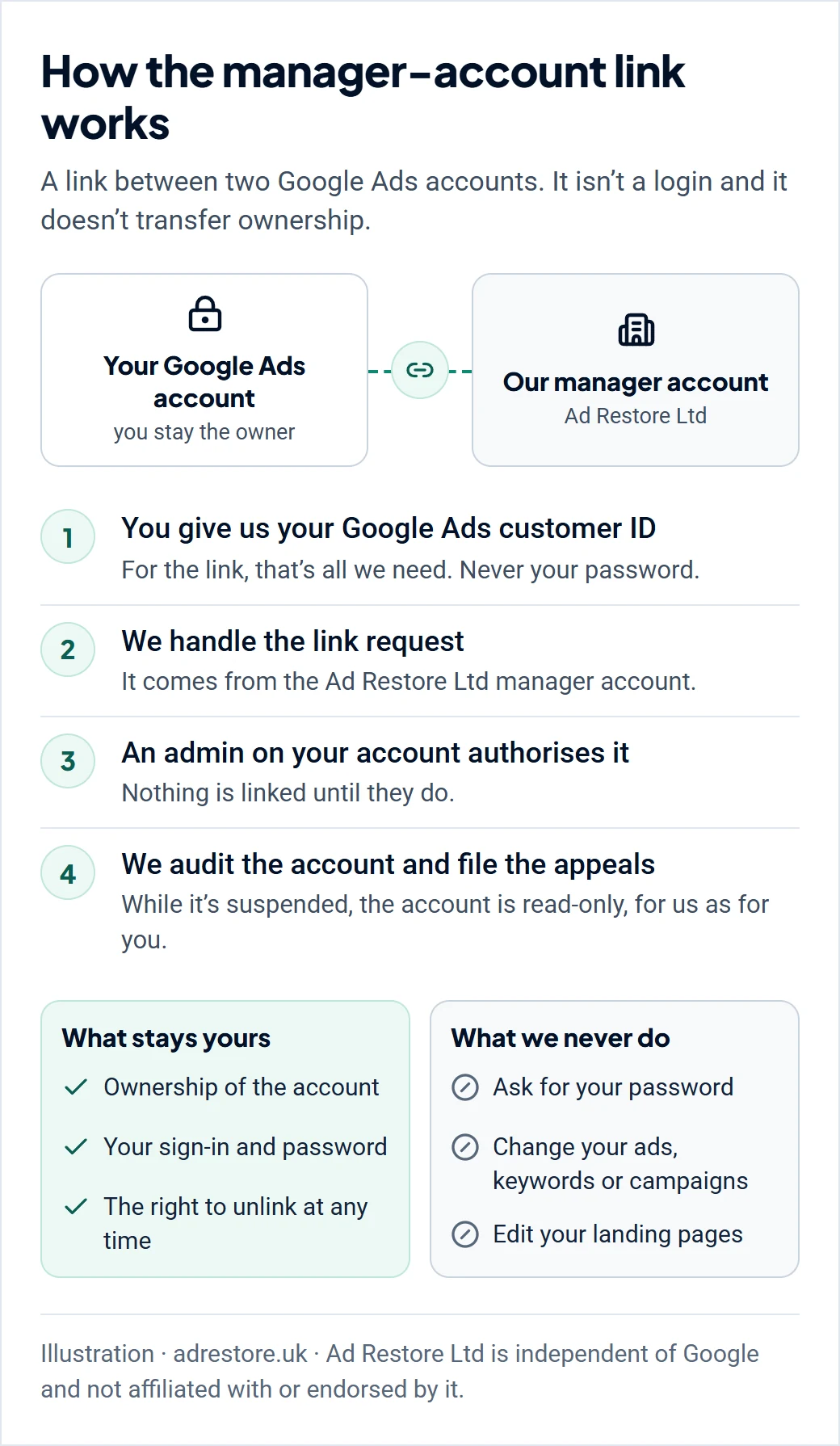
How the process runs, in order
Get in touch.
Call us, email us, or request a quote for a complex case. You tell us about the business, what happened before and after the suspension, and what has been done in the account since. Nothing is accessed at this stage.
Sign and pay.
Each service has a fixed price, shown before you pay. You sign a plain service agreement and pay by card. We check your case and start work within 24 hours of payment (up to 48 hours at weekends).
We request the link.
No password is involved.
An admin on your account authorises it.
The link exists from that moment, not before.
Full audit
of the account, including change history.
Second sit-down,
covering what must change and what documentation is required.
First appeal filed on your behalf.
Then we work from Google’s response.
In our experience we tend to get either the first or the second appeal sorted. We aim for the first, but if not, the second. Each appeal is prepared to stand on its own: where Google’s response identifies something further, we address that rather than resubmitting the same case. It is rarely, if ever, the third appeal, and if a case reaches that point we would explore other options with you. Reinstatement is Google’s decision, not ours.
What the link lets us do, and what we will not do
We can see everything inside the access: customer IDs, change history, and every detail needed to audit the account end to end. We file appeals on your behalf.
We don’t change ad copy, keywords or campaigns, and we don’t take control of the account. Google’s documentation describes a linked manager account as able to “monitor ad performance, update campaigns, and manage other account tasks for those client accounts”, so the capability exists; we simply don’t use it. That is a fixed policy, not a limit on capability. Separately, an account can’t be edited while it is suspended, and on our operational read that applies to everyone with access, ourselves included.
What the link genuinely can’t carry is your credentials. Google: “with a manager account, you won’t be able to change proprietary information for a client account, such as the account’s sign-in information.”
Nor are you locked in. The same page states that “users with administrative access to those accounts can terminate the relationship with the manager account at any time by unlinking their account from the manager account.”
Compared with a provider who asks for direct access
Some providers offering suspension services ask for direct access to your account, meaning your sign-in details. We won’t, and where we can’t state something about another provider’s arrangement, we say so rather than guess.
A manager-account link compared with handing over your sign-in
| What is asked of you | Ad Restore Ltd | A provider asking for direct access |
|---|---|---|
| Your Google Account password | Never requested | Requested; whoever holds it can sign in as you |
| Who is identified on the account | Ad Restore Ltd, as the named linked manager account | Nobody separate from you; the work happens under your own sign-in |
| Ending the arrangement | You unlink the account yourself, at any time | Not known to us |
The second row is about identification, not advantage. The link names Ad Restore Ltd as the manager account associated with yours, so the party doing the work is identified as itself rather than as you. It carries no weight with Google and no bearing on how an appeal is assessed. Ad Restore Ltd is independent of Google. We have no special relationship with it and no privileged channel into its review process: we prepare and submit appeals through the same channels open to any advertiser, and the decision rests with Google.
Don’t open a new Google Ads account to get round this.
Google’s Circumventing Systems policy names creating new accounts to re-enter the system after a suspension as a violation, and Google says any new accounts that the advertiser tries to create may also be suspended. Read why a new account makes things worse.
What you must still do yourself
- Landing page changes. We will never change your landing page. That is a fixed policy, not a limit on capability. The changes must be made by you and to our specification, or the appeal can’t succeed.
- Documentation. Google needs to establish that you are a real person, and we can’t produce that for you. It must be accurate and authentic, and it must match the account it is submitted for: the registered name, the address, the person running the business. In our experience, documents that don’t match the account are what appeals founder on.
In our experience, failed appeals are rarely about strategy. They are about procedure, and about instructions not being followed. See what documents Google wants for a suspension appeal.
When we say no
Some categories we decline outright. Others are difficult rather than impossible, and are assessed case by case. Either way, if we can’t take your case on, we say so before any work starts and you get a full refund.
We decline these outright:
- Evidence of bad practice found during the assessment.
- Any attempt to mimic another business.
- Fatal flaws found at assessment. Where tracking URLs in the account have been flagged as phishing, we have not seen an appeal succeed, so we decline the case rather than take a fee for one.
- An account that can’t be linked. Where Google won’t permit a manager account link to the account at all, there is nothing to work with.
These we assess rather than refuse:
- Multiple businesses advertised under one account. This may be very difficult, and we look at it case by case.
- Multiple Google accounts run without a company or individual name attached, where those accounts have been blacklisted. Very difficult, but not impossible. It depends on the willingness of the person involved to put their real identity behind the advertising, and we assess it case by case.
One consequence is worth knowing. Because a suspended account can’t be edited, account-wide problems in ad copy or keywords can’t be cleaned up before the appeal. Each infringement must instead be cited individually within it. More in when a Google Ads suspension can’t be fixed.
Cost, and how refunds work
Each service has a fixed price, paid up front, from £300 depending on the suspension and the option you choose, and every price is on our prices and refunds page. If we can’t take your case on, or our first review finds no realistic way forward, you get a full refund before any work starts, and we’ll talk you through other options. If your account isn’t reinstated after the appeals included, you get a 50% refund, whichever option you choose. Every service includes 14 days of post-reinstatement support. The refund is a payment term, not a promise of reinstatement. Reinstatement is decided by Google alone. Ad Restore Ltd is registered in Scotland, company number SC825525, registered office in Dumfries.
Frequently asked questions
Do I have to give anyone my password to appeal a Google Ads suspension?
No. Google advises against sharing sign-in details: it says not to have people share the same username and password, and to grant each person access through their own Google Account instead. We work through a manager-account link that an admin on your account authorises.
What is a manager account link?
An association between two Google Ads accounts that lets one view and act on the other. It is not a transfer of ownership, not a login, and involves no credentials. Google says a manager account can’t change a client account’s sign-in information.
Can I remove your access?
Yes. Google says users with administrative access can end the relationship with a manager account at any time by unlinking their account.
Will you change my ads, keywords or campaigns?
No. A linked manager account could, and we don’t, as a fixed policy. We audit the account and file the appeals; landing page changes and documents come from you.
What if my account can’t be linked?
Where Google won’t permit a manager account link at all, there is nothing for us to work with, and we tell you so before any work starts, with a full refund.