Skip to content

Google Ads Phishing Suspension: What Counts as Phishing and What an Appeal Needs
 Gianluca Catinella, Director, Ad Restore LtdPublished on Updated 12 min read
Phishing isn’t allowed under the unacceptable business practices policy.
The first line of Google Ads Help’s page “Why is my account suspended for phishing under the unacceptable business practices policy?”. If the suspension notice on your account names phishing, this is the section Google applied.
In Google Ads, phishing means trying to get people’s personal information, such as passwords and card numbers, by “pretending to be a trusted or well-known entity”. It is a section of Google’s Unacceptable Business Practices policy, and like the rest of that policy it is treated as egregious: the account is suspended on detection, with no warning. A genuine business accused of it has to show Google that it isn’t posing as anyone, and that any brand it mentions really is connected to it.
This page covers phishing only. If the banner on your account names the policy without mentioning phishing, read our guide to that suspension notice instead. For the policy as a whole, see what the policy covers.
Google’s wording quoted here was checked against its help pages in late September and early October 2026. Google changes them without notice, so check the linked page before relying on a detail.
At a glance
Egregious, no warning
Google suspends upon detection and without prior warning.
Posing as someone trusted
Phishing is collecting people’s details by pretending to be a brand or service they trust.
Proof of a real partnership
Google’s tips ask for a brand page listing you as a partner, or a public statement from the brand.
Your Google Ads history
Google asks about it, especially if the account is new or you recently switched agencies.
Only a mistake is reinstated
Google reinstates accounts only in compelling circumstances, such as a mistake.
Where this article comes from
I’m Gianluca Catinella, Director of Ad Restore Ltd. What follows is Google’s published policy, a phishing suspension on a business of my own, the phishing suspensions we have worked on since, and my understanding of how these scams work. Where it is my view rather than Google’s, I say so.
On this page10 sections
What does Google mean by phishing?
Put plainly, a phishing suspension means Google has concluded one of two things about the account: that it collects people’s personal or log-in details under false pretences, or that it impersonates a business people trust in order to get them.
Google’s Unacceptable business practices: Phishing section gives three examples:
- a fake website made to look like a well-known money transfer business, to capture card details;
- a fake email login page;
- ads that impersonate a widely known crypto exchange to steal private keys.
What they share is a trusted name paired with a request for personal details. Google gives two reasons for banning it: people are tricked into sharing personal information that can be used to steal their money or identity, and the practice involves deception and misrepresentation.
In my experience, it is typically scammers impersonating a platform or a cryptocurrency service. They replicate a business, operate from different countries and try to advertise on Google just to collect people’s emails and payment details. That can mean impersonating an online community or platform, offering a discount, or putting up a login page and asking for payment when they are not the official business. They take people’s information and sell something they can’t deliver. Google finds that egregious, and a direct violation.
How is phishing different from the rest of the policy?
The core policy is broader. It covers scamming people by hiding or misrepresenting information about your business, products or services, including impersonating other brands or businesses to get money or personal details. Phishing narrows that to one aim: collecting personal information by posing as someone people trust.
The consequences are the same. Accounts are suspended “upon detection and without prior warning”, and reinstated only “in compelling circumstances, such as in the case of a mistake”. The differences are in the detail: the phishing section has its own, shorter list of best practices, and its appeal tips ask for things the core section doesn’t, such as how your business works and your Google Ads history.
Why was I suspended for phishing when I’m a real business?
Genuine phishing is people actually scamming others, not providing a service. But a legitimate page can look like it from the outside, and I have been on the receiving end of that myself.
One of my other businesses, which ran affiliate marketing, had its Google Ads account suspended for phishing. It was a full account suspension, not a disapproved ad. I showed Google that the pages pointed to the official platform, and I supplied agreement documents proving the business had the authority to advertise it. The suspension was removed.
That is the kind of situation worth checking for. The patterns below are ones where, in my view or in the view of volunteers on Google’s community forum, a legitimate page can read as phishing. They are not a list Google publishes:
- A page promoting someone else’s platform or service without showing the relationship, as with my affiliate business.
- A form that collects personal details with no clear business behind it. Volunteer Product Experts describe lead pages that exist only to collect data. Google’s own best practice is to describe your business on your website, with current contact details and a clear explanation of what the company does.
- Pages that look “official” for another company’s service, including support or account help for another brand. Separately from phishing, Google lists offering unauthorised customer support on behalf of third parties as a reason it may pause an account for verification.
The first check I would make is simple. Type in a well-known brand, a school or course brand for example, and you can find replicated sites asking for emails or payment up front. Those are typically phishing for people’s information. If any page of yours could be mistaken for one of those, that is what to fix first.
If your ads were suspended after you pointed them at a booking or payment page, such as Calendly, Square, Booksy or a Stripe link, see our guide to Google Ads suspension after switching to a booking page.
Why is a phishing suspension so hard to trace?
Phishing is one of the hardest suspensions to work. It’s rarely one root cause; often it’s several, and finding them is a journey.
Google says it may review information from multiple sources, including your ad, website, accounts and third-party sources. In our experience, on a phishing suspension those checks go deep, because the entire domain has to be safe, not only the pages your ads point to. That is our view from working these suspensions, not a process Google publishes.

Two causes are easy to miss, because neither sits on the page in your ads:
- Scripts loaded from other domains. Any page on any subdomain of your domain that loads a script from another domain counts, especially when that other domain is unknown or unregistered. One script like that, on a page you never advertise, can make the whole domain look unsafe.
- Brand keywords that match another business. Bidding on a name, or on “official site” terms, that also belong to a separate business can read as impersonation, even when the name is your own trading name.

It is also why rewording an appeal rarely helps. In our experience, a refusal that comes back within the hour, whatever the appeal says, points to something still present on the domain or in the account, not to the wording. Google doesn’t publish that; it is what we see. Our guide to a rejected appeal covers what to do before you appeal again.
My account was hacked and someone ran ads. What now?
A hijacked account follows a different route from a phishing suspension. Where Google detects that an unauthorised user is trying to access the account, its suspensions overview says it will temporarily suspend your account to protect against unauthorised charges. That protects you from charges you didn’t authorise, which is different from a policy finding. If you suspect unauthorised activity, Google provides a form to report it.
In my view, that route is a real avenue: if the account genuinely was taken over, the suspension can sometimes be overturned on that basis. It is another avenue, not a certainty. One volunteer on Google’s community forum has said that if Google had identified unauthorised access, it would have issued a different notice, which suggests a phishing notice after a compromise isn’t automatically treated as a hack. If this is you, report the unauthorised activity, and in any appeal explain what happened and when. Our guide to the unauthorised access notice covers that route.
What should a phishing appeal include?
Google’s tips for this section, in order:
Follow the best practices first.
Use your own name, logo and images on your site and in your ads, be clear about your partnerships, and describe your business on your website.
Explain your situation.
If you’re an official partner of another brand, describe the partnership and how your business is connected to it.
Share proof.
For example, a link to the brand’s official website where your business is listed as a partner, or a public statement from the brand confirming the partnership.
Explain how your business works.
Give your Google Ads history.
Google asks for it in this section, especially if the account is new or has recently switched ad agencies. Google’s help article on phishing suspensions puts it as “Tell us about your Google Ads history”.
Google’s suspensions overview also uses phishing as its worked example of explaining your situation in an appeal.
On the history question, I will be honest: I haven’t seen new accounts or agency changes linked to these suspensions myself. Google asks, though, so answer it fully. On proof, my rule is the same as for any partnership claim: contracts, agreements, real documents, with real signatures from real people. In my own affiliate case, the evidence was agreement documents proving the business’s authority to advertise the platform.
Don’t open a new Google Ads account to get round this.
Google’s Circumventing Systems policy names creating new accounts to re-enter the system after a suspension as a violation, and Google says any new accounts that the advertiser tries to create may also be suspended. Read why a new account makes things worse.
When can a phishing suspension not be fixed?
If the account really was posing as someone else to collect people’s details, there is nothing honest to appeal. Google reinstates only in compelling circumstances, such as a mistake, so a phishing suspension can only go well when the account genuinely wasn’t impersonating anyone.
Google is acting at scale, too: its 2025 Ads Safety Report says it suspended 24.9 million accounts that year. Genuine businesses get caught up in that, which is why the evidence matters. Scams are what the policy is there to stop.
Our Unacceptable Business Practices service page is upfront about the cases we turn down: accounts that are genuinely in violation, and accounts with a fatal flaw, such as presenting another company’s business as your own or advertising another company’s products with no agreement to show for it. We tell you that at our first review. Our guide to when a suspension can’t be fixed covers the harder cases.
The appeal route
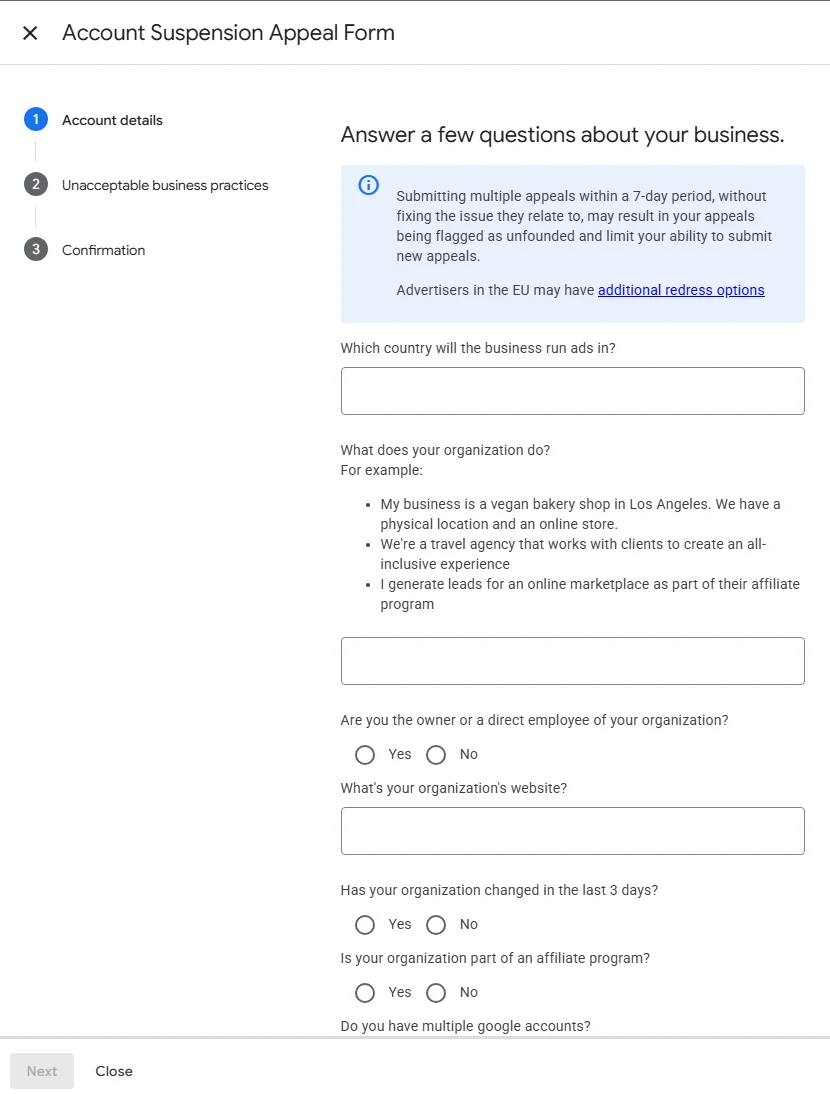
- Where: Google says to select the Contact Us link in the notification at the top of your Google Ads account, which opens the appeal form.
- When: don’t rush it. Google says all advertisers have at least six months from the date of account suspension to appeal, so find the cause and gather the proof first.
- How often: send one appeal at a time. Google says that if you file too many appeals for the same account suspension, it may not process them.
Before you write it, read what the appeal form asks and why appeals get rejected.
Frequently asked questions
What does Google mean by phishing?
In Google Ads, phishing means trying to get people’s personal information, such as passwords and card numbers, by pretending to be a trusted or well-known entity. It is a section of Google’s Unacceptable Business Practices policy and is treated as egregious, so the account is suspended on detection with no warning.
Does a lead form without a privacy policy count as phishing?
Google’s phishing section doesn’t mention privacy policies. Volunteer Product Experts on Google’s community forum do list a form without a privacy policy among the common reasons they see for suspensions like this. The safe step is Google’s own best practice: make it obvious who is collecting the data, by describing your business on your site and keeping your contact details current.
Can I mention a brand I’m an authorised partner of?
Yes, if the relationship is real and clear. Google’s advice is to be clear about partnerships: if you are an official partner, ask the brand to mention you on its own website, and make the relationship clear on your site and in your ads. If you reference a brand without being an official partner, Google suggests you consider a disclaimer on your website and in your ads.
My account was hacked. Will Google treat a phishing suspension as a hack?
Not automatically. Google has a separate route for unauthorised access: it temporarily suspends the account to protect against unauthorised charges, and gives a form to report it. If your account really was taken over, report it, and explain what happened and when in any appeal.
Do I have to complete verification before I can appeal?
Sometimes. Google says certain selected advertisers must complete advertiser verification successfully before they can appeal, and Google limits failed verification attempts, so get the documents right first.
How many times can I appeal?
Google doesn’t publish a set number for account suspensions. The limit of three appeals people quote applies to each individual ad. For accounts, Google asks for one appeal at a time and says too many appeals for the same suspension may not be processed, so make each one count.
Does Google only check the page my ad points to?
Not in our experience. Google says it may review information from multiple sources, including your ad, website, accounts and third-party sources. On a phishing suspension, our view is that the whole domain has to look safe: the rest of the site, other subdomains, and any script they load from another domain. That is our experience, not a process Google publishes.