Skip to content

Your account is suspended – Your account violated the Unacceptable Business Practices policy – Google Ads
 Gianluca Catinella, Director, Ad Restore LtdPublished on Updated 15 min read
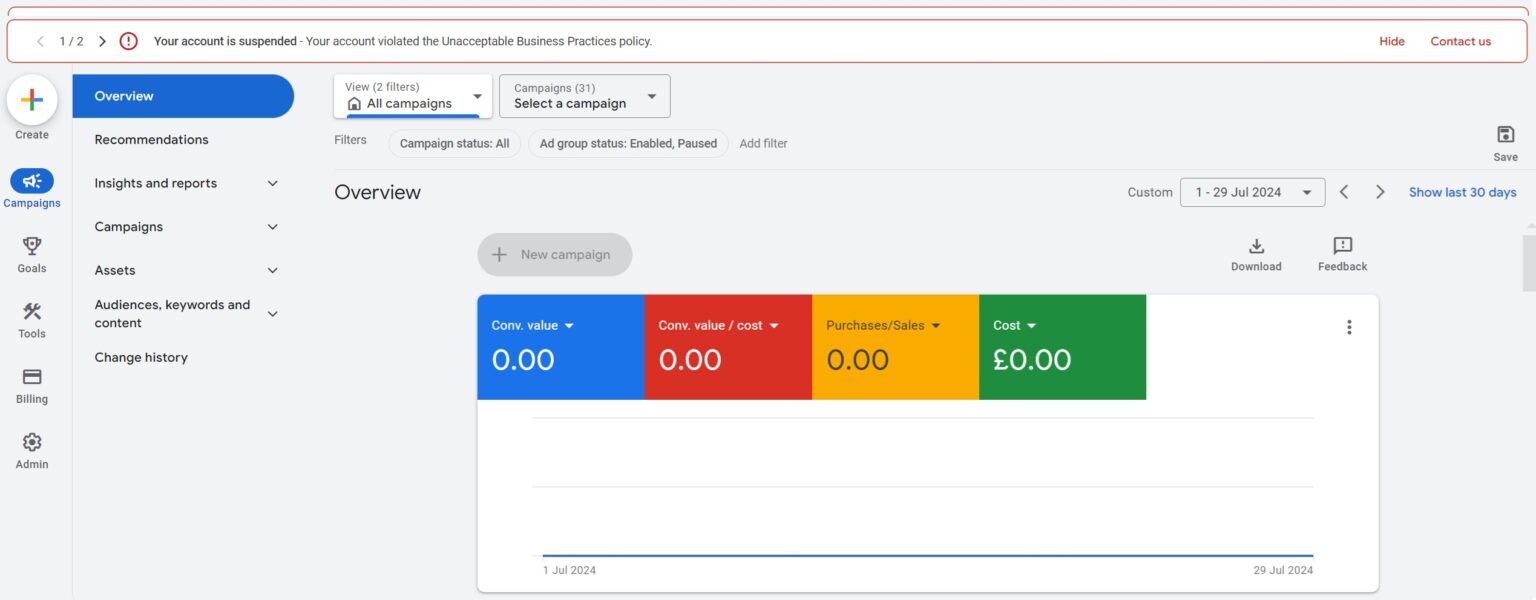
Your account is suspended - Your account violated the Unacceptable Business Practices policy.
The red banner at the top of a suspended account, as in the screenshot further down. Pasted into a search box it often loses its line break: “your account is suspendedyour account violated the unacceptable business practices policy” is the same notice.
This banner means Google has suspended your whole Google Ads account under its Unacceptable Business Practices policy, which bans scamming people by hiding or misrepresenting information about your business, products or services. Google treats it as egregious, so the account is “suspended upon detection and without prior warning”, every ad stops, and the way back is an appeal. The banner names the policy but not the problem, so your first job is to find what triggered it, not to write to Google.
This page is about the suspension notice and what to do next. For the policy itself, section by section, see what the Unacceptable Business Practices policy covers. If your banner names phishing or public figure impersonation, those have guides of their own. If you’d rather we handled it, our Unacceptable Business Practices appeal service covers the fixes and the appeal.
Checked against Google’s help pages on 3 October 2026, and the payment-wording section on 4 October 2026. Google changes them without notice, so check the linked page before relying on a detail.
I’m Gianluca Catinella, Director of Ad Restore Ltd. Where something below is my experience or opinion rather than Google’s documented process, I say so.
At a glance
The whole account
Ads stop in all locations and the account goes read-only.
No warning
Google treats this policy as egregious, so it suspends on detection.
The cause isn’t named
The banner and email name the policy, not the ad, page or claim.
Time to prepare
At least 6 months to appeal, so find the trigger first.
Verification can come first
Some advertisers must pass verification before they can appeal.
On this page13 sections
What does “Your account violated the Unacceptable Business Practices policy” mean?
“Your account is suspended” is about the whole account, not one ad. Your ads stop in all locations, the account goes read-only with only a few actions left, and Google treats the suspension as permanent unless an appeal is submitted and succeeds.
“Your account violated the Unacceptable Business Practices policy” names the rule Google applied. It covers four practices:
- implying you are connected to another brand, organisation or government body when you are not;
- offering what you can’t deliver, including not holding the right licences or qualifications;
- misrepresenting services in ways that risk health or safety, such as pretending to provide medical help;
- impersonating other brands or businesses to get people’s money or personal information.
Google says violations are “taken very seriously and are considered egregious”, and its policy page warns that “you will not be allowed to advertise with Google Ads again”. That line is why people assume the account is finished. Read it alongside another line on the same page: accounts are only reinstated in compelling circumstances, “such as in the case of a mistake”. Reinstatement is hard, but it isn’t impossible when Google has got it wrong.
Why doesn’t the banner say what I did?
The banner names the policy. Google says the suspension email “will identify all policies” the account was suspended for, with a link to submit an appeal. Neither is documented as naming the ad, page or claim that caused it.
In my experience, though, not every banner is the blanket version: Google sometimes now gives the exact reason, such as phishing or impersonation. Those are separate sections of its policy, phishing and public figure impersonation, each with its own appeal tips. If your notice names one of them, read our guide to phishing in Google Ads or to public figure impersonation. Either way, keep a dated copy of the banner and the email.
Is “payment business policy has been violated” the same suspension?
Not necessarily. We haven’t found a Google Ads policy called “payment business policy”. Google sorts account suspensions into separate groups, and payments and business practices sit in different ones, with different fixes. The policy name in Google’s email tells you which one you have.
- Billing and payment suspensions are about how the account pays. Google lists promotional code abuse, requesting a chargeback, suspicious payment activity and unpaid balance. Our guides cover suspicious payment activity and unpaid balances.
- Unacceptable Business Practices is about the business and what it tells people. It’s one of Google’s egregious ad policies, and it’s the suspension this page covers.
- A payments profile notice comes from Google Payments rather than the ad account. If yours reads “Your payments profile is currently suspended”, see our guide to that notice.
Google says the suspension email identifies all the policies the account was suspended for, with a link to the appeal. Copy the policy name from it word for word before you do anything else: it decides which appeal you’re writing.
What usually triggers this suspension?
Google’s own examples come first. Its policy page lists pretending to be a discount online retail store and not delivering what people paid for, pretending to be or be affiliated with a well-known charity, and tricking people into believing you’re the official website for a new real estate development so you can earn commission. Google says it may review your ad, website, accounts and third-party sources, and that content is blocked by automated models or, where a more nuanced call is needed, flagged for review by trained operators and analysts.
From the cases I have worked on, two causes stand out.
- Trust issues that build up. Most of the time, in my view, it comes down to Google’s trust in the business model rather than one bad ad. Google’s ads crawler goes through the site, finds things it reads as trust issues and categorises them. When enough have built up, the account is suspended automatically. Sometimes a person reviews what was collected first; sometimes the system just suspends. That is my reading of the pattern from the outside, not a process Google publishes.
- Selling what you don’t own, or looking like an impersonator. The business advertises products or services it doesn’t own, or it looks as though it is posing as another business, a person or a brand, without obvious agreements or contracts behind it. This happens even to advertisers who are contracted and allowed to sell those products. In my experience, Google suspends first and asks questions later, and the appeal sorts it out afterwards. That is why the paperwork matters.
One version of the second cause hides in the keywords. Bidding on a name, or on “official site” terms, that also belong to a separate business can read as impersonation, even when the name is your own trading name.

If the notice names phishing, look wider than the pages in your ads. In my experience, Google’s checks go deep on phishing because the entire domain has to be safe: any page on any subdomain that loads a script from another domain counts, especially an unknown or unregistered one. That is my view, not a process Google publishes. Our phishing guide explains more.
For the website side, check by check, see our 24-point Unacceptable Business Practices website checklist.
How do you find the trigger?
When I take on a case, the first hour goes on:
- the landing pages the ads send people to;
- the keywords in the account;
- what’s being advertised, and what the business is actually like;
- whether similar businesses are advertising right now, and what they show;
- why this particular business has been hit.
The aim is to find the point that tripped the Unacceptable Business Practices flag. Comparing similar advertisers isn’t an argument to put in an appeal; it shows what is different about yours. Until you know the trigger, an appeal is a guess.
What should you do in the first 48 hours?
By the time most people reach me, they have already filed an appeal and been pushed back. My advice:
- Don’t rush the appeal. Google gives at least 6 months from the date of account suspension to appeal, so there’s time to find the trigger and prepare the evidence first. Don’t sit on it either: Google says that from 21 July 2026, appealing directly from your account isn’t available for policy decisions made more than 6 months earlier.
- Don’t start calling Google support. In my experience, they won’t give you assistance with this, and contacting Google to complain is the worst thing you can do. Google’s documented route is still the appeal, through the Contact Us link in the notification; use it once you know what you’re answering.
- Don’t panic, and start collecting documentation: proof of how the business operates, identification for yourself, details of the payment method on the account, and similar records.
- Download your reports. Google says advertisers can still view a suspended account and its reports, but may not be able to access suspended accounts after an extended period.
What should you change before you appeal?
Fix the cause first. Google’s appeal tips for this policy start with “Follow best practices”, then explaining your situation, sharing proof and completing verification if asked. In order:
Fix the website and the ads.
Google’s best practices include: describe your business on your website, with up-to-date contact details and a clear explanation of what you do; use your own branding; be clear about your partnerships; and be qualified to do the work you advertise. If the site carries a parent company’s logo on its own domain, see how to give a separate website its own identity.
Get the fixed pages re-indexed.
One practice of my own: once the landing pages fit Google’s policies, get them re-indexed before you appeal. In my experience, Google may re-check the pages when an appeal is filed and the page details are reviewed, so it should see the fixed versions. That is my best practice, not a step Google documents.
Explain your situation.
If you’re an official partner of another brand, Google asks you to describe your partnership and share any information that shows how you’re connected.
Gather the proof.
Google names contracts, written agreements, a link to a credible news article about the connection, and public statements from the brand or organisation confirming the partnership.
Complete verification if Google asks.
Google’s tip is to complete verification: all the tasks required for advertiser verification.
Send one appeal.
From the Contact Us link in the notification. Google asks advertisers to send one appeal at a time.
For what the form itself asks, see our walkthrough of the Google Ads suspension appeal form.
Where is the appeal form, and why might verification come first?
- The form. In your account, select the Contact Us link in the notification at the top of the screen. It opens the appeal form, and relevant policy information will appear as you fill it in.
- While it’s in review. If you select Contact Us again, the account shows an “Appeal pending” status. The decision comes by email.
- If it’s rejected. Google says you can re-appeal following the same process. Our guide to a rejected appeal covers what to change first.
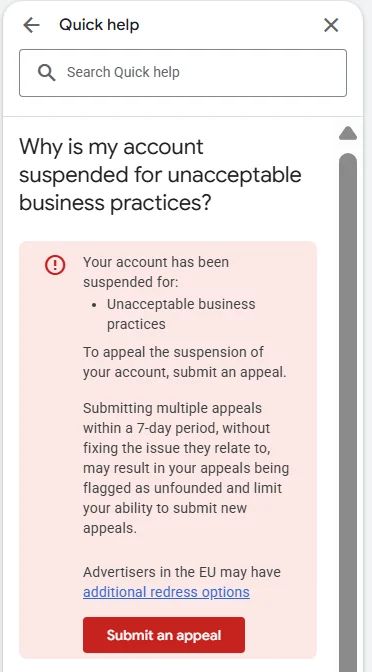
Some accounts hit a wall first. Google says certain selected advertisers must complete advertiser verification successfully to appeal their suspension. Google limits failed verification attempts, and an advertiser it can’t verify won’t be allowed to appeal their account suspension. Passing verification doesn’t lift the suspension on its own either: “your account will remain suspended until your appeal is granted”.
In my experience, clients are often asked to complete business operations verification. If it isn’t submitted, the suspension stays, and it is only resolved once the verification has been properly filed and assessed. It is a long form, and in my view it needs professional help. Our guides to business operations verification and advertiser verification explain what Google asks for.
A case that went well: a satellite broadband installer
A telecoms company that also installed equipment for a well-known satellite broadband brand, as a side service, was suspended under this policy. It had no documentation proving it was authorised to do that work, and Google asked it for documentation. By the time it reached me, the business had been contacting Google and was very frustrated.
Going through the account, I found the brand’s name in its keywords, and the business confirmed the installation work was a side service next to its normal telecoms services. That was the issue.
The landing pages were adjusted, the documentation was provided, and I wrote a formal appeal. It explained what had triggered the suspension, why the business had done things that way, what had been changed, and how it would act in future. Business operations verification went in on 20 November 2024, and Google lifted the suspension at 17:10 the next day; the full case study has the dates. That is what one case took, not a timescale anyone can promise.
That appeal also follows Google’s own tips for this policy: describe the partnership and share information that shows the connection, backed by proof such as contracts, written agreements or a credible news article.
A case I turned down
Not every case can, or should, be appealed. I turned one down where the company was clearly impersonating another business. It had no documentation, and it was using the same domain. The business being represented ran in the United States; the advertiser was trying to run it out of Spain and pass it off as its own. I think that probably triggered a domain-abuse flag, though that is my own view.
That was a fatal flaw, and I didn’t take the case. Impersonating other businesses is one of the four practices the policy names, and Google reinstates only in compelling circumstances, such as a mistake. When there is no mistake, there is nothing honest to appeal, and I would rather say that at the start than take the case.
Is this suspension the end of the account?
This is the belief I most often have to correct: people think the account is done for. It is a difficult suspension, and I won’t pretend otherwise, but it isn’t always the end of the road. There can be avenues to go through. What closes them is burning every appeal trying to fix it yourself.
Google asks advertisers to send one appeal at a time, and says that if you file too many appeals for the same account suspension, it may not process them. Where it sees the appeals function being misused, it suspends processing of certain appeals for 7 days. The “3 appeals” limit you may have read about belongs to individual ads (“Each ad is limited to 3 appeals”), not to account suspensions.
The cases we don’t take are the ones our service page is upfront about: accounts that are genuinely in violation, and accounts with a fatal flaw, such as presenting another company’s business as your own, advertising another company’s products with no agreement to show for it, or no longer controlling a domain that’s still in the account. We tell you that at our first review. Even then, only Google decides.
Don’t open a new Google Ads account to get round this.
Google says accounts related to the suspended account may be suspended, and “any new accounts that the advertiser tries to create may also be suspended”. Its Circumventing Systems policy names creating new accounts to re-enter the system after a suspension as a violation, and that policy is egregious too. Read why a new account makes things worse.
Frequently asked questions
What does “Your account violated the Unacceptable Business Practices policy” mean?
Google has suspended the whole Google Ads account under its Unacceptable Business Practices policy, which bans scamming people by hiding or misrepresenting information about a business, its products or its services. Google treats it as egregious, so the account is suspended on detection without warning, ads stop in all locations, and the way back is an appeal. The banner names the policy but not the specific problem.
Did Google warn me before suspending the account?
No. Unacceptable Business Practices is on Google’s list of egregious policies, so accounts are suspended upon detection and without prior warning. The warning Google sends at least 7 days before a suspension applies to repeat violations of policies that aren’t egregious.
Can I delete the ads that caused it?
Deleting them won’t lift the suspension. Google treats a suspension as permanent unless an appeal is submitted and the account is reinstated, and a suspended account is read-only, with only a few actions available. Fix the cause and explain it in one well-prepared appeal.
How long do I have to appeal?
Google says all advertisers have at least 6 months from the date of account suspension to appeal. It also says that from 21 July 2026, appealing directly from your account isn’t available for policy decisions made more than 6 months earlier. Use the time to find the trigger and prepare, not to wait.
Can I get my remaining balance back?
Google says that if your account was suspended and you qualify for a refund, you can always cancel your account and receive your refund. That’s Google’s billing route, and it’s separate from the appeal.
Is the banner the same as the email?
They cover the same suspension. Google says the email identifies all the policies the account was suspended for and links to the appeal. In my experience, the banner is sometimes the blanket Unacceptable Business Practices message and sometimes names the exact reason, such as phishing or impersonation. Keep a dated copy of both.
Is “payment business policy has been violated” the same suspension?
Not necessarily. We haven’t found a Google Ads policy with that name. Google sorts suspensions into billing and payment reasons, such as suspicious payment activity, chargebacks and unpaid balances, and policy reasons such as Unacceptable Business Practices. The suspension email names every policy involved, so check which one yours names: the fixes are different.