Skip to content

Mismatched product price – Google Merchant Center
 Gianluca Catinella, Director, Ad Restore LtdPublished on 8 min read
Mismatched product price
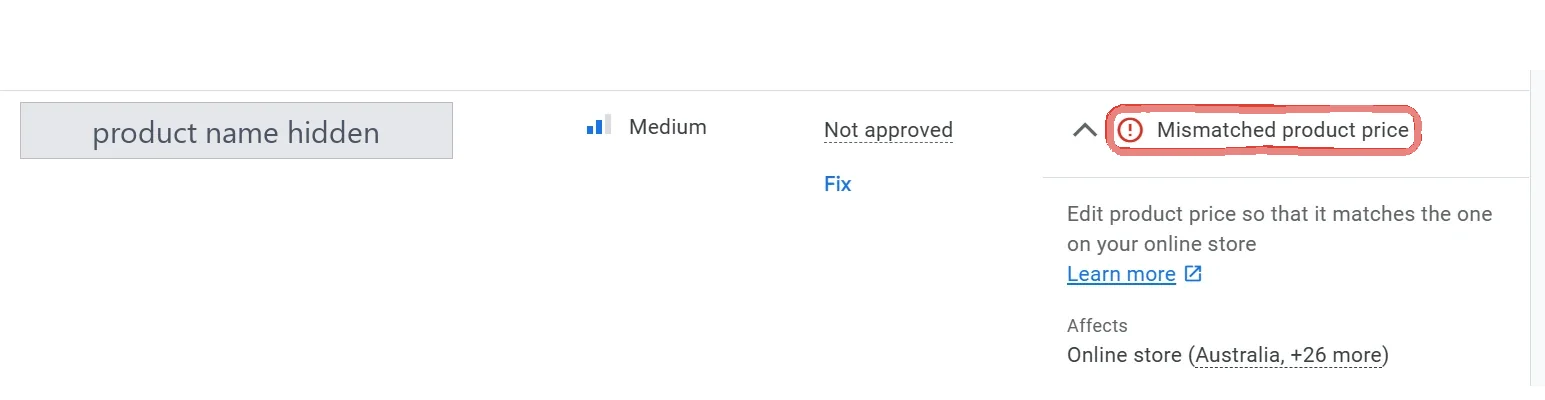
Shown beside a product marked “Not approved”, with the instruction “Edit product price so that it matches the one on your online store”. Google’s UK help page words it “… in your online shop”.
This notice means Google checked the product’s page on your website and found a different price from the one in your product data, so the product has been held back from Shopping ads and free listings. Google says that when it finds a mismatch, the product with the mismatch may be disapproved. The fix is to make the two prices match, and then to fix whatever made them drift.
It’s a product-level issue, not an account suspension, but Google’s help page for it adds: “This may lead to an account suspension.” The account-level price notices have different names, such as “Inaccurate price status due to inconsistency between feed and landing page”; they’re covered further down.
Checked against Google’s Merchant Center help pages on 4 October 2026. Google changes them without notice, so check the linked page before relying on a detail.
At a glance
The product, not the account
The product stops showing until the prices match. The account carries on.
Googlebot compares the two
Your product data against the price on the page, or in its structured data.
Often a sync problem, in our experience
In one shop, a Shopify integration. Resetting it and correcting prices fixed it.
Re-checked in hours or days
Google re-crawls disapproved products and reapproves them once the prices match.
It can become an account problem
Google says mismatches may lead to an account suspension.
On this page10 sections
What Google is checking
Google says Googlebot routinely crawls your website landing pages and compares the price in your product data with the price on the landing page, or in the page’s structured data if you have it. If they differ, the product can be disapproved.
What it reads is the page’s HTML. In Google’s words: “If data on your website is passed dynamically with JavaScript after the page is loaded, this will trigger an error.” So a price that looks right in your browser can still be the wrong one for Google.
Why prices drift apart
Google’s list of common reasons for price mismatch:
- Timing. The website changed and the product data hadn’t caught up yet.
- Incorrect structured data. Google uses the page’s markup to understand its prices.
- Bots see a different price from people. Google suggests its rich results test to reproduce it.
- Sale prices. A wrong sale price effective date, or the wrong time zone, shows the wrong price.
- An old notification. The mismatch was found at a particular time; the product may already have been updated and reapproved.
- Minimum quantities. If items only sell in bulk, the price must be the total for the minimum quantity.
What we found in one shop
The screenshot above comes from an Australian online shop selling American snacks and sweets. One product, not approved for “Mismatched product price” on 21 November 2024, was affecting its online store in Australia and 26 more countries.
In our experience the cause wasn’t the prices themselves: it was a Shopify integration issue between the shop and Merchant Center. Resetting the integration, then fixing the prices manually, solved it.
Google’s own advice points the same way. Its help for the account-level price notice tells Shopify users: “If your data isn’t updating correctly, try toggling the sync off and back on within your app to force a re-sync.”
What Google asks you to do
Find the affected products
In Merchant Center, go to Products, open the Needs attention tab and filter for the issue. For many products, Google lets you download the list as a CSV file.
Make the prices match
Google’s fix: “Update the price in your product data source to the same price listed on your website”, in the right currency for the country you target.
Fix what made them drift
A sync that has stopped, an upload schedule that’s too slow, structured data that’s wrong. Otherwise the next price change brings the notice back.
Request a website check
Google says requesting a website check will speed up the review and reapproval process. It may take up to 12 hours to review your website, and you can’t send another request in that time.
Still flagged? Request a review
If the issue persists after you’ve fixed the data, Google’s route is “I disagree with the issue”, then Request review.
Google says it automatically re-crawls disapproved products over the next few hours or days, and that once the prices match, the products are reapproved.
Automatic item updates help, but don’t cure it
Merchant Center can update prices itself from what it finds on your landing pages. Google says automations are enabled by default, but also that “Automations aren’t a replacement for regular updates of your product data”: they’re for sporadic problems on a small share of products.
Even a fixed-up price still counts against you. When Google updates a price for you, its notice “Automatic updates: Mismatched price” says “we continue to treat products with mismatches as critical errors that can lead to account suspension”.
When it becomes an account problem
One product with a stale price is a product issue. Many of them can turn into an account issue. Google’s account-level notice “Inaccurate price status due to inconsistency between feed and landing page” comes with a warning email and a deadline, and then pre-emptive disapproval of your products. Google says “The review will take seven working days to complete”, and that “Contacting the support team will not trigger an account review”.
In our experience, price mismatches at scale can end in an account-level Misrepresentation suspension. Google’s price pages say “account suspension” without naming the policy, so read your notice for the exact wording. If it says Misrepresentation, our guide to the Misrepresentation suspension explains it, and Merchant Center suspensions covers how a suspended Merchant Center account and Google Ads affect each other.
Don’t remove products to get through a review.
Google treats that as abuse of its network. Its own example: “if you significantly reduce your Merchant Center product count before a review and then upload the missing products shortly after receiving account approval, this could cause a gap in enforcement and result in account suspension.” Fix the prices instead, and keep the products in the account.
A separate problem in the same shop: the legal pages
Looking at the same shop, we found a second issue that had nothing to do with prices: legal pages were missing, including a proper returns policy. That’s a website requirements problem, and a Misrepresentation risk on its own.
Google has a notice for it, where the account does not have a clear return and refund policy, and its checkout requirements say that omission of relevant information is considered a misrepresentation. If you’re fixing prices, check these pages too. Our guide to “Website needs improvement” lists what Google expects to find.
The review route
- Products disapproved. Fix the prices, then request a website check; if the issue stays, “I disagree with the issue” and Request review.
- Account warned. Fix the cause before the deadline in Google’s email and request a review; Google says a review takes seven working days.
- Account suspended. Read the exact policy name in the notice first, then the Misrepresentation guide or Merchant Center suspensions.
Questions people ask
The price on my website is right. Why does Merchant Center say it doesn’t match?
Because Google compares your product data with what Googlebot gets from the page, not with what you see. A price added by JavaScript after the page loads, wrong structured data, or a different price shown to bots can all cause it. The notification can also be older than your latest fix: Google says the mismatch was found at a specific date and time, and the product may already have been reapproved.
How long does it take for the product to be approved again?
Google says it automatically re-crawls disapproved products over the next few hours or days. Requesting a website check speeds it up, and that check may take up to 12 hours.
Can a mismatched price get my Merchant Center account suspended?
Yes, Google says it may lead to an account suspension. In our experience, price mismatches at scale can end in an account-level Misrepresentation suspension, so fix the cause, not only the products Google listed.
Should I turn on automatic item updates?
Google says they’re on by default, and they can correct a few prices for you. But Google also says they aren’t a replacement for regular updates of your product data, and that products with mismatches still count as critical errors.
I use Shopify. What should I check first?
The connection between Shopify and Merchant Center. Google tells Shopify users whose data isn’t updating correctly to try toggling the sync off and back on within your app to force a re-sync. In the shop we worked on, resetting the integration and then correcting the prices manually is what fixed it.
Does a returns policy have anything to do with a price mismatch?
Not directly: it’s a separate requirement. But in the same shop we found missing legal pages, including a proper returns policy, and Google has its own notice for a site that does not have a clear return and refund policy. Fix both while you’re there.