Skip to content

Which number does Google want: customer ID, appeal ID or case ID?
 Gianluca Catinella, Director, Ad Restore LtdPublished on 8 min read
Have your customer ID ready when you contact Google Ads customer support.
A tip on Google Ads Help’s page “Find your Google Ads customer ID”.
Usually the customer ID: the 10-digit number, written like 123-456-7890, that identifies the Google Ads account. Google asks you to have it ready when you contact support, and it’s the number a manager-account link uses. The appeal ID and the support case ID are references for one appeal or one conversation: quote them only when you’re following that up.
Around a suspension you can meet five different numbers, and several look alike. Here’s each one, where it appears, and who needs it.
Checked against Google’s help pages on 4 October 2026. Google changes them without notice, so check the linked page before relying on a detail.
At a glance
Customer ID: 3-3-4
10 digits, like 123-456-7890. The one most forms want.
Manager account ID
Same format, but it’s an agency’s account, not the suspended one.
Appeal ID: one appeal
Quoted in Google’s emails about that appeal.
Case ID: one conversation
In square brackets in a support email’s subject line.
Payments profile ID: 4-4-4
12 digits, for billing and payment verification.
On this page9 sections
The five numbers side by side
Google’s numbers around a suspension
| Number | What it looks like | Where you’ll see it | Who needs it |
|---|---|---|---|
| Customer ID | 10 digits: 123-456-7890 | Top-right corner of Google Ads; Google Ads emails; bank statements (“GOOGLE *ADS” and the number) | Google support, a manager-account link, us |
| Manager account ID | The same 10-digit format | Next to the manager account’s name, top left | Only when the manager account itself is the subject |
| Appeal ID | In the emails we have, 10 digits | Subject and body of Google’s appeal emails | Anyone following up that appeal |
| Support case ID | A digit, a dash, then a long number | In square brackets in a support email’s subject line | Anyone following up that case |
| Payments profile ID | 12 digits: 1234-5678-9012 | Billing settings in Google Ads; Google payments settings; invoices | Payment verification forms, billing questions |
The customer ID: the one most forms want
Google describes it as “a unique number used to identify your Google Ads account”. To find it, sign in, click your profile picture, and it’s listed under your account name. Google adds that it’s displayed in the top-right corner of the account, and that you can find it in previous Google Ads emails or billing statements.
It’s on your bank statement too. Google says its charges typically appear as “GOOGLE *ADS” followed by a 10-digit number, for example ADS123-456-7890, and “this number is the customer ID” of the account the charges came from.
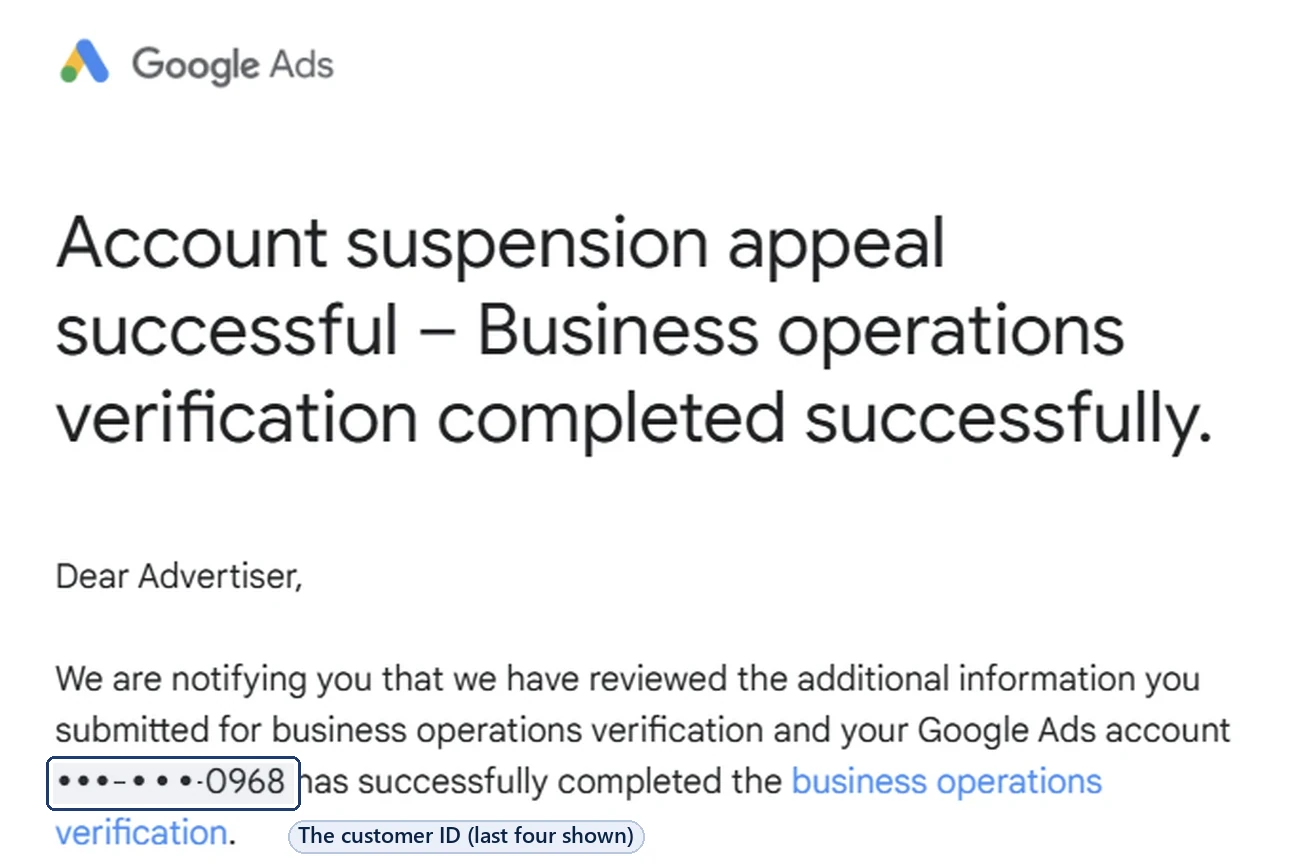
It isn’t a password, but treat it with some care. Google’s tip: “Only share your ID with people that you trust”, because anyone who has it may be able to use it to access your Google Ads information.
The manager account ID: an agency’s account, not yours
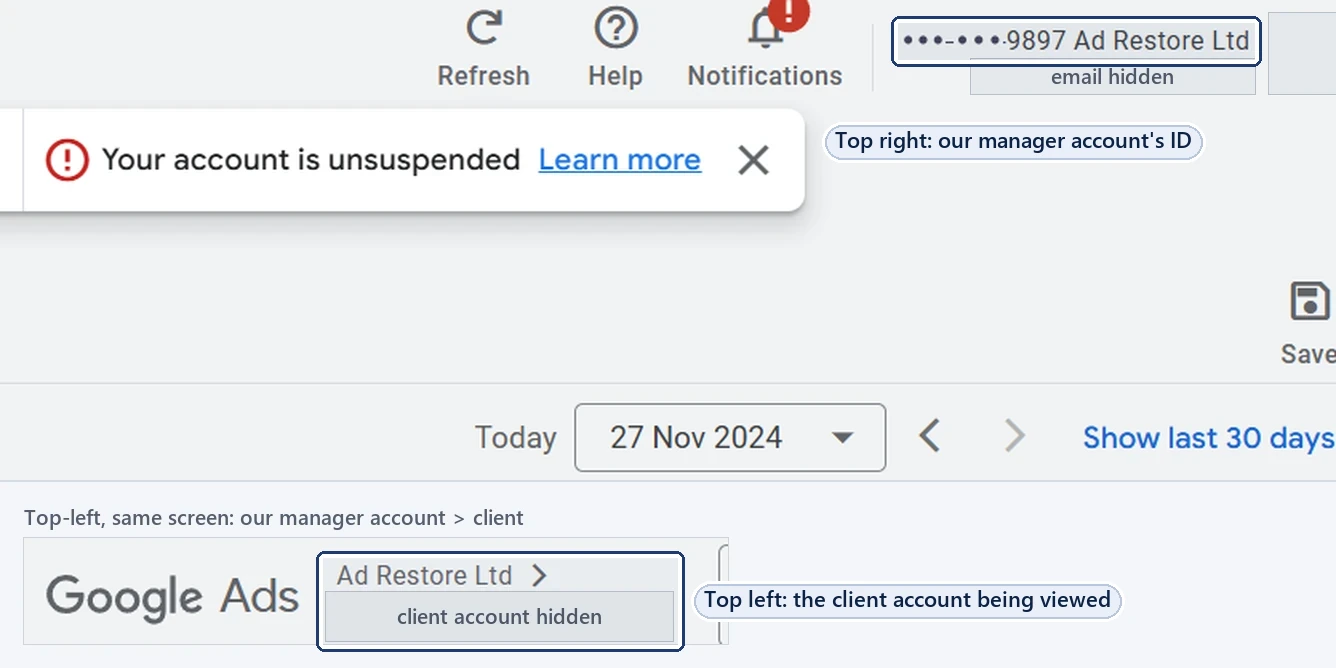
A manager account is a Google Ads account that manages other accounts, and it has a customer ID in the same format. Google’s instruction: for manager accounts, click the down arrow next to the account name in the top-left corner, and the ID shows under it.
That’s where mix-ups happen. When a client account is opened through a manager account, the screen can show both numbers, so check you’re copying the ID of the account that’s actually suspended.
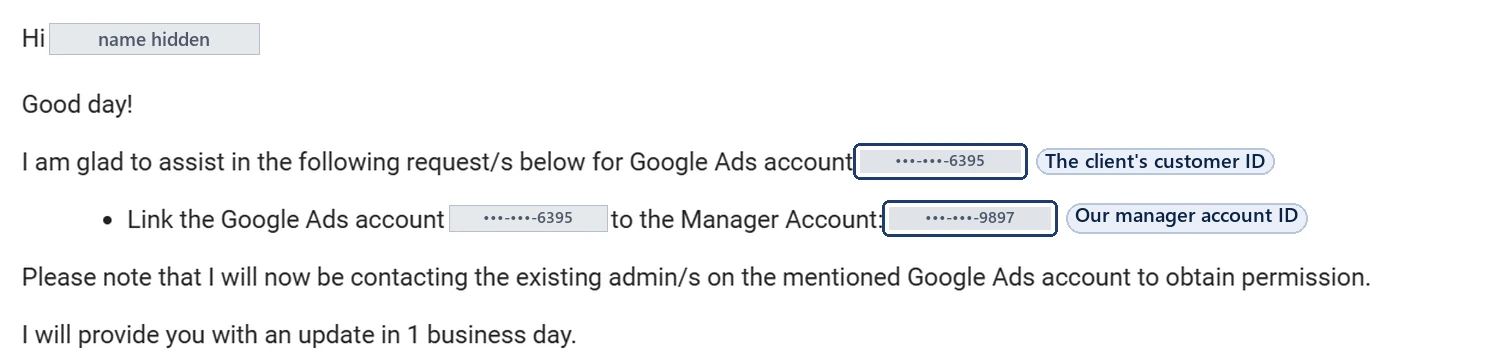
To link an account, the manager account enters the Google Ads account’s customer ID. Google says users with access to that account then get an email inviting them to link, and it’s only linked once they accept. Here’s a Google support email about one of those requests, with both numbers in it:
The appeal ID: one appeal
After you appeal a suspension, Google’s emails about it carry an appeal ID. In the emails we have, it’s a 10-digit number in the subject line, “Update on your account suspension appeal (ID …)”, and again in the body, next to the customer ID. Our guide to the “appeal received” email covers the first one you get.
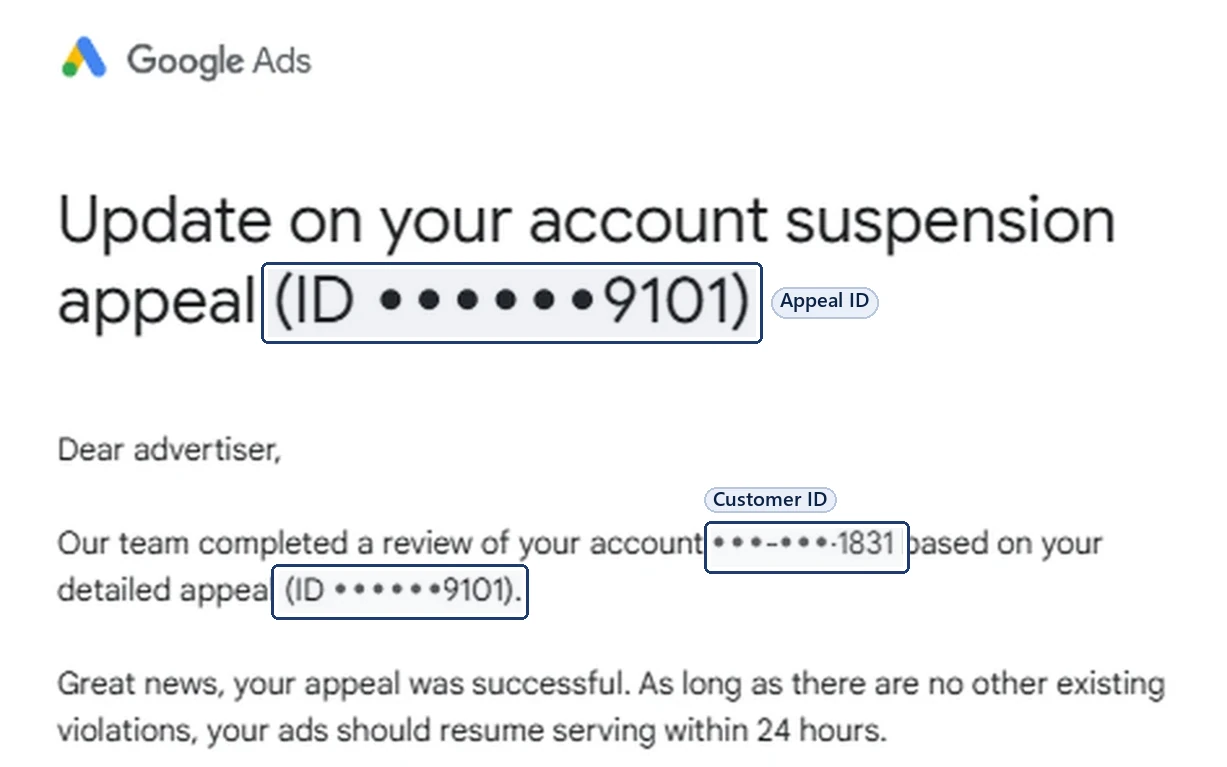
The appeal ID identifies that appeal, not the account. Google says that to appeal several suspended accounts you should submit a separate appeal for each suspended account, so each one gets its own.
The support case ID: one conversation with support
When you contact Google Ads support, the replies we’ve received carry a case ID in square brackets in the subject line: a single digit, a dash and a long number. It refers to that one support conversation. Keep it, and quote it when you follow that conversation up.
![A Google support email with the subject line [case ID] Follow up to your email, the case ID shown as dots and the last four digits 7994. It is sent from ads-support@google.com, says the account has been reactivated after a detailed appeal, and is signed gTech Customer Experience.](/wp-content/uploads/2026/10/google-ads-support-case-id-subject-line-gtech-2024.webp)
If the question is about a charge, Google’s page on disputing a Google Ads charge says support will need the reason, the date, the amount and the transaction ID, which you’ll find in the account’s billing summary.
The payments profile ID: billing only
Your payments profile is the billing record behind the account. Google’s billing glossary calls its number a “12-digit unique numeric ID, most commonly referred to as a payments profile ID”, and Google’s own developer documentation writes it with dashes, for example “1234-5678-9012”.
In Google Ads, you’ll find it under Billing, then Settings: in “Payer details” on postpay and prepay accounts, or under “Payments Profile” on monthly invoicing. It’s the number Google’s payments verification form wants: “Enter the 12-digit payments profile ID shown in your Google payments settings”.
Don’t confuse it with the payments account ID. Google says each payments account has a unique ID with 16 digits, written XXXX-XXXX-XXXX-XXXX. If the notice is about the payments profile itself, read our guide to “Your payments profile is currently suspended”.
Which number to give, and to whom
- In a suspension appeal: you appeal from inside the suspended account, through the Contact us link in the notification, so the account is already known. If a form asks for an ID, give the customer ID of the suspended account itself, not a manager account’s.
- To Google Ads support: the customer ID, plus the case ID if you’re following up an existing case. For a disputed charge, the transaction ID, date and amount too.
- For payment verification: the 12-digit payments profile ID.
- To us: the customer ID of the suspended account is what we need to request a manager-account link, and an admin on your account approves it. If you’ve already appealed or contacted support, the appeal ID and case ID help us see what’s been sent. Never your password.
No number on this page needs your password with it.
Google says it will never send an unsolicited message asking you to provide your password. If someone asks for it alongside your customer ID, stop. Read how to check an email that says it’s from Google and how suspension help works without your password.
Frequently asked questions
What is my Google Ads customer ID?
The 10-digit number, written like 123-456-7890, that identifies your Google Ads account. Google shows it in the top-right corner of Google Ads and under your account name when you click your profile picture, and it appears in Google Ads emails and on bank statements after “GOOGLE *ADS”.
Is the customer ID the same as the Google Ads account ID?
Yes. Google calls the Google Ads account’s number the customer ID. When a form asks for your “Google Ads ID”, this is the number to give: 10 digits, not an email address or a name.
Where do I find my appeal ID?
In Google’s emails about the appeal. In the emails we have, it’s a 10-digit number in the subject line and again in the body. It identifies that appeal, not the account.
What is the number in square brackets in a Google support email?
It’s the support case ID: a single digit, a dash and a long number. It refers to that one conversation with Google Ads support, so quote it when you follow that conversation up.
Where do I find my payments profile ID?
In Google Ads, under Billing, then Settings: in “Payer details” on postpay and prepay accounts, or under “Payments Profile” on monthly invoicing. It’s 12 digits, written like 1234-5678-9012, and it’s also in your Google payments settings.
Is it safe to give my customer ID to an agency?
Google says to share it only with people you trust, because anyone who has it may be able to use it to access your Google Ads information. A manager-account link needs it, but users with access to your account still have to accept the request. Nobody needs your password.