Skip to content

xwf.google.com email: is it really from Google?
 Gianluca Catinella, Director, Ad Restore LtdPublished on 10 min read
Google representatives always have an email address that ends with @xwf.google.com.
From Google Ads Help’s page “About our third-party partners”, in a note that starts “Always check carefully the identity of persons or entities claiming to act on behalf of Google.”
It can be. xwf.google.com is part of Google’s own google.com domain, and Google’s help page on its third-party partners says “Google representatives always have an email address that ends with @xwf.google.com”. What matters is that the address really ends that way and that Gmail shows the message as authenticated. Even then, a genuine Google email won’t ask for your password.
If your account is suspended, an email from an unfamiliar Google address, perhaps signed “gTech Customer Experience”, is hard to judge. Below is what Google says about its own addresses, two emails we have received, and the checks Google tells you to make.
Checked against Google’s help pages on 4 October 2026, and the scam section on 9 October 2026. Google changes them without notice, so check the linked page before relying on a detail.
At a glance
xwf.google.com is on Google’s list
Google says its representatives’ addresses end @xwf.google.com.
Check the address, not the name
A display name can say anything. Read the address and Gmail’s “Mailed by” line.
Never your password
Google won’t send an unsolicited message asking for it.
Check links before you click
Copy the link address and see where it really goes.
Report anything odd
Google has forms for suspicious emails, calls and third parties.
On this page9 sections
What is xwf.google.com?
The sentence comes from Google Ads Help’s page “About our third-party partners”. Google says these partners “work on behalf of Google to help new advertisers start and optimise their campaigns”, and names some of them: Accenture, Atento, Cognizant, Concentrix, Regalix/Marketstar, TDCX/Teledirect, Teleperformance, TMJ, TTEC and WNS.
The same note tells you how to check: “Always check carefully the identity of persons or entities claiming to act on behalf of Google”, by asking them to send you an email so you can verify who they are. The part after the @ ends in google.com: xwf.google.com is a subdomain of google.com, not a look-alike domain.
Google’s pages name a few different sending addresses, depending on who is writing:
Addresses Google’s own help pages mention
| Who is writing | What Google says the address looks like | Where Google says it |
|---|---|---|
| Google itself | The “From” address and “Return-Path” both contain @google.com or @ads.google.com | Suspicious emails or calls claiming to be from Google Ads |
| A Google representative working through Google’s partners | Ends with @xwf.google.com | About our third-party partners |
| A payment verification request | Comes from noreply-payments@google.com, with “Verify your payment method” in the subject line | Verify your payment information |
| Verification updates during a billing appeal | Arrive via Google Payments (payments-noreply@google.com) | Billing and payment suspensions |
Google’s help pages don’t explain what the letters “xwf” stand for, so we won’t guess.
Emails we have received
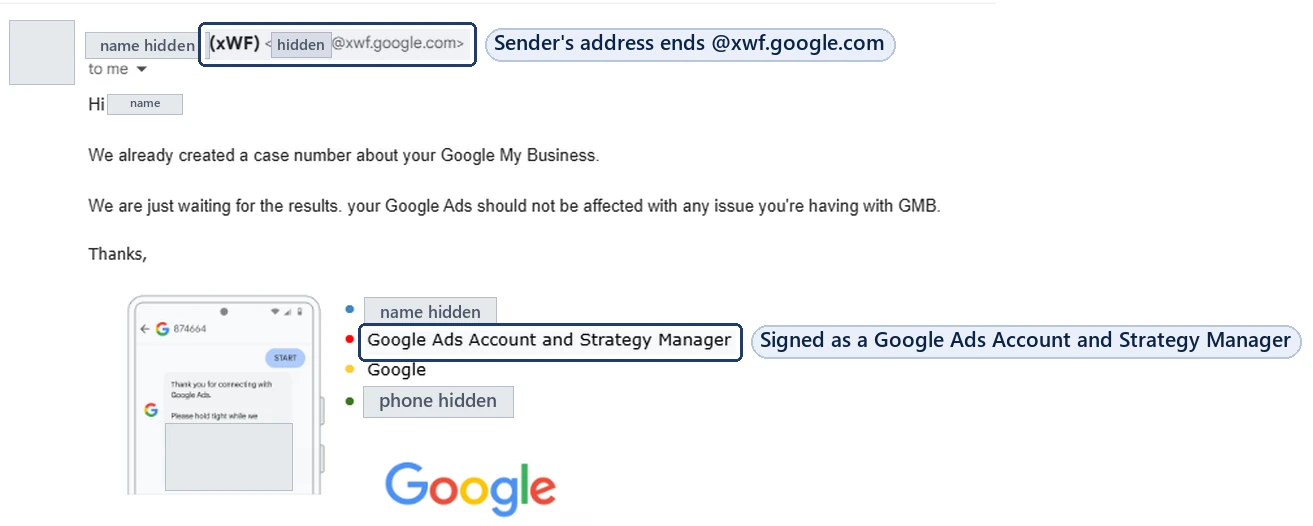
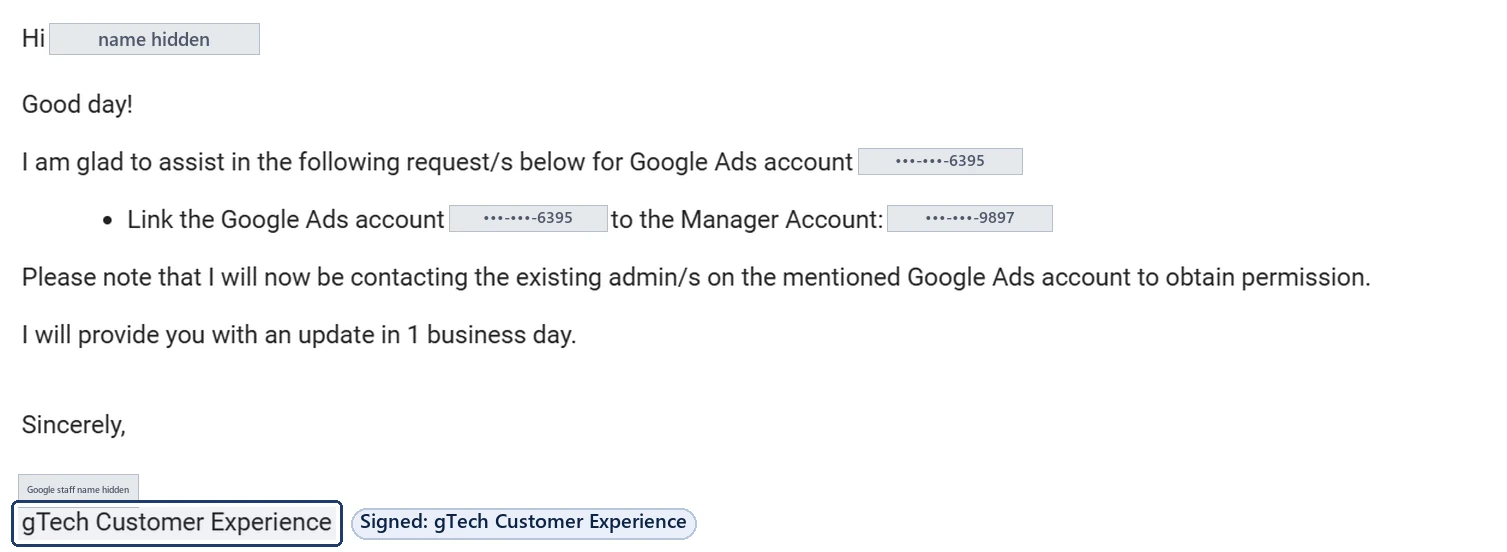
Here are three real emails from our own inbox, with names hidden.
![A Google support email with the subject line [case ID] Follow up to your email, the case ID shown as dots and the last four digits 7994. It is sent from ads-support@google.com, says the account has been reactivated after a detailed appeal, and is signed gTech Customer Experience.](/wp-content/uploads/2026/10/google-ads-support-case-id-subject-line-gtech-2024.webp)
None of the three asks for a password, card details or documents. The second says Google would contact the account’s existing admins for permission, which is how a manager-account link is meant to work: an admin approves it, and nobody needs your sign-in. Our guide to getting suspension help without sharing your password explains that route.
“gTech” is a name Google uses for its own ads support organisation. One of Google’s job listings describes gTech Ads as “responsible for all support and media and technical services for customers big and small across our entire Ad products stack”. The third email above pairs that signature with an ads-support@google.com address. A signature can be copied, though, so the address and the checks below still matter.
How to check an email that says it’s from Google
Google’s Ads and Gmail help pages give these checks. Do them before you reply or click anything.
Read the address, not the name.
Gmail’s advice is to check that the email address and the sender name match. The part after the @ should be one Google names, such as google.com, ads.google.com or xwf.google.com. Anything else, however close it looks, isn’t on Google’s list.
Check that Gmail authenticated it.
Open the email and select the down arrow under the sender’s name. Google says a message is authenticated if you see a “Mailed by” header with the domain name, such as google.com, and a “Signed by” header with the sending domain. A question mark next to the sender’s name means it isn’t.
If in doubt, read the full header.
In Gmail, select More, then Show original. Google’s page on how to trace an email with its full header also links to its Messageheader tool. For Google Ads mail, Google says the “From” address and “Return-Path” should both contain @google.com or @ads.google.com.
Check every link before you click it.
Google’s advice: before clicking any links in the email, right-click, copy the link address and paste it somewhere to read it. If it goes somewhere other than a page on google.com, it might be a non-Google page.
If someone phoned you, ask for an email.
Google’s security page says to ask the caller to send you an email, then check it the same way.
Can an xwf.google.com email be a scam?
A genuine one isn’t, but a name or a signature proves nothing. Google’s security page warns that “sometimes businesses and hackers pretend to be associated with Google” to get more information than they should. So judge the message, not the label on it:
- The address. Does it really end @xwf.google.com, or only look similar? A display name that says “Google” with a different address behind it isn’t on Google’s list.
- Authentication. Does Gmail show “Mailed by” and “Signed by” lines for the sending domain, or a question mark next to the sender? The steps above cover it.
- The request. A message asking for your password, card number or ID by email or through a link is the clearest warning sign, whoever it appears to come from.
- Someone who says they’re a partner. If you’re contacted by a third party rather than Google, Google says to check if they are a Google Partner.
For security alerts about your Google Account itself, Gmail’s help says that if you think a security email that looks like it’s from Google might be fake, go directly to myaccount.google.com/notifications to check your recent security activity. For anything about a suspension, sign in to Google Ads yourself and read the notification there.
What a real Google email won’t ask for
Google is direct about this: “Google will never send an unsolicited message asking you to provide your password or other sensitive information by email or through a link.” Gmail’s help adds that if you’re signed in, emails from Google won’t ask you to enter the password for that account.
Google does sometimes need documents from a suspended advertiser, for advertiser or payment verification. Those requests sit inside your account: Google says you’ll receive an email from Google Ads or an alert in your account when you need to verify. So if an email asks for ID or card details, don’t reply with them. Sign in to Google Ads yourself, without the email’s links, and look for the request there.
Phishing, in Google’s own words, means trying to get people’s personal information “by pretending to be a trusted or well-known entity”. Google bans it in ads too: our guide to the phishing suspension covers that side.
Don’t send passwords, card numbers or ID documents by email.
Not to anyone claiming to be Google, and not to anyone offering to fix a suspension. Nobody needs your password to help: access to an account can be given through each person’s own Google Account or a manager-account link that an admin approves. Read how suspension help works without your password.
Can an @xwf.google.com rep lift a suspension?
Google doesn’t say. Its partners page describes their job as helping advertisers start and optimise campaigns. In the first email above, the rep told us a case had been created, which is the most we can show. A suspension is appealed from your account: Google says to select the Contact us link in the notification at the top of the screen, which opens the appeal form. Only Google decides whether an account is reinstated.
Before you appeal, read what the appeal form asks.
How to report a suspicious email or call
Google’s security page lists where to report:
- An email or call: Google Ads’ report form, which connects you with an Online Specialist.
- A web page: Google Safe Browsing’s phishing report. Copy the link address rather than visiting the page.
- A company selling Google Ads services: the third-party complaint form.
- If you’ve already shared details: tell Google through its account security form and follow Google’s tips to secure your account.
Frequently asked questions
Is an email from @xwf.google.com really from Google?
It can be. Google Ads Help says “Google representatives always have an email address that ends with @xwf.google.com”. Check that the address really ends that way and that Gmail shows it as authenticated (“Mailed by” and “Signed by”), and never send a password, whoever it’s from.
Is xwf.google.com a real Google domain?
It’s a subdomain of google.com, and Google’s own page on its third-party partners names it as the address its representatives use. A display name can still be faked, so read the full address and check the headers.
Can an xwf.google.com email be a scam?
A message that really comes from an @xwf.google.com address is from Google’s domain, but Google warns that businesses and hackers sometimes pretend to be associated with it. Check that the address really ends @xwf.google.com, that Gmail shows it as authenticated, and that it doesn’t ask for a password, card number or ID by email or a link. If a third party contacts you, Google says to check whether they are a Google Partner.
What does xWF mean in a Google email?
Google’s help pages don’t spell it out. What Google does say is that its representatives’ addresses end with @xwf.google.com, and that partner companies work on its behalf to help advertisers start and optimise campaigns.
Who is gTech Customer Experience?
gTech is a name Google uses for its ads support organisation: one of its job listings describes gTech Ads as responsible for all support and media and technical services across its ad products. We have received Google support emails signed “gTech Customer Experience”, one of them from ads-support@google.com. A signature can be copied, so still check the address.
Will Google ask for my password by email?
No. Google says it “will never send an unsolicited message asking you to provide your password or other sensitive information by email or through a link.” If an email asks for documents, sign in to Google Ads yourself and look for the request there.
Can a Google rep get my suspension lifted?
Google doesn’t say its partners decide appeals. A suspension is appealed through the Contact us link in the notification in your account, and only Google decides whether the account is reinstated.