 Skip to content

Can you link a suspended Google Ads account to a manager account?
 Gianluca Catinella, Director, Ad Restore LtdPublished on 9 min read
Suspended accounts are in read-only mode, with a few exceptions.
This is Google’s own wording, from its Google Ads account suspensions overview, checked on 28 September 2026. Google announced the change on 13 May 2024, for June 2024, and said then: “All other actions will be disabled in the suspended account.”
Yes. In our experience, a suspended Google Ads account can be linked to a specialist’s manager account, which lets us work on it without ever asking for your password. We handle the linking. An admin on your account has to authorise it.
What a link can’t do is unlock the account. Google says suspended accounts are in read-only mode: you can still look around, appeal, verify and handle billing and a few settings, but all other actions will be disabled. That applies to us once we’re linked, just as it does to you. You don’t need to work the linking out yourself: we handle it for you.
Checked against Google’s help pages on 28 September 2026. Google changes them without notice, so check the linked page before relying on a detail.
At a glance
Read-only since June 2024
Google announced on 13 May 2024 that it would limit what suspended accounts can do from June 2024.
No password needed
Google recommends you don’t share your password with anyone.
An admin has to authorise it
In our experience, the link has to be authorised by an admin on your account. Without one, we can’t link it.
Appeals, not edits
In our experience, once it’s linked we can review the account and file appeals. Nobody can change ads or keywords while it’s suspended.
There’s a risk to other accounts
Google’s billing and payment suspensions page lists accounts linked to the same manager account among those related to a suspended one.
On this page10 sections
Why a link beats sharing your login
Google’s own security advice is not to share logins. If several people need to use a Google Ads account, Google says don’t have them share the same username and password: give each person access through their own Google Account instead. It adds that if you’re managing several Google Ads accounts, a manager account might be a better option.
Your password isn’t only for Google Ads. Google points out that your Google Account allows access to most Google products, and recommends you don’t share your password with anyone. It also says anyone with access to your Google Account can access your Google Ads account and look up your advertising data.
A manager link is narrower than a login:
- It can’t touch your sign-in. Google says that with a manager account, you won’t be able to change proprietary information for a client account, such as its sign-in information.
- It doesn’t take ownership by default. When a manager links an existing account, Google says it won’t have ownership of that newly linked client account by default. The client account still owns its data.
- Other clients can’t see yours. Google says users of client accounts don’t get access to the manager account or to any other accounts linked to the same manager account.
In our experience, it comes down to privacy and trust. Anyone who asks for your Google password to fix a suspension is asking you to do what Google recommends against. Treat that as a warning sign.
What changed in June 2024
On 13 May 2024, Google posted an update to its policy change log: “In June 2024, Google will limit the functionality of suspended accounts.” It listed what advertisers could still do and said all other actions will be disabled in the suspended account. The update will not change how active accounts operate.
Google’s suspensions overview now carries the same list. In a suspended account, you can still:
- Account settings: cancel the account and claim refunds.
- Billing: make a payment, download tax documents and add a payment method.
- Appeals and verification: appeal the suspension and complete advertiser verification.
- Security settings: update them within the Google Ads account.
- Look around: navigate to any page, read information and download reports.
Editing campaigns, ads or keywords isn’t on the list. Google’s help pages on linking accounts to a manager account that we checked don’t mention suspended accounts at all.
What you need to do
Check you’re an admin.
In our experience, the link has to be authorised by an admin on your account. Your level is in the Access level column, under Access and security in the Admin menu.
If you’re not, find who is.
In our experience, if nobody in the business is an admin, or the only admin has left, we can’t link the account.
Write down the account’s history.
In our experience, the account doesn’t show us how it was first set up. Tell us who set it up, what details were given, which business it was under and what the original domain was.
Authorise the link when we tell you.
We handle the linking and tell you what to expect. It needs an admin on your account to authorise it.
Leave the appeals to one person.
Google says that if you file too many appeals for the same account suspension, it may not process them, and that submitting one appeal at a time ensures a timely response and review.
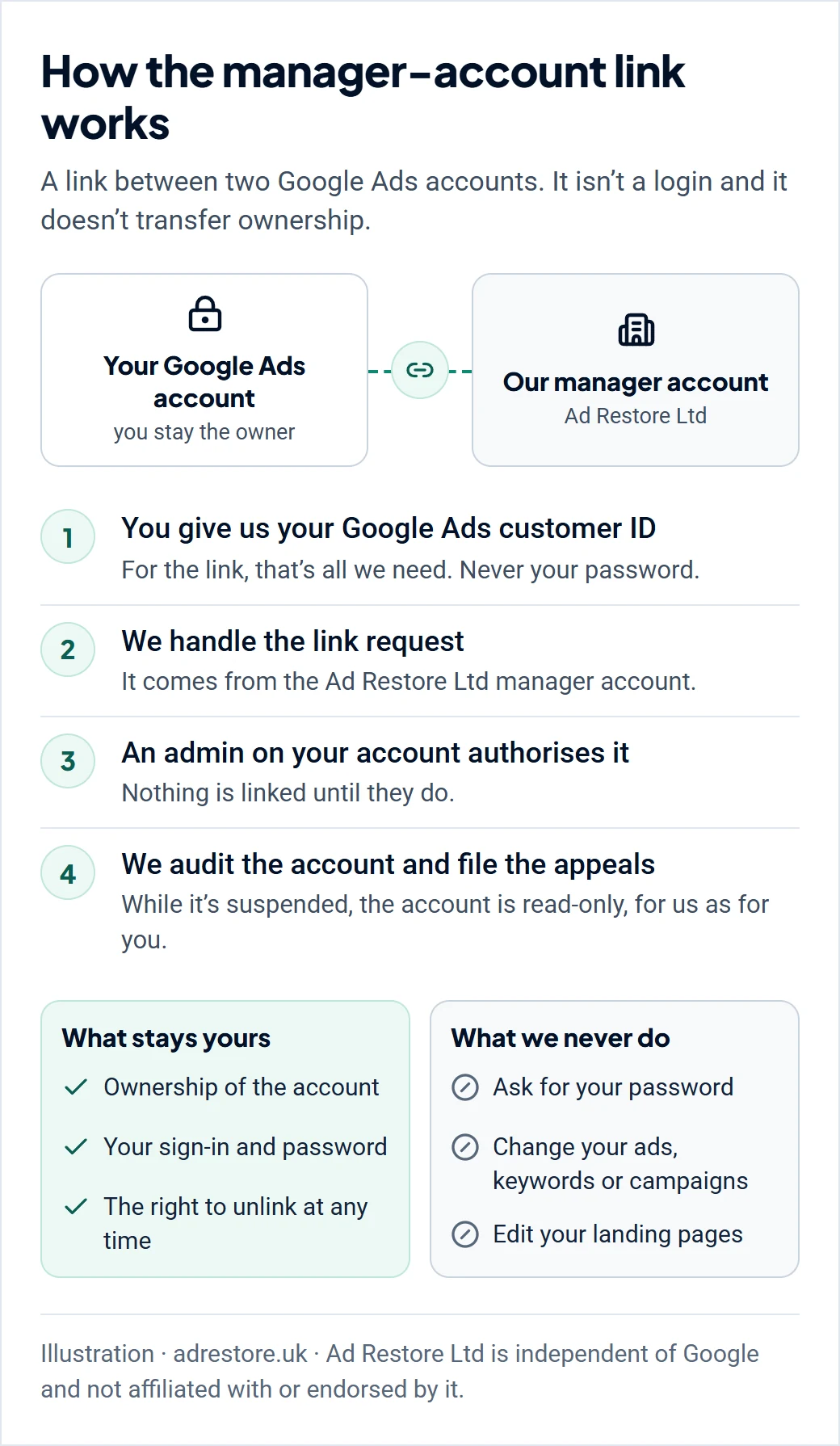
What we can and can’t do once it’s linked
In our experience, once the account is linked we can:
- review how the account is set up and go through its details;
- file the suspension appeals.
Nobody can change keywords, ads or campaigns while the account is suspended. Google’s list doesn’t include editing, and it says all other actions will be disabled in the suspended account. That’s the same for us as for you.
What the link doesn’t give us is the account’s back story. In our experience, we can’t see the details of how it was set up, which is why step 3 asks you for them.
Linking doesn’t change who decides, either. Only Google decides whether an account is reinstated.
Is linking a suspended account risky?
Google’s own wording points to some risk, and it’s fair to tell you about it.
- Google’s suspensions overview says accounts related to the suspended account may be suspended.
- Its billing and payment suspensions page gives examples of related accounts, including accounts linked to the same manager account.
- Google’s third-party policy applies to anyone who manages Google advertising on behalf of customers, and says they carry some responsibility to ensure their clients and managed accounts adhere to all Google Ads policies.
On Google’s wording, the accounts at risk are the ones around yours, such as other accounts linked to the same manager account. In our experience, our manager account has held active and suspended accounts, and it has never been suspended for hosting suspended accounts. That’s our experience, not a Google rule, and Google doesn’t promise it.
The risk can run the other way too. Google says it may pause your individual account if it’s linked to a manager account that is currently in violation of the third-party policy, and you’d need to unlink it to serve ads again. So check who you’re linking to.
After the account is reinstated
Google’s June 2024 change only applies to suspended accounts, so the read-only limits end when the account is reinstated. Every one of our services includes 14 days of post-reinstatement support. Our job is to help lift the suspension, then help you grow the business safely from there.
If you’d rather end the link later, Google says users with admin access can end the relationship with the manager account at any time by unlinking. The account won’t lose its own account campaign history.
Can every suspended account be linked?
Not always. In our experience, it can’t be done without an admin, because the link has to be authorised by one. If nobody in the business has admin access, or the only admin has left, we can’t link it.
Don’t leave it too long, either. Google says advertisers may not be able to access suspended accounts after an extended period, and gives every advertiser at least six months from the date of account suspension to submit an appeal.
If we review your case and can’t take it on, you get a full refund. Our guide to when a suspension can’t be fixed covers the harder cases.
Don’t open a new account to get round the read-only limits.
Google says any new accounts that you create will be automatically suspended, and its Circumventing Systems policy names creating new accounts to re-enter the system after a suspension as a violation. Read why a new account makes things worse.
The appeal route
The link is where the work starts, not the appeal itself. Once it’s in place:
- Related accounts first. Google asks that all linked (or previously linked) and all related accounts comply with its policies before you appeal. See our guide to suspensions connected to a related account.
- Verification, if Google asks. Google says certain selected advertisers must complete advertiser verification successfully to appeal. Google limits failed verification attempts, so get the documents right first. Our advertiser verification guide covers what’s asked.
Before an appeal goes in, read what the appeal form asks and why appeals get rejected.
Frequently asked questions
Can a suspended Google Ads account be linked to a manager account?
In our experience, yes. We handle the linking, and an admin on your account has to authorise it. The Google help pages on linking accounts to a manager account that we checked don’t mention suspended accounts.
Do I have to give you my password?
No. Google recommends you don’t share your password with anyone, and its security advice is to give each person access through their own Google Account rather than share a username and password. Being asked for your password to fix a suspension is a warning sign.
When did suspended Google Ads accounts become read-only?
Google announced it on 13 May 2024, in its policy change log: “In June 2024, Google will limit the functionality of suspended accounts.” The announcement gives the month, not a day.
Once it’s linked, can you change my ads or keywords?
No. While the account is suspended, Google limits it to a short list, including appeals, verification, billing, security settings and looking around. Google says all other actions are disabled, for us as much as for you.
I’m not an admin, and the person who set the account up has left. Can you still link it?
In our experience, no. The link has to be authorised by an admin, so we can’t link it until someone with admin access can do that.
Could linking my suspended account cause problems for other accounts?
Google says accounts related to a suspended account may be suspended, and its billing and payment suspensions page gives accounts linked to the same manager account as an example. In our experience, our own manager account has never been suspended for hosting suspended accounts, but that’s our experience, not a Google promise.
Does linking to your manager account make Google more likely to reinstate it?
No. Linking doesn’t change who decides: only Google decides whether an account is reinstated. Ad Restore Ltd is independent of Google and not affiliated with or endorsed by it.














