 Skip to content

Only Google admins can reset verification – Google Ads
 Gianluca Catinella, Director, Ad Restore LtdPublished on 10 min read
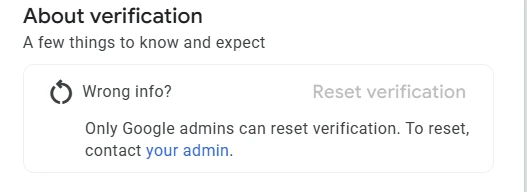
Only Google admins can reset verification. To reset, contact your admin.
We saw this line on the Advertiser Verification tab of the Account page (Admin > Policy > Account), under “Wrong info?” and a greyed-out Reset verification button, in a Google Ads account where we had read-only access. Google’s help page puts it as “Only a Google Ads account admin can do this.”
This line means you’re signed in to the Google Ads account without admin access, so you can’t reset its advertiser verification yourself. “Google admins” here means the admins of your Google Ads account, not Google staff: the line itself tells you to contact your admin. Google’s help page says that to get verified for the right organisation, you’ll need to reset an account’s verification and get verified again, and that only a Google Ads account admin can do this.
In our experience it’s that simple: if you have admin access, you can reset it directly. On the Google Ads Community, people ask how to reset after an account was set up years ago under someone else’s name, or after an agency submitted its own documents on a client’s account. Neither poster reported how it ended.
Checked against Google’s help pages on 29 September 2026. Google changes them without notice, so check the linked page before relying on a detail.
At a glance
Admins only
Google says only a Google Ads account admin can reset verification. In our experience, read-only users see the line above under a greyed-out button.
You verify again afterwards
A reset means getting verified again, and Google gives you a new deadline if you had one.
Meant for the wrong organisation
Google’s reasons are changing the name in the ad disclosure, or the wrong organisation being verified.
Not a way out of a suspension
In our experience, the reason is the site, the domain and the assets linked to the account, not the verification, so the account stays flagged.
Never two verified at once
In our experience, if you’re replacing an account in good standing, reset and cancel it first. An old and a new account both verified can be suspended for Circumventing Systems.
On this page8 sections
What the line means
Advertiser verification is how Google checks who is behind the ads. It uses your information to verify your identity or your business operations, and shows your name in ad disclosures. Google says the old Advertiser verification page is now “Account”, and it can be found under Admin > Policy > Account. That’s where the Reset verification button is.
Resetting is an admin job, like the verification itself. Google says only a Google Ads account admin can complete the tasks, and its table of access levels gives “Start and complete advertiser verification” to admin access only. If you’re a standard or read-only user, ask an admin on the account to do it.
What a reset does, and what Google doesn’t say
Google gives two reasons to reset: you want to change the name in the ad disclosure, or the wrong organisation got verified. If you had a deadline to complete verification, you’ll get a new deadline after resetting verification.
In our experience, resetting means your company or business, your identification as an individual or an organisation, is no longer linked to this account.
Google’s page stops there. What it doesn’t say:
- That your history goes. Google says some account information is publicly available, including name change history and ads removed or accounts suspended for legal or policy reasons. It doesn’t say a reset removes any of it.
- That your payments profile changes. The same Google page gives separate routes for changing a payments profile’s account type, legal name, and country or ownership, the last through Google Ads Support. Our reading: if the wrong company is on the payments profile, a reset alone won’t fix it.
- That links to other accounts end. Google does connect accounts through verification: it describes accounts suspended because other accounts verified using the same identity documents were suspended. Before an appeal, it asks you to make sure all linked (or previously linked) and all related accounts comply with its policies. Our reading: ending a link doesn’t take an account out of the picture.
When a reset makes sense
Everything in this section is for accounts in good standing: not suspended, and with no open policy problem. If yours is suspended, read “When not to reset” below instead.
- The wrong company was verified. In our experience, if it’s the wrong company, just reset. This is the case Google describes. In our reading, it can include an agency verified as if it were the advertiser on a client’s account: Google says if you manage ads for a client, make sure that you select Yes for “Is your organisation an agency?”, and warns: Otherwise, your account may be paused or suspended. When an agency goes through the agency route, the finished tasks we’ve seen read “You’ve provided your agency’s information” and “You’ve provided the client’s information”.
- You’re stuck in business operations verification because of a mistake. In our experience, if you can’t get through business operations verification because you’ve made a mistake, reset and start again. Google’s advice is to check your responses for accuracy and completeness. Its reasons for failing include documents that don’t clearly establish whether you are an individual, an organisation or an unregistered business. A reset is for correcting a genuine mistake, not for trying a different story: Google says submitting false info will be a violation of the Circumventing systems policy. Our business operations verification guide covers the form.
- You’re changing agency. In our experience, it’s a good idea to reset the details already set up in the account before moving over, so the verification starts clean. A reset doesn’t mean you skip business operations verification, though. Google says it may ask you to answer questions about business operations again after significant changes, including making changes to your payments profile. If it does, it wants every relationship in the value chain, which can include marketing agencies accessing the Google Ads account.
- You’re replacing an account in good standing. In our experience: reset advertiser verification, then cancel the old account, before moving to the new one. Don’t let the old and the new account both carry advertiser verification. In our experience that can be suspended for Circumventing Systems, and later accounts can be tied to it. Cancelling needs administrative access to your account. If the only problem is who holds the login, you may not need a new account at all: Google says you can transfer ownership of a Google product to another Google Account, Google Ads included.
How to reset, for admins
Check a reset is the right fix.
The account is in good standing, and the problem is who’s verified, not a policy issue. In our experience, the History table on the Account page lists past tasks with labels such as “About your business”, “Agency verification” and “Client verification”.
Get an admin to do it.
If you see “Only Google admins can reset verification”, you aren’t one. Ask whoever is.
Check the payments profile.
Google says the name and location on it must exactly match your legal name and location on the documents you submit. Changing a payments profile is a separate process on Google’s page, not part of the reset.
Reset.
Expand the Policy drop-down under Admin and select Account, then select Reset verification and follow the instructions. In our experience, the button sits under “Wrong info?” on the Advertiser Verification tab.
Get verified again, truthfully.
Answer the questions about your organisation, including whether you’re an agency and who pays for the ads. Note any new deadline.
When not to reset
If your account is suspended, leave the reset alone. Please don’t reset your advertiser verification to dodge a suspension: in our experience, the suspension doesn’t go away.
- The cause isn’t the verification. In our experience, it’s the site being advertised, the domain that’s linked and the assets linked to the account. The bots will still crawl your site, and the account is still flagged. When Google decides whether you’re breaking its policies, it says it reviews information from a variety of sources, including ads, accounts, websites, content and complaints.
- It can spread. In our experience, the underlying suspension is still there and can cause even more problems down the line. That’s especially true for an agency whose payment instrument sits across its clients’ accounts: they can all get flagged. On its billing suspensions page, Google gives accounts using the same email or payment method, or accounts linked to the same manager account as examples of related accounts that will be suspended.
- Don’t use it to retry. Google limits failed verification attempts, and no Google page we’ve read says a reset gives any back. It lists trying to circumvent advertiser verification among the reasons it pauses accounts.
It’s just not worth it. In our experience, it’s best to talk to a specialist about your particular case.
Don’t reset verification, or open a new account or payments profile, to get round a suspension.
Google lists creating new accounts to re-enter the system after a suspension, and submitting false information as part of its verification programmes, as Circumventing Systems violations, a policy it treats as egregious. It also says any new accounts that the advertiser tries to create may also be suspended. In our experience, deactivating a billing account and starting a new one is the worst thing you can do: Google can block the new one until the suspension is handled, which can’t happen without billing. You go round in circles. Read why a new account makes things worse and what a permanently closed payments profile means.
What to do instead
- Find the cause. In our experience, that’s the site, the domain and the assets. Start with our guides to Unacceptable Business Practices and Circumventing Systems suspensions.
- Check every connected account. If yours was caught up in someone else’s suspension, read about suspensions connected to a related account and the Verification identity reuse notice.
- Verify the account you have, if Google asks. Suspended accounts are read-only, but Google lists appeals and verification among the actions still open to you. Some advertisers must complete advertiser verification successfully to appeal. In that case, Google says, your account will remain suspended until your appeal is granted.
- Appeal from the suspended account. Use the Contact us link in the notification at the top of your screen, and don’t send repeat appeals for the same suspension: Google says submitting one appeal at a time ensures a timely response.
Frequently asked questions
What does “Only Google admins can reset verification” mean?
You’re signed in without admin access to the Google Ads account. “Google admins” means the account’s admins, not Google staff. Google says only a Google Ads account admin can reset verification, so ask one.
Where is the Reset verification button?
Under Admin, open the Policy drop-down and select Account, then select Reset verification and follow the instructions. In our experience, it’s under “Wrong info?” on the Advertiser Verification tab, greyed out for a read-only user.
Can Google support reset it for me?
Google’s help page describes the reset as something an admin does in the account, and doesn’t mention support doing it. It does send you to Google Ads Support to change a payments profile’s country or ownership.
Does resetting verification lift a suspension?
No. In our experience, the cause is the site, the domain and the assets linked to the account, not the verification, so the suspension stays. Even when Google asks a suspended account to verify before appealing, it says the account stays suspended until the appeal is granted. Google’s route out of a suspension is an appeal from the suspended account.
Will a reset remove our old name from Google’s public records?
Google doesn’t say. Its verification page lists name change history, and ads removed or accounts suspended for legal or policy reasons, among the information that’s publicly available.
Can I reset verification and start a new account?
Not after a suspension: Google says new accounts a suspended advertiser tries to create may also be suspended. If you’re replacing an account in good standing, in our experience you reset, cancel the old account, then move, so the old and the new account are never both verified. If only the login needs to change, Google lets you transfer ownership of the account instead.














