 Skip to content

Action required: Reinstate your Microsoft Advertising account
 Gianluca Catinella, Director, Ad Restore LtdPublished on 14 min read
Action required: Reinstate your Microsoft Advertising account
The subject line and red banner of the email Microsoft Advertising sent me at 01:18 on Saturday 9 May 2026, signed “Microsoft Advertising Trust & Safety Team”.
This is an email Microsoft sends when it suspends a Microsoft Advertising account (Microsoft Ads, still often called Bing Ads). I received it in May 2026 for an affiliate marketing account I ran through my other company, not Ad Restore’s own account. It doesn’t name a policy. It says an automated system “detected potential violations” and that Microsoft has “suspended ad delivery and access to all accounts under your Manager Account”. Microsoft’s policy page puts it more bluntly: for serious violations it suspends “your access to the service, including access to all information contained therein, immediately and without prior warning”.
The account was reinstated on 19 May 2026, ten days after the suspension email. What made it a much more straightforward process was picking up the phone: I spoke to Microsoft Advertising support directly, and someone helped me along the way. The appeal itself still had to be written properly. Below is what happened, in order, with my own screenshots: the appeal link that led nowhere, the blocked sign-in, support, the Account Review Form, and the identity check (AIV). Then how Microsoft’s process differs from Google’s, the platform we work on every day.
Written from my own Microsoft Advertising case (May 2026), using my screenshots and files from the time. Account numbers, email addresses, the website, addresses and the documents I sent are hidden. Microsoft’s help pages were checked on 3 October 2026 and Google’s on 2 October 2026; both change without notice.
At a glance
No policy named
The email listed eight possible reasons and said an automated system had “detected potential violations”.
No sign-in at all
Two days later, when I tried to appeal, the sign-in page said my access was blocked and to contact Support.
A person helped
Speaking to Microsoft Advertising support directly made it a much more straightforward process.
Then an identity check
Once I could sign in, the account was paused, pending advertiser identity verification (AIV).
Reinstated
After the identity-verification appeal and my contact with support, the account was reinstated on 19 May 2026.
On this page10 sections
What Microsoft’s email said
The email came from Microsoft Advertising, adctr@microsoft.com, at 01:18 on Saturday 9 May 2026. Here it is, with my user name hidden:
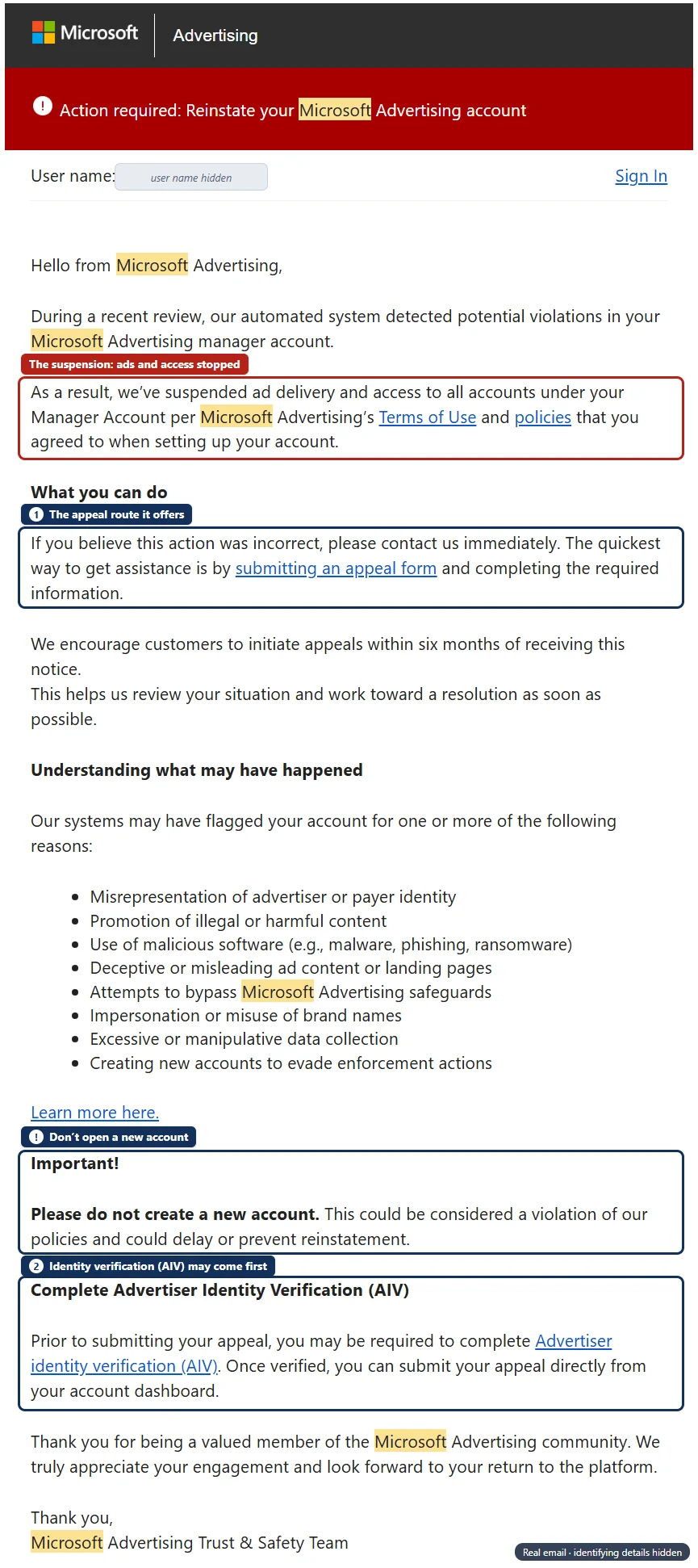
It names no policy. Instead, it lists what Microsoft’s systems “may have flagged”:
- Misrepresentation of advertiser or payer identity
- Promotion of illegal or harmful content
- Use of malicious software (e.g., malware, phishing, ransomware)
- Deceptive or misleading ad content or landing pages
- Attempts to bypass Microsoft Advertising safeguards
- Impersonation or misuse of brand names
- Excessive or manipulative data collection
- Creating new accounts to evade enforcement actions
It then asks for three things. Appeal through a form, ideally “within six months of receiving this notice”. Don’t create a new account. And be ready to complete Advertiser Identity Verification (AIV) first: “Once verified, you can submit your appeal directly from your account dashboard.”
Microsoft’s help pages call this kind of suspension an egregious violation suspension. Their list of examples starts with “obfuscation of advertiser or payer identity, including providing inaccurate identity information or documentation”, and ends with creating a new advertiser account or Manager Account to get round a suspension. The email didn’t say which of its eight reasons applied to my account.
The appeal link went nowhere: sign-in was blocked
On Monday 11 May I clicked “submitting an appeal form”. The link tried to open the appeal page inside the account, and dropped me, signed out, on Microsoft Advertising’s public home page instead; the address bar read “signout=true&msg=sessionexpired”. Signing in showed this:
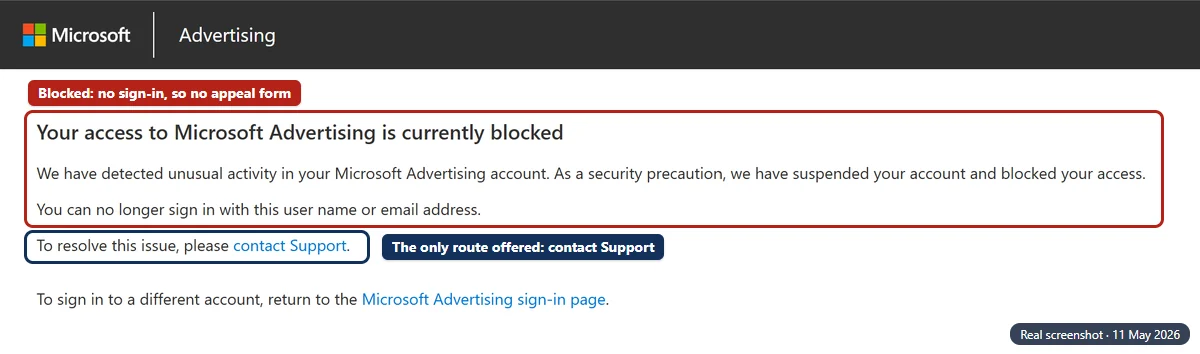
So the route the email offered was closed: the appeal form lives inside the account, and I couldn’t get into the account. The block page offered one way forward, “contact Support”. That matches Microsoft’s own policy, which says you may appeal an immediate suspension by contacting Support within six months of the decision.
The step that made the difference: talking to support
So I picked up the phone, contacted Microsoft Advertising support and got to speak to someone directly. Looking back, that was the step that made the difference:
It’s a more personal thing as opposed to just appeal filing. You get somebody that helps you along the way, so it’s a much more straightforward process.
Gianluca CatinellaDirector, Ad Restore LtdThat’s where it differs from what Google’s help pages describe. Google’s suspension help describes a form: you select the Contact us link in the notification, and a specialist will be assigned to your case and replies within 3-5 working days. Those pages don’t mention phoning or chatting about a suspension. With Microsoft, a person at support helped me along the way. Support doesn’t make the decision, Microsoft’s review does, but having someone help along the way made the process much more straightforward.
Microsoft lists its support options by country. For the UK, its Microsoft Advertising support page gives a phone line, 0800-633-5915, Monday to Friday 8am to 6pm GMT, and chat 24 hours a day, 7 days a week (checked 3 October 2026). Outside the UK, the same page lets you choose your location.
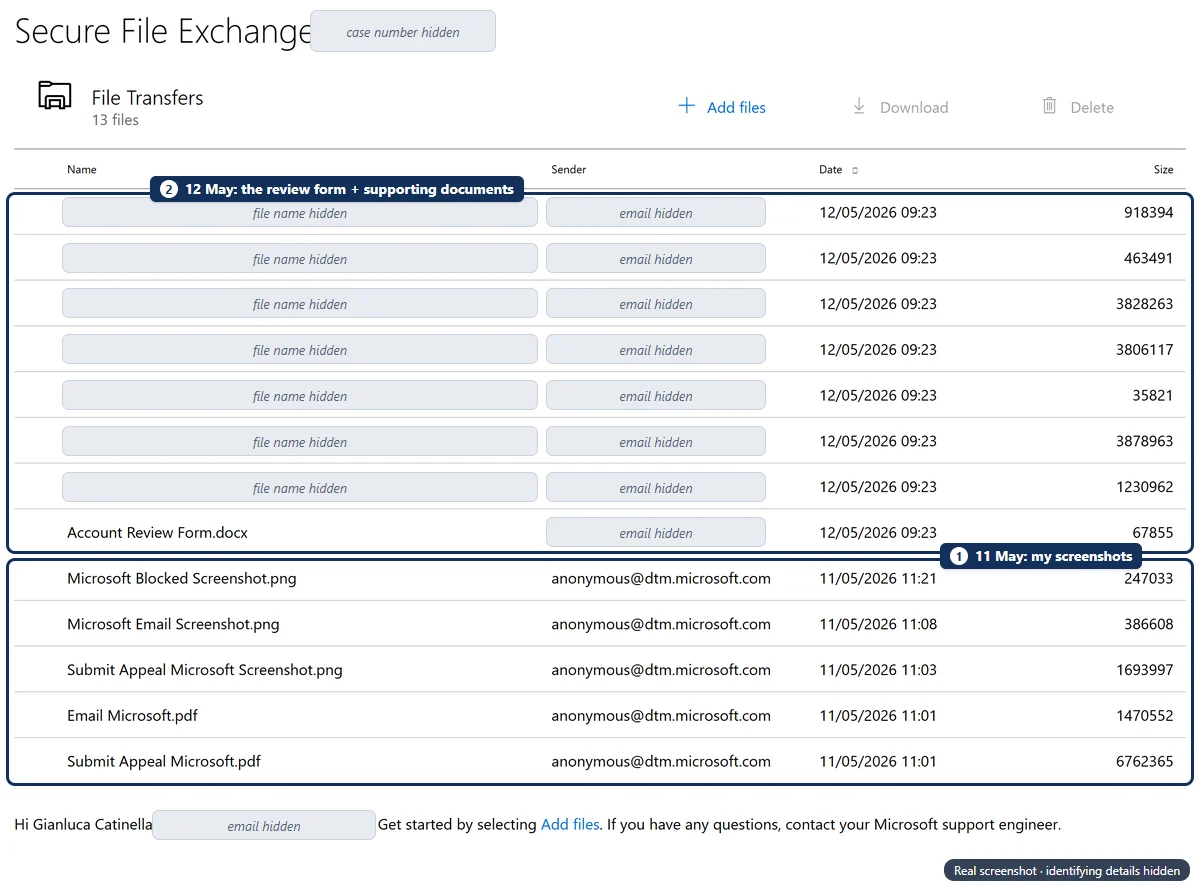
My files show the support case was already under way that Monday morning. By 11:01, Microsoft support had opened a Secure File Exchange workspace for my case, and I uploaded my screenshots of the email, the appeal link and the block page into it. Secure File Exchange is how Microsoft’s support staff collect files, through a link that is specific to your support case. The next morning, Tuesday 12 May, I uploaded Microsoft’s Account Review Form, filled in, and supporting documents to the same workspace.
The Account Review Form
Microsoft’s Account Review Form is a short Word document in four parts:
- Business information: your name and phone number, your association to the business and/or the cardholder, and the business name, description and address.
- Account information: the advertising account name, the manager account number, the account number, the advertised URL, and the products or services advertised.
- Billing information: the payment method type, a PayPal email address if you use one, the card type, the name on the card, its last 4 digits, the expiry date and the billing address.
- Additional information (optional): “any additional details that may be relevant to the reviewers”.
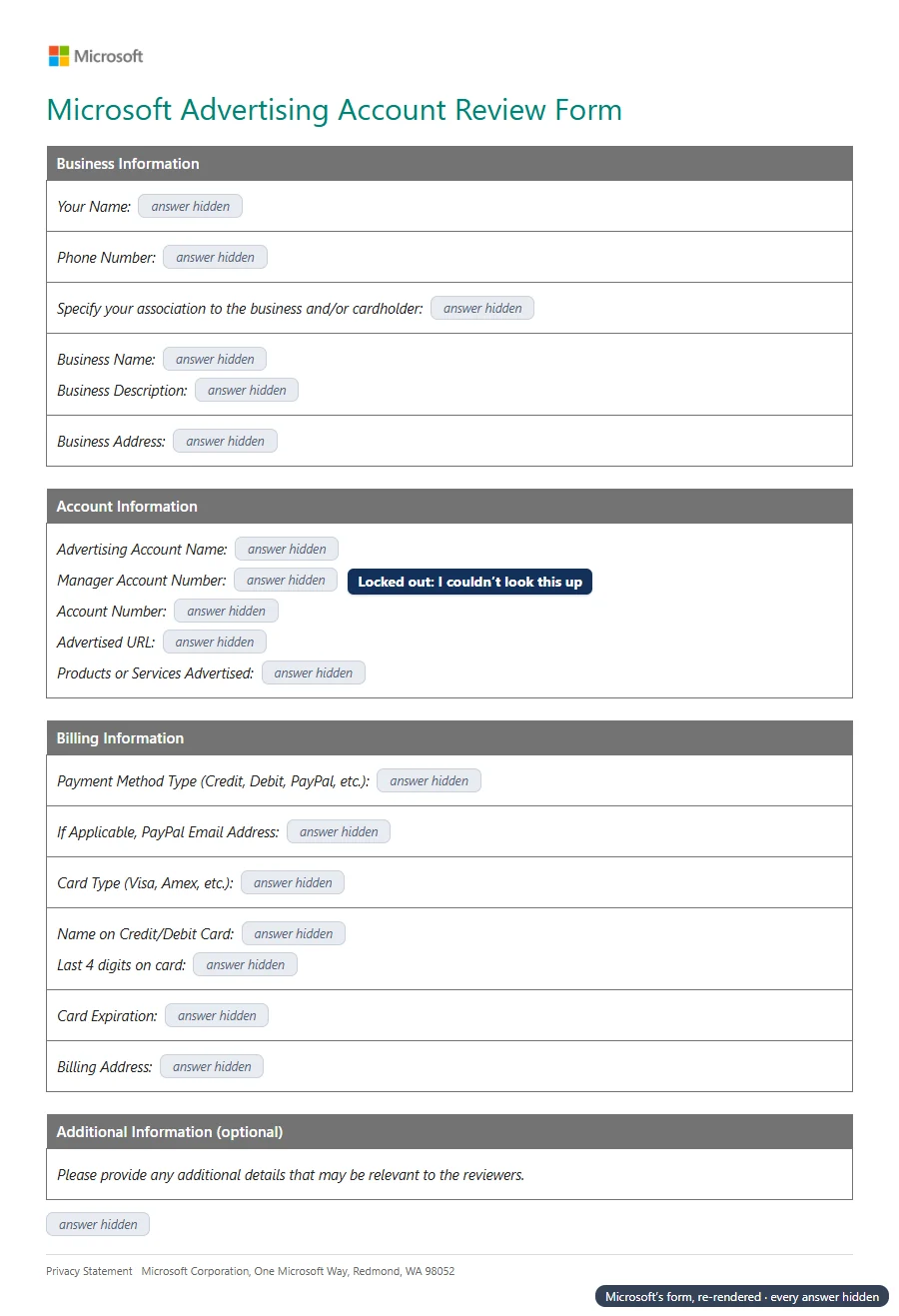
One question I couldn’t answer properly was the manager account number. Locked out, I had no way to look it up, and said so on the form. It’s worth keeping your account and manager account numbers somewhere outside the account, before you ever need them.
Read next to the email’s first reason, “misrepresentation of advertiser or payer identity”, the form is about one thing: whether the person, the business, the account and the payment method all connect.
Paused until identity verification (AIV)
By Tuesday 19 May I could sign in again. The account still wasn’t serving ads. A red banner across the top said: “Your account is currently paused. You will need to complete advertiser identity verification to make your account eligible to serve ads.”
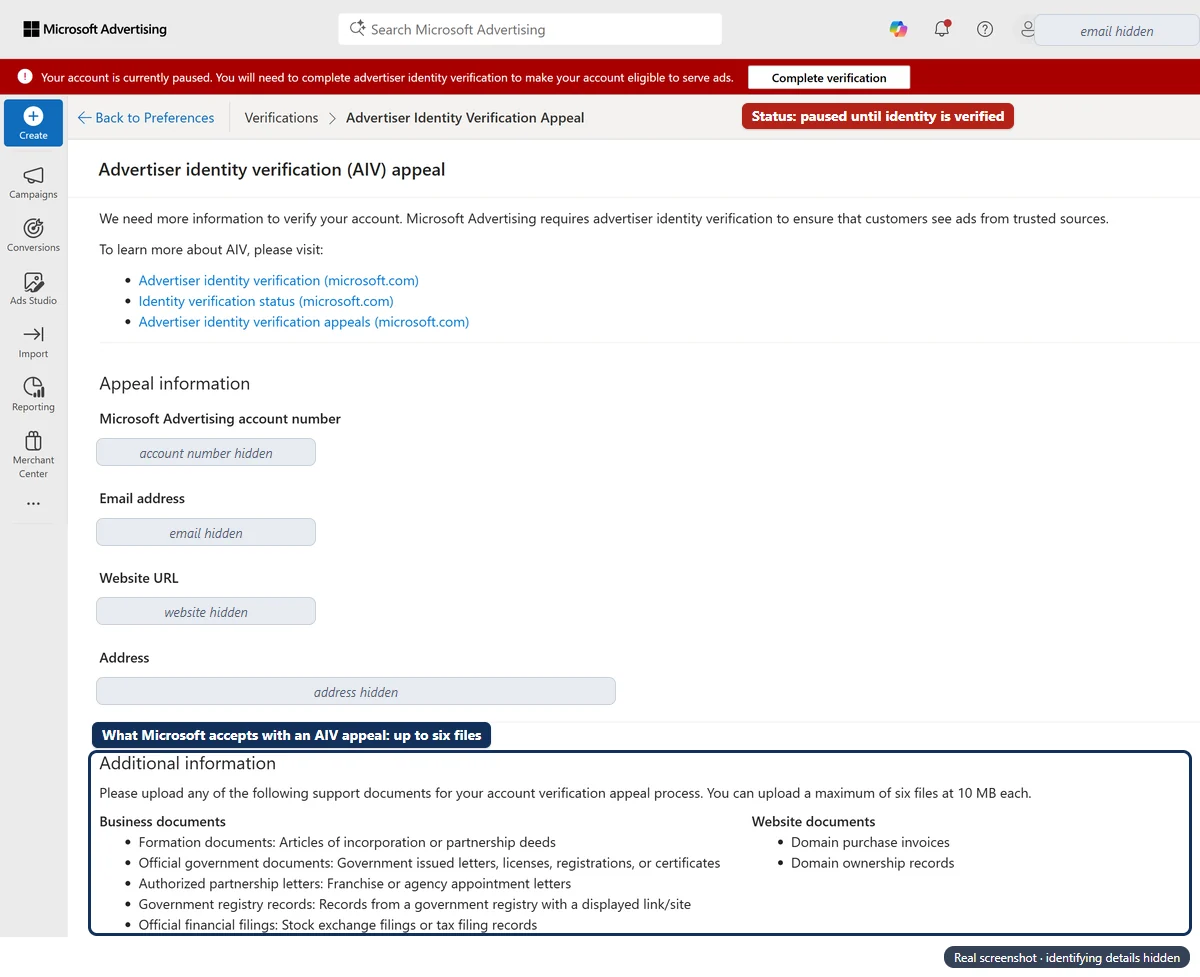
AIV is Microsoft’s identity check for advertisers. Microsoft’s help pages say the appeal link appears once you’ve tried AIV and failed, and an AIV attempt on my account had failed. On 19 May I filled in the appeal form above. After that identity-verification appeal, and with support’s help along the way, the account was reinstated on 19 May 2026.
I’m not listing the documents I sent. What counts depends on your country and your business, and Microsoft lists what it accepts on the form itself.
What Microsoft’s help pages say about AIV
- Review time. Microsoft’s review process may take 3-5 business days.
- Details must match. If you verify as a business, the name and location on your business documents “should exactly match the business name and location that you’ve provided”.
- Website documents. They must list a domain that’s “an exact match to the one you’re enrolling” and include your company’s name and address.
- Affiliates. Registered affiliates who own their business and websites can verify as a business.
- Email address. If you’ve provided a non-business email address, you also need personal identification documents.
- Attempts and appeals. Microsoft gives you three attempts to complete your identity verification, and you’re only allowed to submit an appeal once. While an appeal is open you cannot make a new AIV attempt until the appeal is reviewed, which Microsoft says ideally takes 7-10 business days.
Microsoft’s two pages don’t quite agree on when you can appeal. The appeals page says you can resubmit or appeal after a failed attempt; the status page says you can appeal after three verification attempts. Go by what your own account offers, and since you only get one appeal, check everything before you send it.
Line everything up before you verify.
Microsoft’s word is “exactly”. Before an AIV attempt or appeal, compare the business name, address, website and email in your account settings with what your documents say, line by line, and send only genuine, current documents: Microsoft lists “providing inaccurate identity information or documentation” as an egregious violation.
My timeline
My Microsoft Advertising suspension, May 2026
| When | What happened | Where it’s from |
|---|---|---|
| Sat 9 May, 01:18 | Email: “Action required: Reinstate your Microsoft Advertising account” | The email |
| Mon 11 May, 11:00–11:17 | The appeal link opens the signed-out home page; signing in shows “Your access to Microsoft Advertising is currently blocked” | My screenshots, 11:00 and 11:17 |
| Mon 11 May, 11:01–11:21 | My screenshots uploaded to Microsoft support’s Secure File Exchange for my case | The workspace’s file list |
| During the case | Spoke to Microsoft Advertising support directly by phone | My own account (no file shows it) |
| Tue 12 May, 09:23 | Account Review Form and supporting documents uploaded | The workspace’s file list |
| By Tue 19 May | Signed in again; account “currently paused” until AIV; an AIV attempt had failed | Screenshot, 19 May |
| Tue 19 May, 10:39 | Identity-verification (AIV) appeal form filled in | Screenshot, 19 May |
| Tue 19 May | Account reinstated | My own account (no file shows it) |
From the suspension email to the identity-verification appeal took ten days.
What I’d tell someone in the same position
My advice is simple: talk to someone at Microsoft Advertising support directly, then write the appeal properly.
You just need to talk to somebody directly to get it resolved. And then obviously write the appeal properly.
Gianluca CatinellaDirector, Ad Restore LtdAnd what the process itself showed me:
- If the appeal link just signs you out or the sign-in is blocked, stop clicking it and call. The block page said to contact Support, and Microsoft’s policy says that’s how you appeal an immediate suspension.
- Take screenshots with the date and time showing. They let me show support the email, the dead appeal link and the block page within 20 minutes that morning.
- Expect an identity check. The email warned that AIV may come before the appeal, and my account went from blocked to paused until AIV.
- Make the details match before you verify. Microsoft wants an exact match, and you only get one AIV appeal.
- Watch the six months. Microsoft’s policy gives you six months from the suspension decision to appeal.
How Microsoft’s process differs from Google’s
Ad Restore works on Google Ads suspensions every day, so the differences stood out. From each company’s help pages and my own case:
Microsoft Advertising and Google Ads suspensions compared (help pages checked 2–3 October 2026)
| Microsoft Advertising | Google Ads | |
|---|---|---|
| Access while suspended | Microsoft suspends access to the service, including all the information in it. My sign-in was blocked. | Suspended accounts are read-only, and appealing and advertiser verification still work. |
| Where you appeal | By contacting Support. The email pointed to an appeal form inside the account. | The Contact us link in the notification opens the appeal form. |
| Talking to a person | Support by phone and chat. I spoke to a person at support, and my case had its own file workspace. | The suspension help pages describe a form, and a specialist is assigned to reply. Neither page mentions phoning or chatting about a suspension. |
| Identity check | You may have to complete AIV before you can appeal (the email). | Advertiser verification can be done while suspended (same Google page as above). |
| Review time | Suspension appeals typically take seven to 10 business days; AIV appeals seven to ten business days. | Appeal form: a specialist is assigned and you get a response within 3-5 working days. |
| Deadline | Within six months of the suspension decision. | At least six months from the date of suspension. |
| New accounts | Creating one to get round a suspension is itself listed as an egregious violation. | Any new accounts the advertiser tries to create may also be suspended. |
Two rows mattered most in my case. On Google Ads you can still open a suspended account, read the notice and use the appeal form. On Microsoft Advertising I couldn’t sign in at all, so everything went through support until access came back. And being able to talk it through with a person at Microsoft made it a much more straightforward process than filing an appeal and waiting.
Don’t open a new account to get round it.
Microsoft’s email said it plainly: “Please do not create a new account. This could be considered a violation of our policies and could delay or prevent reinstatement.” Its help pages list creating a new advertiser account or Manager Account to get round a suspension as an egregious violation in its own right. Google says the same about Google Ads: any new accounts that the advertiser tries to create may also be suspended.
Frequently asked questions
Why was my Microsoft Advertising account suspended?
The email may not tell you. Mine named no policy: it said an automated system had “detected potential violations” and listed eight possible reasons, from misrepresentation of advertiser or payer identity to creating new accounts to evade enforcement. Microsoft’s help pages call these egregious violation suspensions.
How do I appeal a Microsoft Ads suspension if I can’t sign in?
In my case the email’s appeal link needed me to be signed in, and sign-in was blocked. The block page said to contact Support, and Microsoft’s policy says you appeal an immediate suspension by contacting Support within six months. Microsoft Advertising’s UK support page lists 0800-633-5915, Monday to Friday 8am to 6pm GMT, and chat 24 hours a day.
Can I speak to a person at Microsoft about a suspended account?
Yes. Microsoft Advertising support takes calls and chats; its UK support page lists the options. I spoke to support directly, and having someone help me along the way made it a much more straightforward process than just filing an appeal. You still need to write the appeal properly, and only Microsoft decides the outcome.
What is the Microsoft Advertising Account Review Form?
A short Word form that asks for business information (your name, phone, your link to the business and cardholder, the business name, description and address), account information (account and manager account numbers, the advertised URL, what you advertise), billing information (payment method, card type, name on the card, last 4 digits, expiry, billing address) and optional additional information. I sent mine to Microsoft support through its Secure File Exchange.
What is AIV in Microsoft Advertising?
Advertiser identity verification: Microsoft’s check that you, your business and your website are who you say. Microsoft says its review may take 3-5 business days, that you get three attempts, and that you can submit an appeal only once. Once I could sign in, my account was paused, pending AIV.
How long does a Microsoft Ads suspension appeal take?
Microsoft says suspension appeals typically take seven to 10 business days, and to contact Support if you’ve heard nothing after 10 business days. AIV appeals take seven to ten business days. In my case, the identity-verification appeal went in ten days after the suspension email, and the account was reinstated on 19 May 2026.
Was your Microsoft Advertising account reinstated?
Yes, on 19 May 2026. After I spoke to Microsoft Advertising support directly and submitted the identity-verification appeal, the account was reinstated. Only Microsoft decides the outcome of a case.
Should I open a new Microsoft Advertising account instead?
No. Microsoft’s email says “Please do not create a new account”, and its help pages list creating a new advertiser account or Manager Account to get round a suspension as an egregious violation.
Does Ad Restore help with Microsoft Advertising suspensions?
Microsoft Advertising isn’t one of our fixed-price services: we work on Google Ads and Merchant Center suspensions. I’ve been through Microsoft’s process on my own account, though, so you’re welcome to ask. Ad Restore Ltd is independent of Microsoft and Google.














