 Skip to content

Who pays for your client’s ads? Agency verification in Google Ads
 Gianluca Catinella, Director, Ad Restore LtdPublished on 15 min read
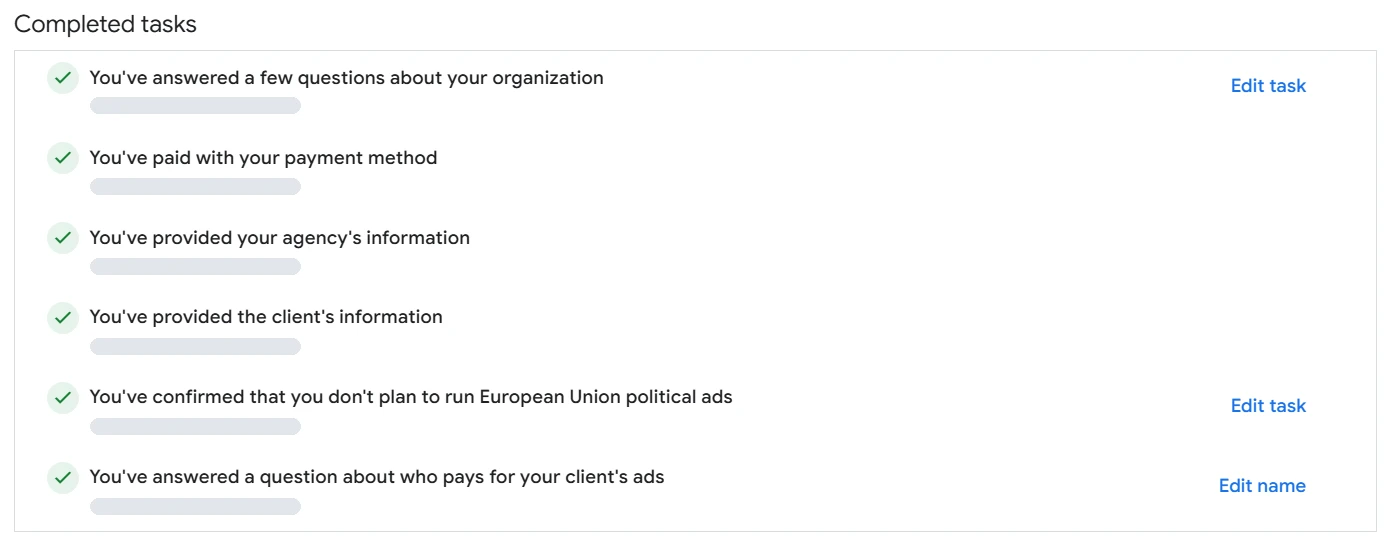
You’ve answered a question about who pays for your client’s ads
This is how the finished task reads in an agency-managed Google Ads account we’ve audited, under Admin › Policy › Account. The wording matches the task Google’s help pages call “Answer a question about who pays for your ads”.
When you verify a Google Ads account that you run for a client, Google asks you to answer a few questions about the type of organisation and who pays for the ads. Two of those answers matter most to an agency: whether you’re an agency, and who pays. Together they shape the ad disclosure: who is named as the advertiser, and who as the payer.
The same question turns up in Google’s email to one advertiser, who posted it on the Google Ads Community in July 2025: “Your ad disclosure now shows: Ads funded by…”, followed by “If this information is incorrect, you’ll need to answer a question about who pays for your ads.”
For an agency, who pays is more than a label on the ad. In our experience, paying for a client’s ads gives you more control, but it ties your payment method to every account you pay for. That’s where the risk sits.
Checked against Google’s help pages on 29 September 2026. Google changes them without notice, so check the linked page before relying on a detail.
At a glance
Agencies answer Yes
Google says that if you manage ads for a client and don’t select Yes to its agency question, the account may be paused or suspended.
The client is the advertiser
Google’s third-party policy counts verifying your client’s account as your own as misrepresenting identity.
“Funded by” is public
The payer’s name can appear in ad disclosures, My Ad Centre and the Ads Transparency Centre.
A shared payment method links accounts
Google gives accounts using the same payment method as an example of accounts related to a suspended one.
Client-pays is lower risk, in our experience
Suspended client accounts under our own manager account didn’t take the rest down, because we weren’t paying for them.
On this page11 sections
The two questions, and how to answer them
Advertiser verification starts with a few questions about your organisation. For an agency, two of them matter.
- “Is your organisation an agency?” (“Is your organization an agency?” on Google’s US English pages.) If you run ads for clients, the answer is Yes. Google is direct about it: if you manage ads for a client, make sure that you select Yes for this question. Otherwise, your account may be paused or suspended.
- Who pays for the ads? Say who really pays. In our experience, if it’s the client, say it’s the client: they put their payment instrument on the account and they handle it. If it’s you, you have to say it’s you, but that opens you up to risk, because your payment instrument could then be used across your own advertising and your clients’ advertising.
Answer honestly, even when the true answer feels riskier. Google says submitting false info will be a violation of the Circumventing systems policy and will result in the suspension of your account. Its Circumventing Systems policy lists submitting false information as part of Google’s verification programmes as an example of what isn’t allowed. For agencies, Google’s third-party policy gives verifying your customer’s account as your own as an example of misrepresenting identity.
For the wider process, from documents to deadlines, see our advertiser verification guide.
What Google asks an agency to do
Put together from Google’s task list, this is the route for an agency. Only a Google Ads account admin can complete the tasks.
Answer the organisation questions.
Select Yes for the agency question, and answer who pays for the ads.
Give your agency’s details.
Google asks for your agency’s info, then one or more checks, such as documents, a D-U-N-S number or a phone number.
Identify your client.
You can send a link with the task to your client or complete the task for your client, choosing the client’s payments profile. You’ll only see profiles you’re an admin for. If you can’t see the client’s, send the link to its admin. Google says this won’t affect the Google Ads account billing setup or give new access to the Google Ads account.
Verify the client’s payments profile, if it isn’t already.
If it hasn’t been verified, you’ll need to complete a separate advertiser verification for your client: the Organisation or Individual tasks, depending on the client’s account type. Google emails the agency once the profile is verified.
Agencies paying by monthly invoicing may have a different route, set out in Google’s guide to advertiser verification in bulk.
Who gets verified: agency pays or client pays
Google’s guide to verification in bulk puts it plainly: the identity of a Google Ads account represents the identity of the business being advertised for in the account. That identity typically comes from the payments profile of the Google Ads account, meaning the profile the account is billed to. That guide is written for accounts paying by monthly invoicing. Google’s general task list points the same way for other billing: an agency gives its own details, then its client’s.
- The client pays. The client’s own payments profile is on the account. The business being advertised and the business paying are the same. The client is verified as the advertiser, and as long as the names match, there’s no separate payer name to show.
- The agency pays. The agency’s payments profile pays, but the client should still be the verified advertiser. For agencies that pay, Google’s process includes a step to identify the client’s payments profile. That profile isn’t used for billing and is purely used to establish the identity of the end advertiser.
In our experience, agencies do a bit of both. It depends on their business model. If they pay for their clients’ ads, they’re at higher risk and need to vet their clients more carefully. If the client pays, there’s less risk to the agency. A client might fail to pay their fee, or their website might be non-compliant, or they change something and the account is suspended. Either way, the whole manager account isn’t at risk. A manager isn’t culpable for the damages of the account’s owner, but it is if it’s the one paying.
What “funded by” shows, and who can see it
Once you’re verified, Google says your ad disclosure will show “Ads funded by” and the payments profile name, when that name is different from your verified name. It appears in My Ad Centre and the Ads Transparency Centre.
For agency accounts, the default payer name is the client’s. For verified agency accounts, your client’s payments profile will be used. To change the name, you’ll need to answer a question about who pays for your ads. Google’s transparency policy adds that advertisers are responsible for the accuracy of the displayed payer name for their ads.
Check what your clients’ ads say once they’re verified, because anyone else can too. On a Google ad, select More or Info, then About this advertiser. The Ads Transparency Centre can be searched using the advertiser or website name.
Verified as a direct advertiser by mistake? Google’s help says that to get verified for the right organisation or the right type of organisation, you’ll need to reset the account’s verification and get verified again. Only a Google Ads account admin can do this. When Google started showing payer names in 2025, it told agency advertisers who were incorrectly verified as direct advertisers to do exactly that and re-verify as an agency, so that the agency’s name wouldn’t show as the payer when that wasn’t the intention. In our experience, if the wrong company was verified, resetting is the right fix. Just don’t do it to get round a suspension (see the warning below). Our guide to resetting advertiser verification covers who can do it and when not to.
Why one payer behind many advertisers is a risk
When an agency pays, its clients can each be verified as themselves while their ads name the agency as the payer. We’ve seen exactly that: dozens of advertisers, each verified as itself, with the same agency paying for all of them and named as the payer on their ads.
Our reading, not Google’s words: the “funded by” line doesn’t create a link between those accounts, it shows one, the same payer behind all of them. Google’s billing help gives accounts using the same email or payment method, or accounts linked to the same manager account as examples of accounts related to a suspended one, and says they will be suspended.
In our experience, that’s why the payer matters. When the agency pays directly, everything is tied to the agency.
A client’s problem can also arrive without warning. For Unacceptable Business Practices, Google says accounts will be suspended upon detection and without prior warning. It adds that it may review information from multiple sources, including your ad, website, accounts and third-party sources.
When one client is suspended: what happens in each model
You’d think every client under your manager account would be suspended along with the first one. In our experience, it depends on whether the accounts are linked, and the link that matters most is who pays.
- Each client pays for itself. Clients with suspended accounts have sat under our own manager account, and it didn’t suspend everything else in our agency account. We weren’t paying for them.
- The agency pays for all of them. In our experience, this is when it spreads: the agency pays for the accounts, invoicing the clients for the ads and paying Google directly. The agency is then responsible for that advertising, and if it pays for all the other accounts, they can be hit with multiple bans.
Google’s list of related accounts does include accounts linked to the same manager account, so a shared manager isn’t risk-free. What we can tell you is what we’ve seen.
When we first set up Ad Restore, a support agent from Concentrix warned us to be careful with suspended accounts, because one could suspend the entire manager account. Concentrix is one of the third-party partners that, in Google’s words, work on behalf of Google on Google Ads. The agent told us they had seen entire manager accounts suspended this way. Looking back, we understand the warning as being about agencies with many accounts on one payment instrument. Most businesses we help have one domain, one business and one payment instrument.
What the agency sees. In our experience, the other accounts show a Verification identity reuse suspension. Our guide to that notice explains it. Google says that if your account was suspended because other accounts verified using the same identity documents were suspended, it will be automatically reinstated once those other accounts are successfully appealed. In our experience, identity reuse doesn’t show an appeal button, so the work goes into the account where the problem started.
We’ve seen how far it can spread. An agency paid for dozens of clients’ ads from its own payments profile. One client’s account was suspended over its website, and a second account opened for the same client was suspended too. In the end, dozens of accounts under the agency’s manager account carried the identity reuse notice. In our reading, three things came together: the agency paid for everyone, the client’s website hadn’t been vetted, and a second account was opened for the same client.
When it’s fine for the agency to pay
We haven’t found a Google page that forbids an agency paying for its clients’ ads. Google’s third-party policy covers agencies that purchase and manage advertising for their clients, and its guide to verification in bulk has a section for agencies that pay for and manage Google Ads accounts on behalf of their clients.
In our experience, it’s fine when handling everything is the agency’s business model and the client doesn’t want to deal with any of it. That’s a more hands-on approach. It gives the agency more control, but also more risk. If you can’t vet a client’s site and assets beforehand, you may be taking on unnecessary risk just to win a new client.
If you decide a client should pay for their own ads, Google’s route on postpay or prepay accounts is a billing transfer, also called “Change who pays”. Google says that afterwards you’ll be required to complete advertiser verification even if you were previously verified. Only do this on an account in good standing, as a planned change. Never do it while the account is suspended.
Five things to check before you take a client on
In our experience, these are the five things to check on a client and its website before you accept them. They matter even more if you’ll be paying for their ads.
- The documentation is accurate. That’s both the client’s company documents and the policies on its website. Anything that goes into verification has to be true: Google treats false information in verification as a Circumventing Systems violation.
- They’re cookie compliant.
- They’re not scamming people, and they have a returns policy. Google doesn’t allow scamming users by hiding or misrepresenting info about your business, products or services.
- They’re a legitimate business. They’re incorporated, and they have the incorporation documents to prove it.
- Their business details are on the site.
Google’s third-party policy points the same way. It says that when a significant portion of an agency’s client accounts are suspended for egregious violations, as a sustained pattern, it indicates a failure to implement proper vetting processes.
If you’d like a second pair of eyes, we can check a client’s website and assets against Google’s policies before you take them on.
Don’t reset verification, move billing or open a new account to get round a suspension.
In our experience, resetting advertiser verification to dodge a suspension doesn’t make it go away. The reason isn’t the verification. It’s the site being advertised, the domain and the assets linked to the account, and Google’s systems will still check them. The same goes for moving accounts, or deactivating a billing account and starting a new one. In our experience, you can end up locked out: the account needs reinstating before you can set up billing, and the suspension can’t be handled without billing. Google says any new accounts that the advertiser tries to create may also be suspended. Its Circumventing Systems policy lists creating new accounts to re-enter the system after a suspension as a violation. Read why a new account makes things worse.
If a client is already suspended
- Don’t file more appeals. In our experience, the first thing to do is speak to a specialist, not file another appeal. Google says that if you file too many appeals for the same suspension it may not process them, and that submitting one appeal at a time ensures timely response and review.
- Start with the account where it began. In our experience, the accounts caught up by identity reuse can’t be appealed directly, so the cause has to be fixed in that first account. Read about Unacceptable Business Practices and Circumventing Systems suspensions.
- Other accounts caught up? See our guides to identity reuse and suspensions linked to a related account.
- Payments profile closed? Read what “closed permanently” means before you touch billing.
Frequently asked questions
Should we answer Yes to “Is your organisation an agency?”
Yes, if you manage ads for a client. Google says to select Yes, and that otherwise the account may be paused or suspended.
What should we answer to who pays for our client’s ads?
The truth. If the client’s own payment method is on the account, say the client pays. If your agency pays, say so. Google says submitting false information during verification violates its Circumventing Systems policy.
Why do our client’s ads say they’re funded by our agency?
Google shows a payer name when it differs from the verified advertiser’s name. By default it’s the payments profile name, and for verified agency accounts it’s the client’s payments profile. To change the name, Google asks you to answer a question about who pays for your ads; if your agency does pay, saying so is the honest answer. If the account was verified as a direct advertiser by mistake, Google’s 2025 policy update told agency advertisers in that position to reset their advertiser verification and re-verify as an agency. Don’t reset to get round a suspension.
If one client is suspended, will our other client accounts be suspended?
They can be. Google’s examples of accounts related to a suspended one include accounts using the same payment method and accounts linked to the same manager account. In our experience, it depends on whether the accounts are linked, and paying for them is what ties them to the agency: suspended client accounts under our own manager account didn’t take the rest down, because we weren’t paying for them.
Is it against Google’s rules for an agency to pay for clients’ ads?
We haven’t found a Google page that says so. Google’s third-party policy covers agencies that purchase and manage advertising for their clients, and its guide to verification in bulk has a section for agencies that pay for their clients’ accounts. In our experience, it’s fine as a business model, but it carries more risk, so vet each client’s site first.
Does the client have to give us access to their payments profile?
Not necessarily. You’ll only see payments profiles you’re an admin for. If you can’t see the client’s, send the task link to its admin. Google says this won’t affect the Google Ads account billing setup or give new access to the Google Ads account.
Can we move a suspended client’s billing, or open a new account for them, to get round the suspension?
No. In our experience, it doesn’t touch the cause of the suspension and can leave you locked out. Google says new accounts a suspended advertiser tries to create may also be suspended.














