 Skip to content

Leftover theme demo content can get a Google Ads account suspended
 Gianluca Catinella, Director, Ad Restore LtdPublished on 20 min read
Your account violated the Unacceptable Business Practices policy.
The banner Google Ads shows on a suspended account. Like Google’s suspension email, it names the policy, not the page on your website that a reviewer objected to.
Run a WordPress theme’s demo import and you get a finished-looking website. You also get the theme vendor’s sample listings, blog posts, people and pictures, published under your name and listed in your sitemap. Google’s Unacceptable Business Practices policy says you can’t offer products or services that you don’t have or can’t deliver, or make it seem like you’re affiliated with another brand when you’re not. Leftover demo pages can look like either.
Google’s policy doesn’t mention demo content by name, and when we searched on 1 October 2026 we found no guide that joins the two: only lists of ad disapprovals, Google’s policy pages and theme vendors’ clean-up notes. So this guide sets out what we found on a live case, which of Google’s lines it runs into, and how to find and remove demo content on your own site.
Checked against Google’s help pages on 1 October 2026. Google changes them without notice, so check the linked page before relying on a detail. The case is anonymised: names, account numbers, places and websites are left out, and identifying details are hidden in the screenshots.
At a glance
Demo imports go live
On the case below, eight template flats and eleven demo posts sat under the advertiser’s branding and in its sitemap.
Google looks beyond the ad
For this policy, it may review your ad, website, accounts and third-party sources.
No warning first
Google treats Unacceptable Business Practices as egregious: accounts are suspended on detection.
Delete, don’t hide
Noindex and unlinking leave demo pages live, and a draft is one click from going live again. Delete them and let the addresses return 404 or 410.
Check before the first ad
Your sitemap and WordPress’s public API show most of what’s published, without logging in.
On this page12 sections
What does a theme’s demo import leave behind?
A demo import copies the theme’s showcase website onto yours, so you can swap in your own words and pictures. Whatever you don’t replace or delete stays published. One widely used plugin for this, One Click Demo Import (over a million active installations on WordPress.org), notes that “All demo content will be imported under the current user”, so the demo posts appear under your own name.
Leftovers can include:
- template listings in the theme’s own content type, such as flats, properties, team members or testimonials, each with an archive page;
- demo blog posts, with their categories, tags and an author archive;
- WordPress’s own sample content: the “Hello world!” post, its comment from “A WordPress Commenter” and a “Sample Page”, which WordPress creates when it’s installed;
- demo images in the media library, each with its own public address;
- the theme’s 404 page text;
- pieces you never see, such as page-builder header and footer templates and a members’ login box.
Most of these have their own public address, and by default WordPress’s own sitemaps are created for all public and publicly queryable post types and taxonomies, as well as for author archives.
What we found on a live case
This is a case we’re working on: a Spanish Google Ads agency that handles multiple accounts for multiple different clients. One client’s account advertised a Spanish new-build property development’s sales website (a microsite) to buyers in the Netherlands, Germany, Poland and the UK. It was suspended for Unacceptable Business Practices on 25 July 2026, which Google’s own email confirmed. By 29 September, 53 of the 75 accounts under the agency’s manager account were suspended. That spread is its own story, told in our agency case study.
When we checked the website on 1 October 2026, it was built on a WordPress real-estate theme, and the theme’s demo content was still live:
- Eight template flats under the advertiser’s own header and footer. One is a “one bedroom” penthouse with a “Total area 158 Sq Ft”, “sun-filled Central Park and city views” and lorem ipsum. The real development sells 2- and 3-bedroom homes in Spain.
- Ten demo blog posts, with a June 2024 publish date in WordPress, about two years before the website’s domain was registered. One describes Related, a real company, as “the most prominent privately-owned real estate firm in the United States”, praises Oxford, tells a student’s story about edX, and carries a made-up quote from the theme’s demo persona.
- WordPress’s “Hello world!” post, in its Spanish form “¡Hola, mundo!”, with its sample comment. That made eleven demo posts, in four categories and three tags, with an author archive.
- The sitemaps: 50 of their 75 addresses were demo or template pages. Besides the flats, posts, categories, tags and author archive, 18 page-builder and theme templates redirected to the homepage but were still listed.
- Elsewhere: 140 demo images in the media library, the theme’s English 404 text (even on the German site), a hidden login and registration box in every page, and RSS feeds whose item IDs pointed to a staging address on a different domain.
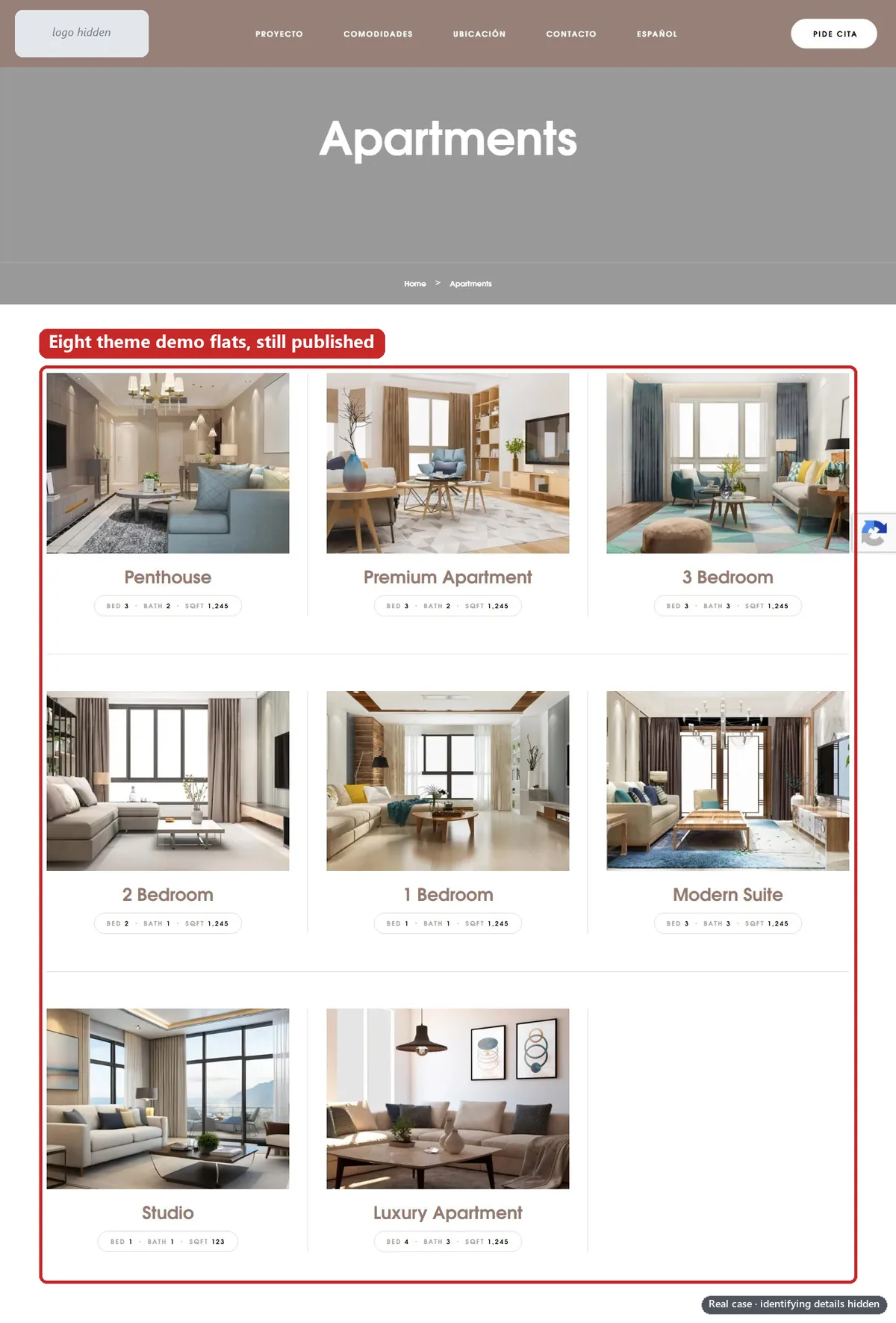
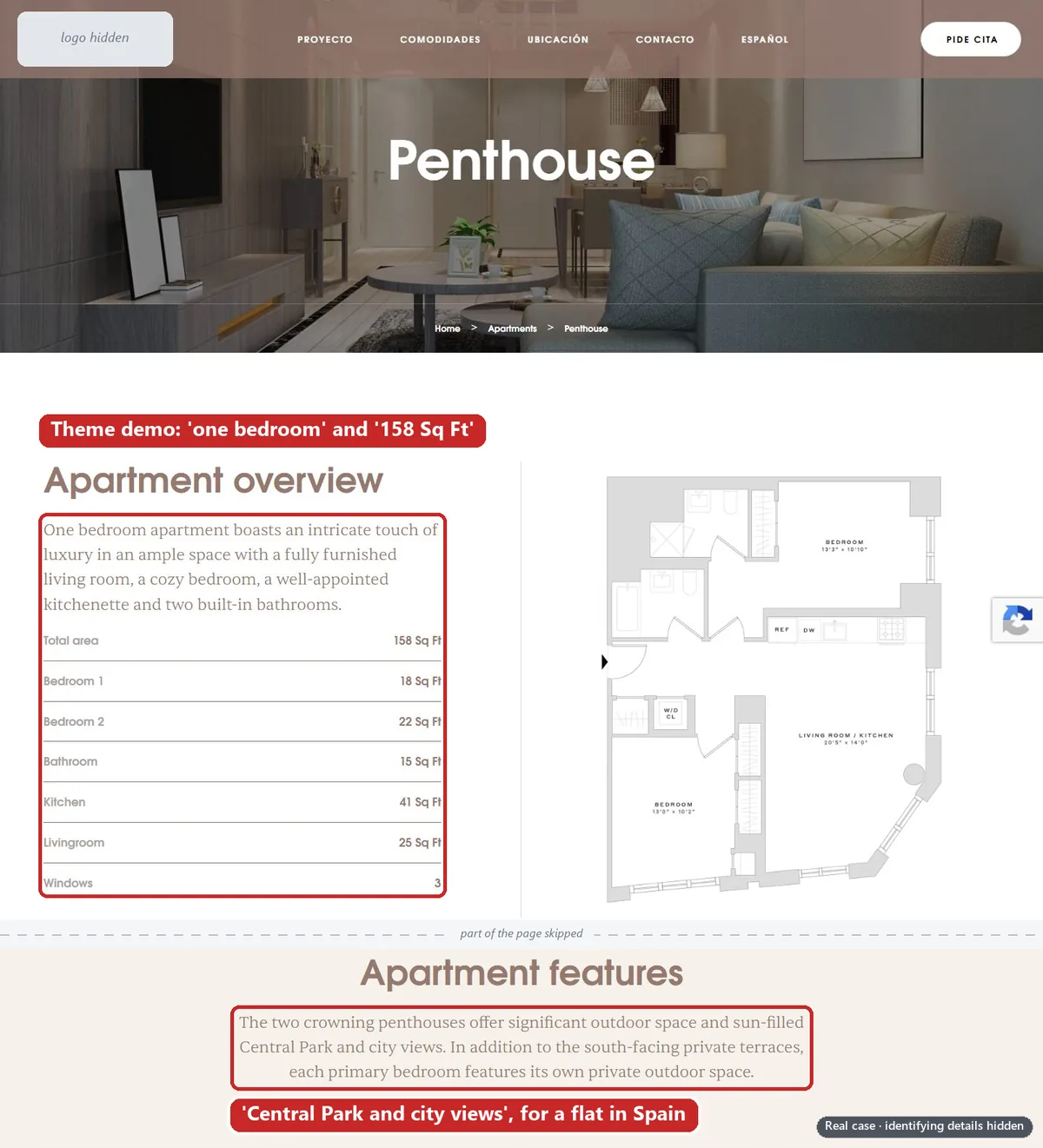
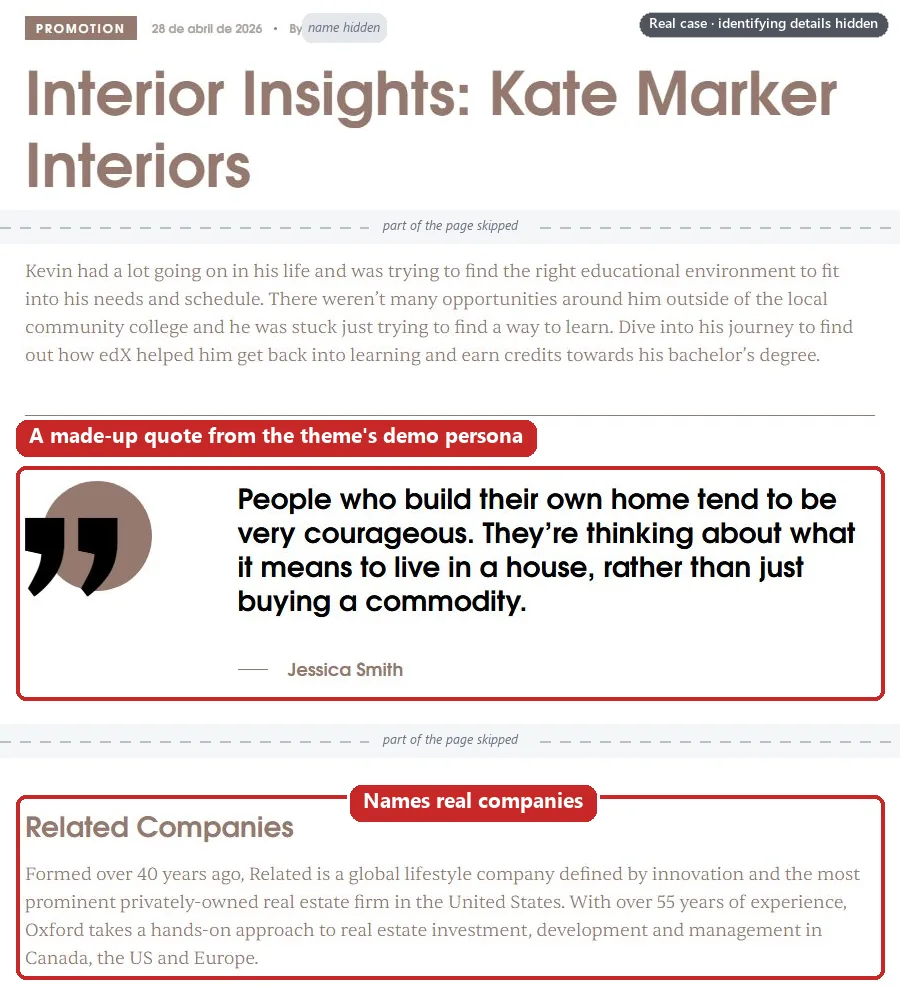
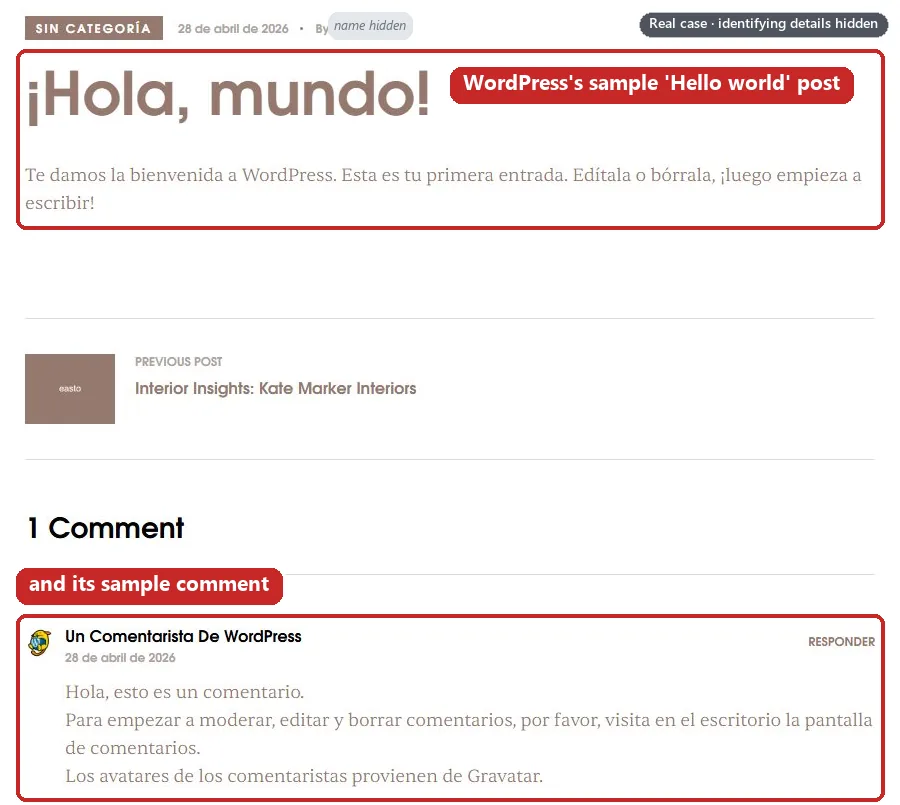
The flats and posts came in with the theme when the site was built in spring 2026. Their WordPress modified dates hadn’t changed since late April, so in our reading they were live when the account was suspended in July. We can’t prove it: there’s no archived copy of the site from July. Appeals were denied while the demo content stayed live, and the site’s legal pages were only updated on 22 and 23 September. The new appeal hasn’t been filed yet, and the case is ongoing.
Demo content wasn’t the site’s only problem, and nothing Google sent on the case named a page. No homepage said which company ran the site, the developer’s own website didn’t link to it, and the domain was registered to the agency. Those are covered in our guides to property development websites and website ownership, relationships and brand association.
Why can leftover demo content get an account suspended?
In our reading, nobody on the case set out to mislead anyone: the demo pages were simply never deleted. But three lines of Google’s Unacceptable Business Practices policy describe what those pages show.
- ”Offer products or services that you don’t have or can’t deliver.” This is on Google’s list of things you can’t do. Template listings are products you don’t have: a penthouse overlooking Central Park, on a website selling homes in Spain.
- ”Make it seem like you’re affiliated with another brand, organisation or government entity when you’re not.” Also on the same list. Demo posts praising real companies, published under your branding, can read as a connection that doesn’t exist.
- ”Use your own branding: Use your own name, logo, images and colours on your website and in your ads.” This is one of Google’s best practices, not a rule. The theme’s sample photos, team portraits and demo persona aren’t yours.
Google doesn’t only look at the page your ad sends people to. For this policy, it says it may review information from multiple sources including your ad, website, accounts and third-party sources. And because Google treats violations as egregious, accounts are suspended upon detection and without prior warning. There’s no grace period to tidy up after launch.
Google’s own property example is “Tricking people into believing that you’re the official website for a new housing development so you can earn commission”. In our reading, a development website full of somebody else’s sample flats makes it harder for a reviewer to believe it’s the official one. Our guide to property development websites covers that rule.
Is lorem ipsum on a landing page a disapproval or a suspension?
On the page your ad links to, the closest Google policy is a different one: Insufficient original content. It doesn’t name lorem ipsum, but its examples include “Templates or pre-generated websites that provide duplicate content”, pages that show “Under construction” or “Coming soon” and pages with no content. That policy leads to ad disapprovals, and Google says violations won’t lead to immediate suspension: a warning will be issued at least 7 days prior to any suspension of your account.
Unacceptable Business Practices works differently: it’s about the business, and there’s no warning. In our reading, the difference is what the placeholder says about you. An unfinished page is a problem with one destination. Listings and articles that aren’t yours raise a question about your business.
Google’s Merchant Center help is blunter. For Shopping ads it says: “Check your site for ‘Lorem Ipsum’ text or default template images”, because these prevent your store from being verified as a trusted business. If you sell products, see our guide to Merchant Center’s “Website needs improvement”.
How do you find demo content on your own site?
Most of these checks use only what any visitor can see, so you don’t need to log in. Do them in a private browser window, and check every language version if your site has them.
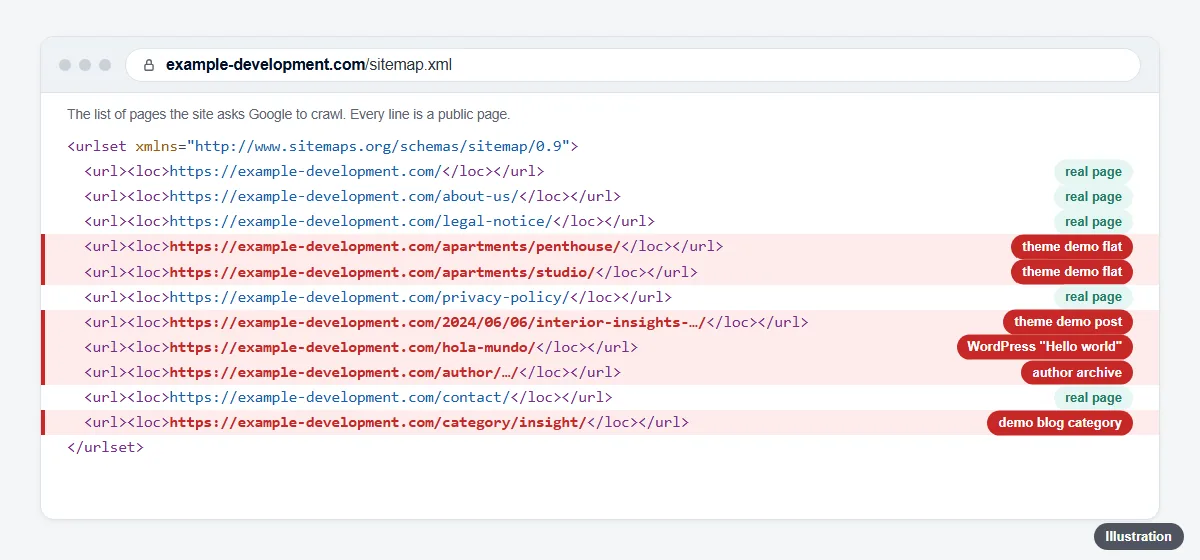
1. Read your sitemap
Open /sitemap_index.xml if the site uses Yoast SEO (it’s the address Yoast tells you to submit), or /wp-sitemap.xml for the sitemap WordPress has exposed since version 5.5. WordPress’s own robots.txt points to its sitemap index, so /robots.txt is a good place to start.
What to look for: child sitemaps you didn’t create (a listings type such as apartments or properties, team, testimonials, page-builder templates), category, tag and author sitemaps on a site with no blog, and any address whose title you don’t recognise. On the case, 8 sitemaps listed 75 addresses, and only 25 of them were real pages.
2. List posts and pages through the WordPress REST API
WordPress publishes a public API under /wp-json/. Open these in a browser:
/wp-json/wp/v2/posts?per_page=100&_fields=id,date,modified,link,title/wp-json/wp/v2/pages?per_page=100&_fields=id,date,modified,link,title/wp-json/wp/v2/types, to see which content types the site exposes/wp-json/wp/v2/media?per_page=100&_fields=id,date,source_url, for the media library
The _fields parameter trims each answer to the columns you ask for. WordPress caps per_page at 100 records, so add &page=2 if there are more; the X-WP-Total header gives the total.
What to look for: dates older than your site, titles you didn’t write, and content types you don’t use. On the case, the API dated ten posts June 2024, before the domain even existed.
Watch out: a theme’s content type only appears in the API if it was registered with show_in_rest. On the case, the flats’ content type wasn’t in /wp-json/wp/v2/types at all, but its pages were live and had their own sitemap. So never treat the API as the full list. If /wp-json/ doesn’t respond, work from the admin screens instead.
3. Run a site: search on Google
Search site:yourdomain.com, then add phrases demo content tends to use, such as site:yourdomain.com "lorem ipsum", "Hello world" or "Sample Page". Google says a site: search returns indexed pages, but the list of URLs returned is not always exhaustive. So it shows what Google has indexed, not everything that’s live.
What to look for: titles you don’t recognise, demo phrases, and measurements or places that don’t fit your business, such as square feet and New York views on a website selling homes in Spain.
4. Read the RSS feed
Open /feed/ and /comments/feed/. Demo posts show up here even when nothing on the site links to them. Each item carries a <guid>. WordPress’s documentation describes the GUID as an identifier that never, ever changes, used primarily to create the feeds, so it can keep the address of the site where the post was first created.
What to look for: demo post titles, the sample comment, and GUIDs on another domain, which give away a staging site, as they did on the case. Don’t edit GUIDs to hide it: WordPress’s documentation says not to change them. Deleting the demo posts takes them out of the feed.
5. Check your author archives
Open /?author=1. On the case, it redirected to an author archive named after the development’s brand, which listed the demo posts.
What to look for: an author archive full of posts you didn’t write, or a demo author’s name. On a site with one author, Yoast can switch author archives off, which redirects them to the homepage and removes the author sitemap.
6. Look for the theme’s own content types
Some themes add content types of their own, such as apartments, properties, agents, team members or testimonials. Look in the WordPress admin menu for items the theme added, and try their archive addresses directly: /apartments/, /properties/, /team/, /testimonials/.
What to look for: listings that aren’t yours, and archive pages that load even when they’re empty. On the case, the Spanish archive listed all eight flats, while the English, German, Dutch and Polish archives were empty pages that still loaded and were still in the sitemap.
7. Read your 404 page
Type a made-up address, such as /this-page-does-not-exist/, in every language.
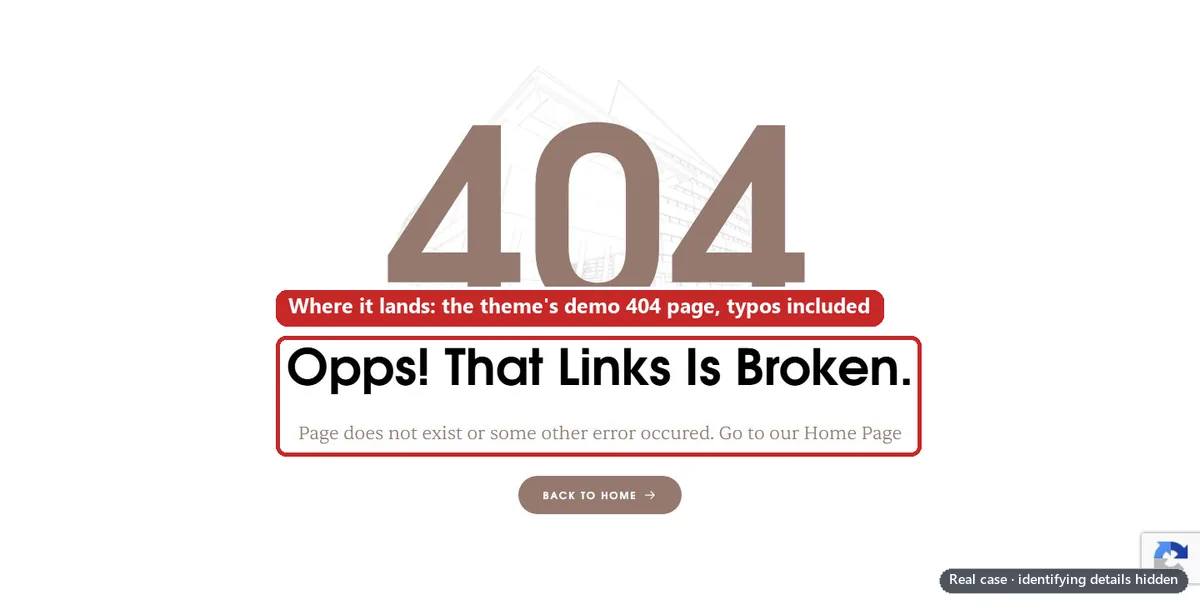
What to look for: the theme’s sample wording, typos, the wrong language, and demo links. Check the status code too: a missing page should return 404, not 200. On the case, missing pages showed the theme’s English demo message, typos included (“Opps! That Links Is Broken”), even on the German site. The German landing page’s broken “About us” link led straight to it.

8. Look for hidden login and registration forms
View the page source (Ctrl+U in Chrome) and search for “register”, “Create an Account” or “wp-login”. Open /wp-login.php?action=register too. In the admin, Settings › General has a Membership option, “Anyone can register”.
What to look for: a members’ login or account box that came with the theme. On the case, every page carried the theme’s hidden “Sign in / Create an Account” box. Registration was switched off, and we know of no Google policy line about it, so this was housekeeping. But a sales website has no reason to carry one.
How do you remove it properly?
Make a full backup first. Then work in this order, so that you finish with evidence for an appeal.
List every demo address and take “before” screenshots.
Save the lists from the sitemap and the API. Screenshot each kind of demo page with the address bar and the date visible.
Delete permanently. Don’t draft it or unlink it.
Move each demo post, page and listing to the Trash, then use Delete Permanently. WordPress keeps trashed items for 30 days by default before deleting them. Delete the sample comment and the demo categories and tags too. The demo posts sit under your own user account: don’t delete the account, switch author archives off instead (step 4).
Switch off the theme module or archive.
If your theme has an option or a companion plugin that turns its listings, team or testimonial module off, use it, so that archives such as /apartments/ stop existing. Theme settings differ, so check your theme’s documentation. If there’s no switch, a developer can unregister the content type in a child theme.
Tidy Yoast’s content types and sitemaps.
In Yoast SEO › Settings, open each unused content type and set the toggle “Show (type) in search results?” to Off; Yoast says this also removes it from the sitemap. Do the same for categories and tags if you have no blog. Under Advanced, switch off Author archives. This hides content; it doesn’t delete it, which is why step 2 comes first.
Make the old addresses return 404 or 410.
Once a post is deleted, WordPress normally answers its old address with a 404, but check: it can also try to guess the right address and redirect there instead. If you want to say a page is gone for good, Yoast explains that 410 means “content deleted”, and its Premium version can set 410 headers. Google Search doesn’t distinguish them: all 4xx errors, except 429, are treated the same. Don’t redirect demo addresses to your homepage either. In our view a redirect says the page has moved, not that it’s gone; on the case, 18 template addresses redirected to the homepage while still listed in the sitemap.
Delete unused demo media.
In the Media Library, use Delete Permanently on the theme’s sample images: team portraits, avatars and listing photos. Check that each one isn’t used on a real page first, because the deletion is permanent.
Fix the 404 page and remove hidden forms.
Rewrite the 404 text in every language, in the theme’s template or a page-builder 404 template. Switch off the theme’s account or login module, and leave “Anyone can register” unticked unless you need it.
Purge every cache.
Clear your caching plugin, your host’s cache and any CDN, so nobody is served an old copy of a deleted page.
Check every old address.
Each one should return 404 or 410: not a page, and not a redirect to somewhere unrelated. Read the sitemap index, the feed and the API lists again.
Resubmit the sitemap.
In Search Console’s Sitemaps report, enter it under “Add a new sitemap” and submit it. Google says that if you make big changes to a sitemap, you might want to resubmit it. For pages that need to leave search results quickly, Google’s Removals tool works within a day, but requests last for about 6 months; removing the page itself is one of the permanent fixes Google lists.
Take “after” screenshots.
The same addresses, now showing the 404, plus the clean sitemap index, with the address bar and the date visible. Keep them with your appeal notes.
Why not just noindex it, draft it or unlink it?
- Noindex keeps a page out of search results, but the page stays live for anyone who opens it.
- Draft or private takes the page down, but it stays in the database, one click away from going live again, and its images keep their public addresses in the media library.
- Unlinking (taking a page out of your menus) changes nothing about the page itself. It stays live, stays in the sitemap and, if it’s a post, stays in the feed.
Our reading, not Google’s words: for this policy Google may review your website, not just your search results, so a page that anyone can still open hasn’t gone. Delete what isn’t yours.
Do it before the first ad goes live
Google gives no warning under this policy, so there’s nothing to react to: the clean-up has to happen before the first ad runs.
If you’re an agency, put it on the launch checklist for every client website:
- the sitemap index lists only real pages;
/wp-json/wp/v2/postsand/pageslist nothing you didn’t write;- a site: search shows no demo phrases;
- the feed shows no demo posts and no staging address;
- theme archives, author archives and the 404 page are clean in every language;
- there’s no members’ login or registration box;
- before-and-after screenshots are saved.
These sit alongside the other checks in our Unacceptable Business Practices website checklist, which covers who runs the site, prices, images and legal pages. If you pay for your clients’ ads, one client’s suspension can spread to your other accounts: see how one client took down 53 accounts.
Can a suspension like this be fixed?
Only Google decides. It says accounts are only reinstated in compelling circumstances, such as in the case of a mistake. In our view, leftover demo content is a housekeeping failure, and an appeal can show it has been fixed, with before-and-after evidence. That isn’t a promise.
The cases we turn down are different. As our service page says, we don’t take accounts that are genuinely in violation, or that have a fatal flaw that makes them unredeemable: for example, presenting another company’s business as your own, or advertising another company’s products with no agreement to show for it.
In our experience, real Unacceptable Business Practices is when a business is actually misrepresenting itself: an ad claiming to be backed by Elon Musk or another public figure when it isn’t, or a health and wellness reseller presenting itself as the brand whose products it sells for a margin. We’ve turned one down before because it was clear they were doing it on purpose. If your case has a fatal flaw, we tell you on the free call instead of taking your money.
Don’t open a new account or payments profile to get round this.
On the case, a second account was opened for the same advertiser, website and payer two days after the first suspension. It ran for five days, then it was suspended as well. Google says any new accounts that the advertiser tries to create may also be suspended, and its Circumventing Systems policy names creating new accounts to re-enter the system after a suspension. Read why a new account makes things worse and our Circumventing Systems guide.
The appeal route
- Fix first, then send one appeal. Google’s appeal tip for this policy is to implement the best practices you’ve been provided if you haven’t already, and it says submitting one appeal at a time ensures timely response and review.
- Appeal from the account. Google’s route is the Contact us link in the notification at the top of your screen.
- Check every related account. Before appealing, Google asks you to make sure all linked (or previously linked) and all related accounts comply with its policies.
- Show what changed. Your before-and-after screenshots, the list of old addresses now returning 404 or 410, and the clean sitemap.
Before you write it, read what the appeal form asks and why appeals get rejected. If the banner is new to you, start with what “Your account violated the Unacceptable Business Practices policy” means.
Frequently asked questions
Does Google only check the page my ad links to?
Not for this policy. For Unacceptable Business Practices, Google says it may review information from multiple sources including your ad, website, accounts and third-party sources. So pages your ads never link to aren’t out of scope.
Will lorem ipsum get my Google Ads disapproved?
Google doesn’t name lorem ipsum, but on a page your ad links to, placeholder content is close to the examples in its Insufficient original content policy, such as templates or pre-generated websites that provide duplicate content and pages with no content. That policy leads to disapprovals, and Google says a warning will be issued at least 7 days prior to any account suspension under it. Unacceptable Business Practices comes without warning.
Is it enough to noindex the demo pages?
In our view, no. Noindex keeps a page out of search results, but the page stays live for anyone who opens it. Yoast’s content-type setting, which also removes the content type from the sitemap, doesn’t delete anything either. Delete the pages, then switch the settings off.
Should deleted demo pages return 404 or 410?
Either works for Google Search: Google says all 4xx errors, except 429, are treated the same. A 410 says the page was removed on purpose; Yoast calls it “content deleted”. What matters is that the old address no longer returns a page.
How do I get demo pages out of Google’s search results?
Delete them and let them return 404 or 410. Google says indexed URLs that return a 4xx status code are removed from the index. If you need them gone faster, the Removals tool hides a page within a day, but requests last for about 6 months. Then resubmit your sitemap.
Is the “Hello world!” post a problem on its own?
No Google policy names it. It’s the sample post WordPress creates when it’s installed: “Welcome to WordPress. This is your first post. Edit or delete it, then start writing!” In our view, it tells anyone who finds it that the site was never finished. Delete it, with its sample comment.
Will removing the demo content get my account reinstated?
Nobody can promise that. Only Google decides, and it says accounts are only reinstated in compelling circumstances, such as in the case of a mistake. On the case above, demo content was one problem among several. Fix everything the website shows first, then appeal.














