 Skip to content

Website ownership, relationships and brand association: what Google Ads asks for, and what to send
 Gianluca Catinella, Director, Ad Restore LtdPublished on 19 min read
Describe your business on your website. Use your own branding. Be clear about your partnerships.
Three best practices from Google’s Unacceptable Business Practices policy, in its English wording. Google Ads Support quoted the policy, in Spanish, to one of our clients on 29 September 2026, under the heading “Cumplimiento y documentación adicional” (compliance and additional documentation).
In our reading, an appeal like this has to answer four questions: who runs the website, who owns it, who else is involved, and whose brand it carries. Two come straight from the policy: Google asks you to describe your business on your website and to be clear about your partnerships. The other two come from Google’s verification help, which asks about the domain owner and everyone else in the value chain. This guide takes them in turn, with the documents that answer each and what to leave out.
The policy is about scamming people by hiding or misrepresenting info about your business, and Google says breaches are considered egregious. Google also says it may review information from multiple sources, including third-party sources. In our reading, your website and the public records need to tell the same story.
Checked against Google’s help pages on 1 October 2026. Google changes them without notice, so check the linked page before relying on a detail. The case is anonymised: names, account numbers, places and websites are left out.
At a glance
Transparency is a name on the page
Who runs the site, named where visitors see it, not only behind a legal-notice link.
Ownership is the domain record
Google’s verification help lists the “domain owner, if different” as a relationship to explain.
Relationships need paper
Google names contracts, letters on company letterhead and invoices as proof.
The brand owner should link to you
Google’s own advice: “ask them to mention you on their website”.
Leave out what doesn’t answer them
Personal IDs, unmasked bank statements and cropped invoices prove nothing about the website.
On this page12 sections
Where did this come up?
It came up on a case we’re working on. The client is a Spanish Google Ads agency that handles multiple accounts for multiple different clients. The website was a Spanish new-build property development’s sales website (a microsite), advertised to buyers in the Netherlands, Germany, Poland and the UK. The first account was suspended for Unacceptable Business Practices on 25 July 2026, confirmed by Google’s own email.
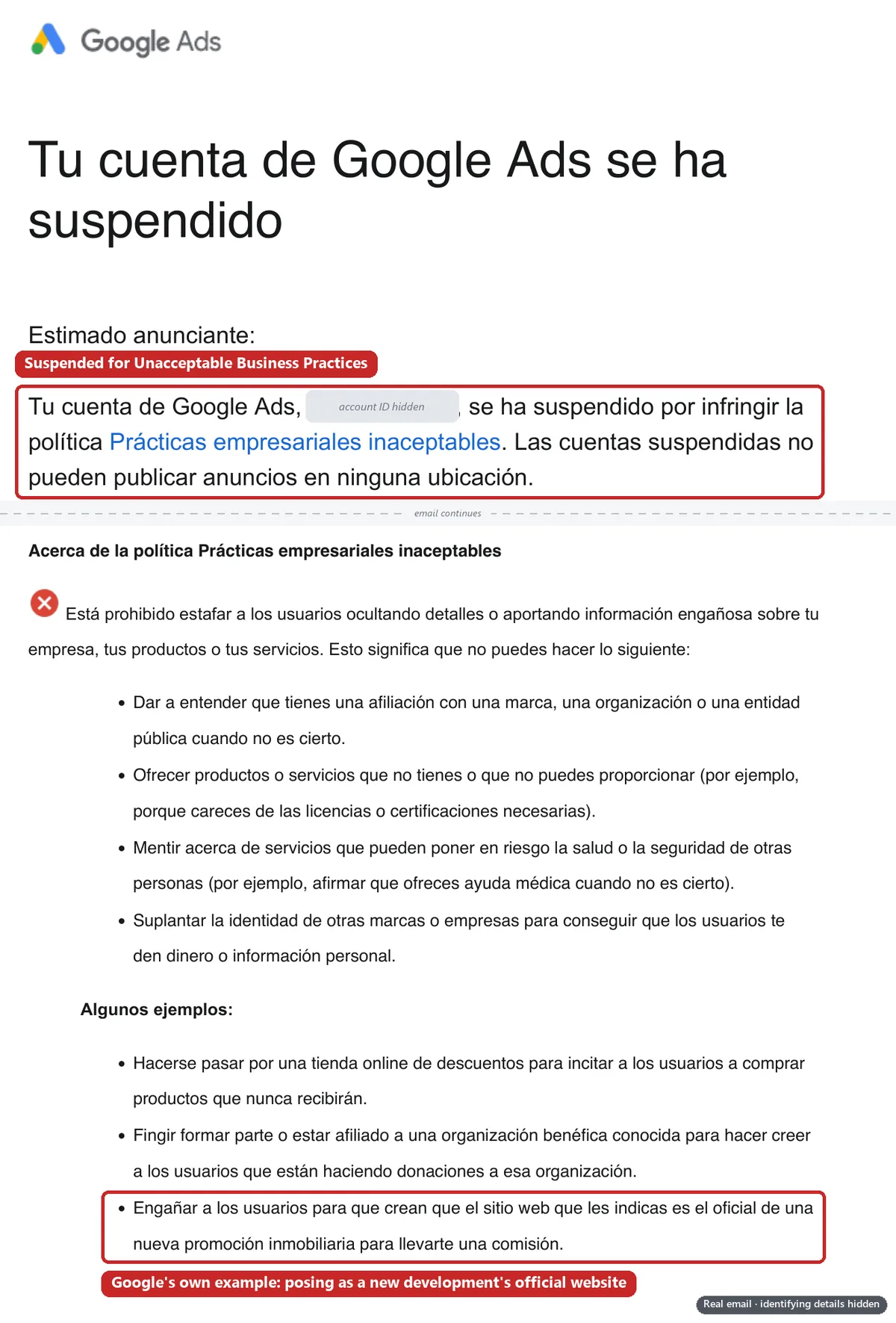
About 10 appeals were denied while the website stayed unchanged; its legal pages were only updated on 22–23 September. By 29 September, 53 of the 75 accounts under the agency’s manager account were suspended (Google Ads API data). Our case study tells how it spread. This guide is about the evidence.
Google Ads Support’s 29 September reply to the agency (the policy, quoted at the top of this page) didn’t list specific documents: the four headings in this guide are our own summary. The appeal hasn’t been filed yet. For the property side of the case, see the “official website” rule for property developments.
Transparency: does the site say who runs it?
In practice, transparency means the company behind the website is named on the website, where a visitor actually sees it. Google’s best practice is a website with updated contact information and a clear explanation of what your company does, like on an “About us” page.
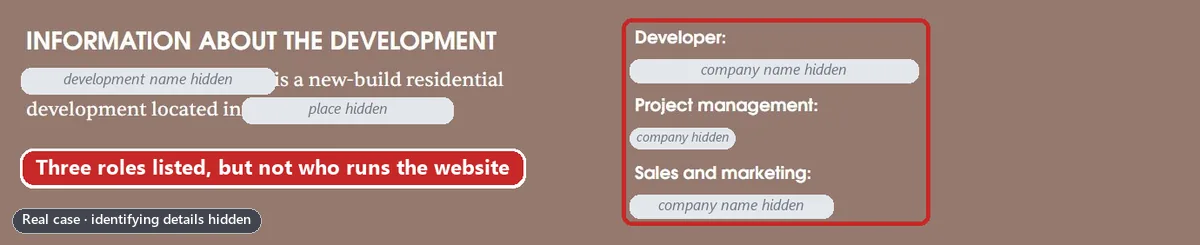
On the case we’re working on, on 1 October no homepage, in any of the site’s five languages, said which company runs the site. The company appeared there only as a role label (project management), in a band near the bottom of the page and in small footer text. It was named as the site’s owner only behind two links: the legal notice and the About page.
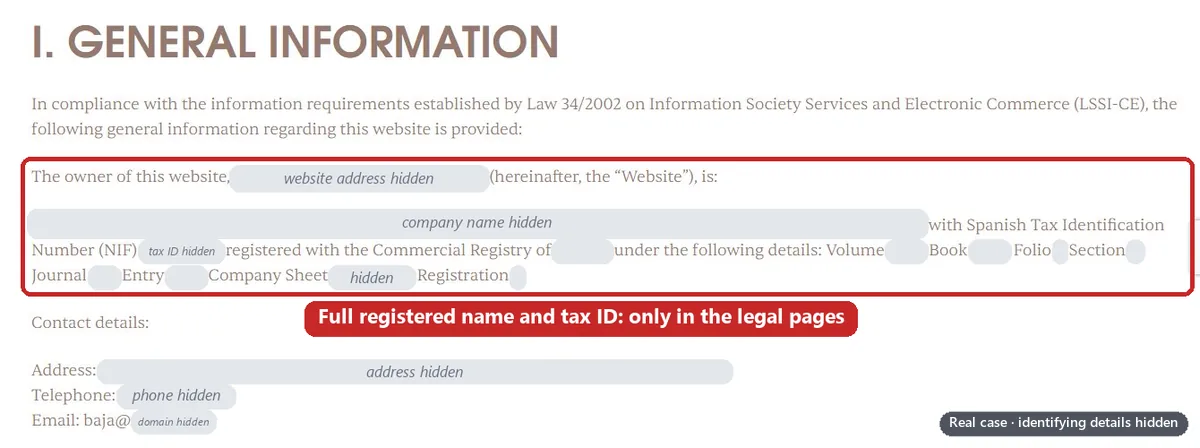
Use the exact legal name the advertiser was verified with. Google is strict about names: its verification help gives, as a common reason for rejection, a name that doesn’t exactly match the full legal name on the registration document, including any suffixes or punctuation.
In the UK, it’s also the law. Every company must show its registered name on its websites (regulation 24 of the Company, Limited Liability Partnership and Business (Names and Trading Disclosures) Regulations 2015), plus where in the UK it’s registered, its registered number and its registered office address (regulation 25). The Electronic Commerce Regulations 2002 add a geographic address, an email address and, where the business is subject to VAT, its VAT number. Spain’s equivalent, which applied on our case, is article 10 of the LSSI.
Put an operator line in the footer of every page, in every language, and say on the homepage or About page what each company does. Our Unacceptable Business Practices website checklist covers the rest of the site.
Website ownership: who is the domain registered to?
In practice, website ownership means the domain record. The registrant is the person or company the domain is registered to, and anyone can look it up.
- For .com and other generic domains: use ICANN’s registration data lookup tool, which ICANN calls “a free public service”. It reads the domain’s RDAP record, the successor to WHOIS. Some fields may show as “Redacted for Privacy”.
- For .uk domains: Nominet’s WHOIS is being phased out in favour of its RDAP client at rdap.nominet.uk, and Nominet shows the registrant’s details only if the registrant has opted in.
- Either way: your registrar’s control panel is another place to look. On the case we’re working on, it showed the registrant.
![Illustration of a domain lookup (RDAP) result for example-development.com: the registrar is ‘Example Registrar, S.L.’ and the registrant organisation, highlighted in red, is ‘[Your agency] S.L.’.](/wp-content/uploads/2026/10/ubp-domain-record-agency.webp)
On the case we’re working on, the domain was registered to the agency, not the advertiser, while the site’s own legal notice and About page said the advertiser owned it. That’s two answers to one question.
Google doesn’t say its reviewers check domain records, but its verification help lists the domain owner, if different among the relationships it wants explained. So a domain held by someone else isn’t banned; it has to be explained, with a document behind it. In our reading, the cleanest fix is to make the record match the site.
How do you change the registrant? It isn’t a registrar transfer
Changing who the domain is registered to is a change of registrant, not a move to another registrar. ICANN’s FAQ for domain holders puts it plainly: “To transfer your domain name to another registrant, you can initiate a change of registrant by contacting your current registrar.” The registrar then asks the current holder to confirm, usually by email.
For .uk names, Nominet calls it a Registrant Transfer. An accredited registrar may do it for you; if not, the current registrant can start it in Nominet’s Online Services. It costs £10 plus VAT, and the new registrant has 5 days to accept.
In our reading, the agency can still manage the domain afterwards. Save the record before and after the change. If it can’t be done before you appeal, get a signed letter from the business saying the agency registered the domain on its behalf (template below).
Relationships: who does what around the website?
Relationships means every company between the customer and the business: who builds or supplies, who sells, who runs the website, who runs the ads and who pays. On the case we’re working on, those were a developer, a project manager, a sales agent and an ad agency, which also paid for the ads.
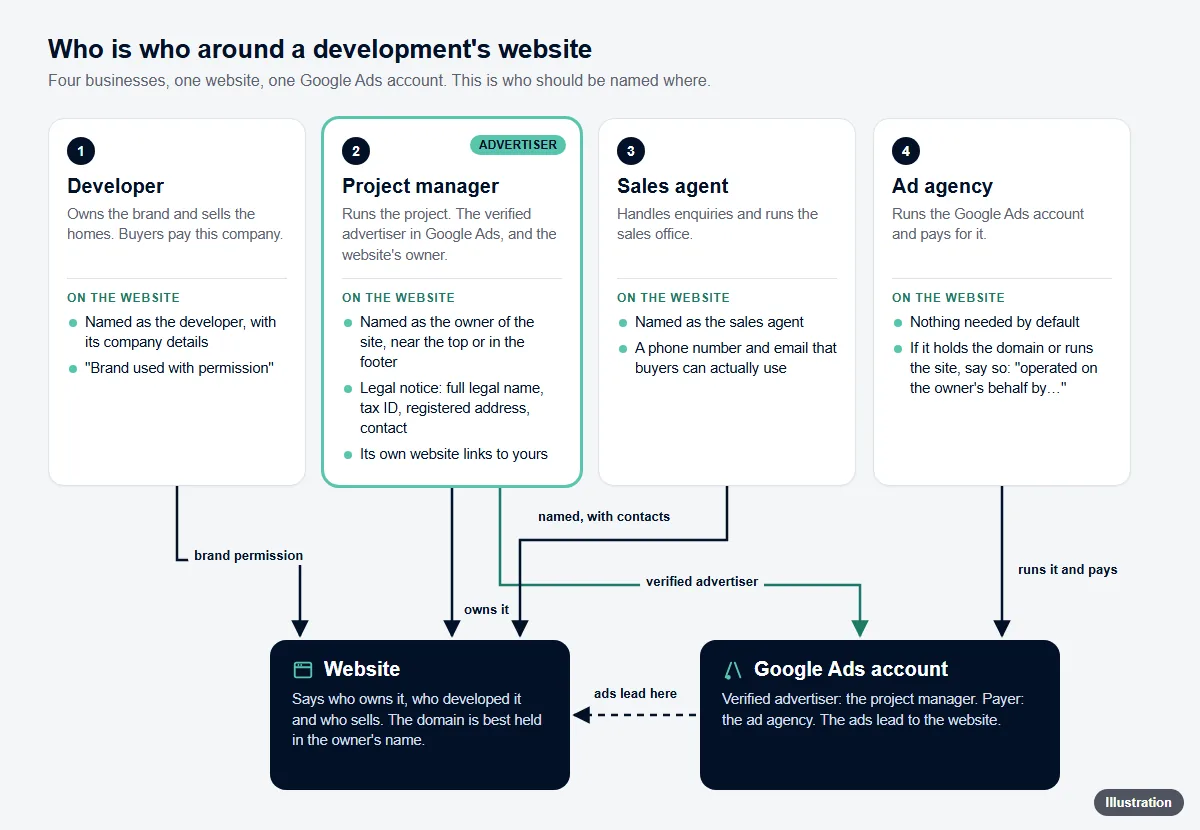
Google’s help for business operations verification spells it out. It asks you to include details on all relationships involved in the value chain. Its list includes marketing agencies accessing the Google Ads account, the end service provider and the domain owner (each “if different”), and other parties involved with the account, such as people who log in to it.
It names the proof too: an official agreement or contract, a document explaining the business relationship or brand owner on their company letterhead, or something such as an invoice or email from the other company. A third party named on your website without a formal relationship needs documenting, or Google says to remove the mention from your website. That page is about verification, not appeals, but it’s the most specific list we’ve found on Google’s help pages.
The payer is a relationship too. If your agency pays for your ads, say so: see who pays for your client’s ads. And if you’ve changed agency, say that as well: in the appeal tips under its phishing section, Google asks advertisers with a new account or who recently switched ad agencies to share their past experience using Google Ads.
Branding and brand association: whose brand is it?
This comes down to three questions: who owns the brand’s trademark, whether you have the owner’s permission, and whether the owner vouches for your site where people can see it.
Who owns it. Look the brand up on the official register: the UK IPO’s trade mark search, which can search by owner; EUIPO’s eSearch plus for EU trade marks; and the OEPM’s trade mark search for Spain. On the case we’re working on, the development’s brand was a trademark owned by the developer company, not by the advertiser or the agency.
Permission. If another company owns the brand, get its written permission to use it on this domain and in the ads. Google’s brand verification for business names shows how it thinks: the trademark owner must be the same as the legal name verified, although Google also accepts a parent or subsidiary relationship that public resources such as Dun & Bradstreet confirm. That’s a different feature, but in our reading the logic carries over. Google’s business name policy update of 19 October 2026 points the same way: a business name may differ from the domain where there’s a verified direct relationship between the advertiser and the domain owner.
Vouching for you. Google’s best practice is direct: if you’re an official or authorised partner of another brand, ask them to mention you on their website, as well as making the relationship clear on your own website and ads. Its appeal tips (in the phishing section) name the same proof: a link to the brand’s official website where your business is listed as a partner.
On the case we’re working on, the developer group’s own website linked to the microsites of its other developments, but not to this one.
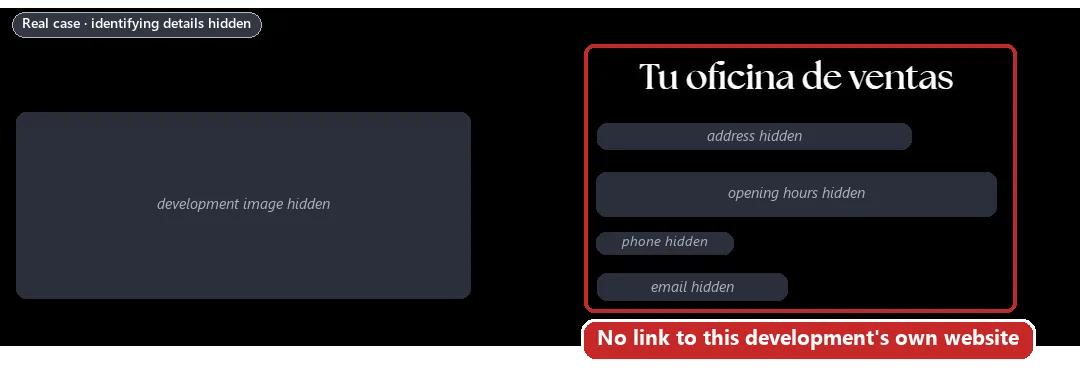
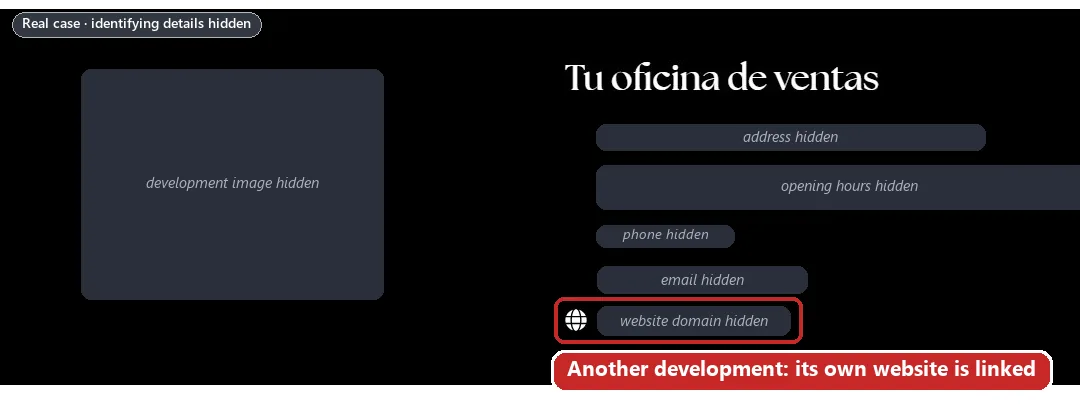
So the fix is something the developer group already does for its other developments. And if you mention another brand without being its partner, Google suggests you consider a disclaimer on your website and in your ads. If the site is a group company’s own microsite, see why a separate website wearing a parent company’s logo can look like a copycat, and how to give it its own identity.
What goes in the evidence pack, and what does each item prove?
Google’s appeal tips say proof can include contracts, written agreements, a link to a credible news article about the connection, and public statements from the brand. On the case we’re working on, this is the pack we’ve drawn up:
- The business’s signed letter. On letterhead, signed by a director or someone else with authority to sign. It ties the website, the domain, the agency, the account and the brand together on one page, so it proves the relationships. Template below.
- Registry extracts for each company named. UK: the company’s Companies House page is free and shows its registered address, incorporation date and officers, and a certified company certificate, which can list its directors and registered office, can be ordered for a fee. Spain: a nota simple from the Registro Mercantil (the registrars’ portal calls it a nota informativa mercantil), with the legal name, tax ID (NIF), registered office, objects and administrators. Elsewhere: a Handelsregisterauszug (Germany), a Kbis extract (France) or a KvK extract (Netherlands). They prove each company exists under that exact name, and who can sign for it.
- The trademark record. A printout from the UK IPO, EUIPO or OEPM register. It proves who owns the brand.
- The brand owner’s permission. A signed letter or licence for the advertiser and its agents to use the brand on this domain and in ads, plus the live link from the brand owner’s website. It proves brand association.
- The agency contract. Or the signed proposal the agency works under. It proves the agency acts for the business.
- Complete invoices showing who was billed. Every page, with the customer named. They prove a paid relationship with the business.
- The domain record after the change. The RDAP lookup and the registrar’s confirmation, with the business as registrant. It proves website ownership.
- Before-and-after screenshots. Dated, with the address bar visible, plus the live URLs so the reviewer can check. They prove what changed.
A short template for the business’s letter
Google publishes an authorisation letter template that a client signs when its agency applies for a certification: on letterhead, naming the agency, the account ID and the domain, and confirming the domain “is the property of my employer”. It isn’t for appeals, but it’s a good model. For certifications, Google adds that emails are not sufficient.
A template to adapt. Only sign what’s true on the day.
[On the business’s letterhead]
Date: [date]
To the Google Ads team,
I, [full name], [job title] of [full legal name, exactly as on the company register] (company number [number]), confirm that:
1. [domain] is our official website for [business, product or development], and we are responsible for its content.
2. The domain is registered to [us / our agency, [agency’s legal name], which registered it on our behalf].
3. [Agency’s legal name] is our marketing agency and is authorised to manage [and pay for] Google Ads account [customer ID] on our behalf.
4. [Brand] is a registered trademark of [owner], number [number], [which is our company / which has authorised us to use it on this website and in our ads].
5. [Other company] is our [developer / sales agent / supplier], under [agreement] dated [date].
Signed: [signature], [full name], [job title]
How do you build the pack? Step by step
Write down who’s who.
One paragraph naming every company around the site and its role, with full legal names.
Make the website say the same thing.
Name the operator on every page and in every language, with the legal name the account was verified with. Our website checklist covers the rest.
Fix the domain record, or document it.
Change the registrant to the business, or explain it in the business’s letter.
Ask the brand owner to link to your site.
A visible “official website” link on its own page, plus its written permission to use the brand.
Pull the official records.
A registry extract for each company named, and the trademark record.
Get the business’s letter signed.
By a director or someone with authority to sign, whose name matches the registry extract.
Collect the contracts and complete invoices.
Including any contracts between the other companies.
Capture before and after.
Screenshots with the address bar and date visible. In verification, Google says screenshots and digital IDs are generally not accepted, so give the live URL as well.
Check every name, then file once.
Legal names must match the registry extracts and the verified advertiser exactly, and no other appeal should be pending.
What shouldn’t you send?
More paper isn’t better. Leave these out:
- Personal ID documents, unless Google asks. IDs belong to advertiser verification, which Google’s appeal tips say to complete if asked. They prove nothing about who owns the website.
- Unmasked bank statements. Even in verification, Google says you can hide or edit out any proprietary or personal information.
- Statements that show other clients. An agency’s bank statement can list payments for other businesses. That’s their information, and it says nothing about this website.
- Cropped invoices with the customer removed. The point of an invoice is who was billed. Google’s document rules for verification ask that all pages of the document are provided.
- The registrar screenshot that contradicts the site. If the record names your agency while the site says your company owns it, it proves the opposite of what you mean. Change the registrant first, or explain it in the business’s letter.
Can it be fixed? The cases we don’t take
It depends on whether the business is what its website says it is. Google says accounts are only reinstated in compelling circumstances, such as a mistake. Documents can show a real relationship; they can’t create one.
Real Unacceptable Business Practices is a business actually misrepresenting itself, and those are the cases we turn down. Our service page is upfront about them: accounts that are genuinely in violation, and accounts with a fatal flaw that makes them unredeemable. For example: presenting another company’s business as your own, advertising another company’s products with no agreement to show for it, or no longer controlling a domain that’s still in the account.
Two more examples of what we mean: an offer presented as “advertised by Elon Musk or any public figure” when it isn’t; and a health and wellness reseller selling products for a margin while presenting itself as the brand, with an obvious connection between the branding, the name and the product. We’ve turned a case down before because they were doing it on purpose.
Our guide to when a suspension can’t be fixed covers the harder cases.
Don’t open a new Google Ads account to get round this.
Google says any new accounts that the advertiser tries to create may also be suspended, and its Circumventing Systems policy gives creating new accounts to re-enter the system as an example of what isn’t allowed. On the case we’re working on, a second account was opened two days after the first suspension, for the same advertiser, website and payer. It ran for five days, then it was suspended too. Read why a new account makes things worse.
How is the appeal filed, and who can press Submit?
Google’s suspensions overview describes the route:
- “In your Google Ads account, select the Contact us link in the notification at the top of your screen.”
- “This link will direct you to the appeal form on the right-hand side of your screen.”
- “While you complete the form, relevant policy information will appear to help you understand the reason for the suspension and the appeal process.”
Google doesn’t publish the form’s fields, its character limits or the files it accepts; we found none on the help pages we checked on 1 October 2026. So have the pack ready before you open it.
Who can submit? Google’s help pages don’t say. A Google Ads API Forum Advisor wrote in September 2025 that the Admin role grants “the ability to appeal suspensions”, and that the Standard role “restricts their ability to appeal suspensions”. In our experience, an agency or specialist with read-only access can review the account and prepare everything, but can’t file: an administrator on the account has to.
When we handle an appeal, we connect to the suspended account through our manager account, and an admin on the account approves the link: see how linking a suspended account works. Either way, file once. Google says submitting one appeal at a time ensures timely review, and gives every advertiser at least six months from the date of account suspension to appeal, so there’s time to get the pack right.
- Before you write it: read what the appeal form asks and why appeals get rejected.
- Related accounts: Google asks that linked and related accounts comply before you appeal. See suspensions connected to a related account, and our guides to identity reuse and Circumventing Systems.
- The policy itself: our Unacceptable Business Practices guide and what the notice means.
Frequently asked questions
Do I need to own the domain to advertise it on Google Ads?
We haven’t found a Google rule that says you must. Google’s verification help lists the domain owner, if different among the relationships it wants explained, so a different owner is possible but has to be explained. In our reading, the safest set-up is a domain registered to the business the website says runs it.
Can my agency own my domain?
It can hold it: we haven’t found a Google rule against that. But if your site says your company owns the website and the record says your agency does, a reviewer sees two answers. Ask the agency to change the registrant to your company; it can still manage the domain for you.
What is a letter of authorisation for Google Ads?
Google uses one for certification applications: an authorisation letter template the client signs on letterhead, naming the agency, the account ID and the domain. Google publishes no template for Unacceptable Business Practices appeals, but it asks for proof such as contracts, written agreements, and the same shape works (see the template above). Trademarks in ad text are a separate process: when a trademark owner complains, Google will review it and may restrict use of the trademark.
How do I find out who my domain is registered to?
For .com and other generic domains, use ICANN’s free registration data lookup tool. For .uk, use Nominet’s RDAP client at rdap.nominet.uk; Nominet shows the registrant’s details only if they’ve opted in. Your registrar’s control panel is another place to look.
Should I send my ID or bank statements with an Unacceptable Business Practices appeal?
Not unless Google asks. IDs belong to advertiser verification, which Google’s appeal tips say to complete if asked, and a bank statement says nothing about who runs or owns the website. If you must send one, Google says you can hide or edit out any proprietary or personal information.
Can my agency file the appeal for me?
Only with the right access. Google’s help pages don’t say who may appeal, but a Google Ads API Forum Advisor wrote that the Admin role includes “the ability to appeal suspensions” and the Standard role restricts it. In our experience, read-only access can’t file. See how linking a suspended account works.
The brand belongs to another company in our group. Is that a problem?
Not in itself, but you have to show the connection: get the trademark owner’s written permission, and ask them to mention you on their website, as Google’s best practice says. For business names in ads, Google accepts a parent or subsidiary relationship if public resources confirm it, which shows the kind of connection it looks for.














