 Skip to content

Google Ads suspended a property development website: the “official website” rule
 Gianluca Catinella, Director, Ad Restore LtdPublished on 19 min read
Tricking people into believing you're the official website for a new real estate development so you can earn commission
One of the examples on Google’s Unacceptable Business Practices policy page, quoted word for word. The UK version says “new housing development”.
Google’s Unacceptable Business Practices policy has one example written for property: a site that passes itself off as the official website for a new real estate development to earn a commission. Few guides explain what that means in practice. This one does, from a live case: a new-build development’s sales website, advertised abroad, whose Google Ads account was suspended under this policy.
In our review, the companies behind the development are real, but nothing a Google reviewer could check confirmed that this was its official website.
Checked against Google’s help pages, UK legislation and the ASA’s advice on 1 October 2026. They change without notice, so check the linked page before relying on a detail. The case is anonymised: no agency, client, development, company, town or website is named, and identifying figures are left out.
At a glance
Google’s own example
The policy names fake “official websites” for new developments, set up to earn a commission.
Ask the developer to mention you
Google’s best practice for official partners: ask the brand to mention you on its own website.
Say what the price includes
Spanish and UK law both require online prices to say whether tax is included.
The brand may not be yours
In our case, the development’s brand was a registered trademark of the developer company, not of the advertiser or the agency.
Agencies carry the risk
In the case we’re working on, 53 of the 75 accounts under the agency’s manager account ended up suspended.
On this page12 sections
What does Google’s “official website” example mean?
Google’s policy is about scamming people by hiding or misrepresenting info about your business, products or services. Two of the things it says you can’t do fit property best: make it seem like you’re affiliated with another brand or organisation when you’re not, and offer products or services that you don’t have or can’t deliver. For the policy as a whole, see our guide to the Unacceptable Business Practices policy.
Our reading: the example describes a lead site. Someone who isn’t the developer builds a site that looks like the development’s own, collects buyers’ enquiries and earns a commission on any sale, while the buyer thinks they’re dealing with the developer. Google treats this policy as egregious, so accounts are suspended upon detection and without prior warning.
The policy doesn’t say how a reviewer tells an official site from a pretend one. It does say Google may review information from multiple sources including your ad, website, accounts and third-party sources. In our reading, the question is simple: does anyone other than you confirm that this is the development’s official website?
In our case, Google’s suspension email was in Spanish and listed the policy’s examples, this one included. Translations aside, Google says the English version is the official language for enforcing its policies.
The case: a new-build development’s sales website
A Spanish Google Ads agency that handles multiple accounts for multiple different clients came to us in September 2026. One client is behind a new-build property development in Spain. Its sales website is a microsite, a separate site for that development, advertised to buyers in the Netherlands, Germany, Poland and the UK.
- 25 July 2026: the account advertising the microsite was suspended for Unacceptable Business Practices, confirmed by Google’s own email.
- Two days later: a second account was opened for the same advertiser, website and payer. It ran for five days, then it was suspended as well.
- From August: suspensions spread across the agency’s other clients, and the accounts we opened showed the Verification identity reuse notice. By 29 September, 53 of the 75 accounts under its manager account were suspended. That story is in our agency case study.
- The appeals: about 10 on the development’s two accounts were denied while the website stayed unchanged. Its legal pages were only updated on 22–23 September.
On 1 October we checked the site again, in all five of its languages, on desktop and mobile. It still had:
- no company named as the operator on any homepage;
- eight flat listings left over from the website theme’s demo;
- 11 demo blog posts, among them WordPress’s “Hello world” post and one naming real companies with a made-up quote;
- a “from” price with no statement on VAT;
- renders of a building not yet built, with no “non-contractual” note;
- a broken “About us” link on the German landing page.
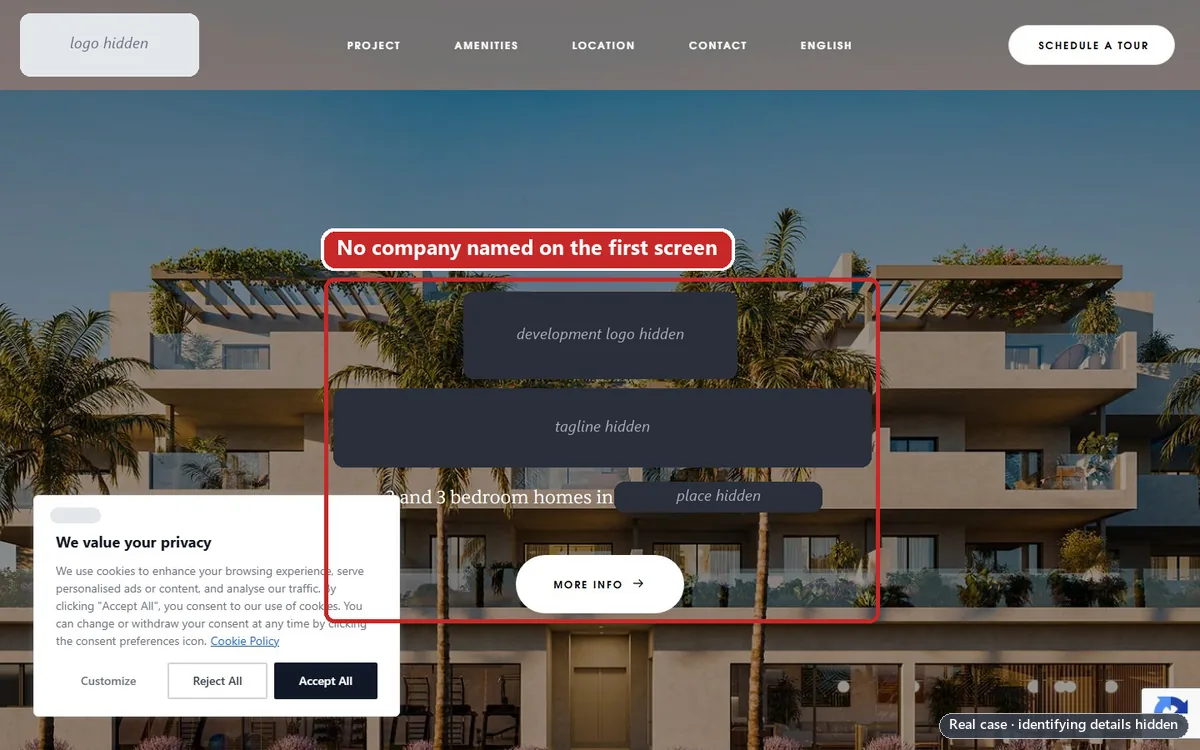
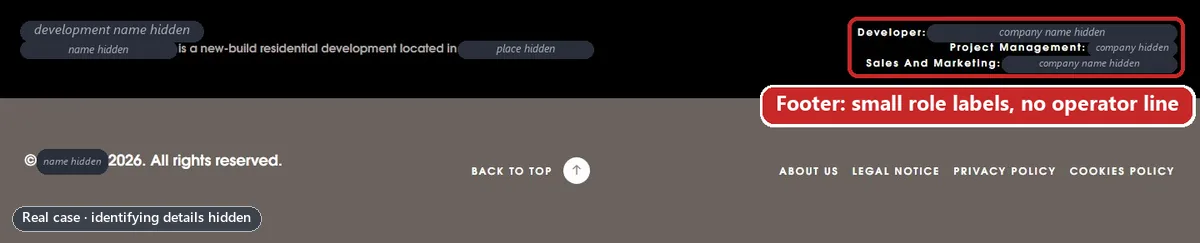
In our review, this wasn’t fraud of the kind Google’s examples describe: the development is real, and the companies around it are in public registers. But the site carried things a developer’s official site wouldn’t. At the time of writing the case is still open, and the new appeal hasn’t been filed.
Who’s who on a new-build development?
Behind one development brand there can be several companies. In our case, four sat around one website.
Who did what in the case
| Role | What it does | Where the website showed it |
|---|---|---|
| The developer group (on the site: project management) | The name buyers see: it presents the development as its own, on its website and in the press. The verified advertiser, and named in the legal notice as the website’s owner. | Its logo in the header and a role label. Its full name only in the legal pages. |
| The developer company (Spanish: promotora; on the site: developer) | A separate company. Buyers pay it, and it owns the development’s trademark. | A role label near the bottom of the homepage. |
| The exclusive sales agent (Spanish: comercialización) | Runs the sales office. Its own website calls it the developer group’s sales and marketing department. | A role label, and the sales office’s address and hours. |
| The ad agency | Runs and pays for the ads, and registered the domain. | Nowhere. |
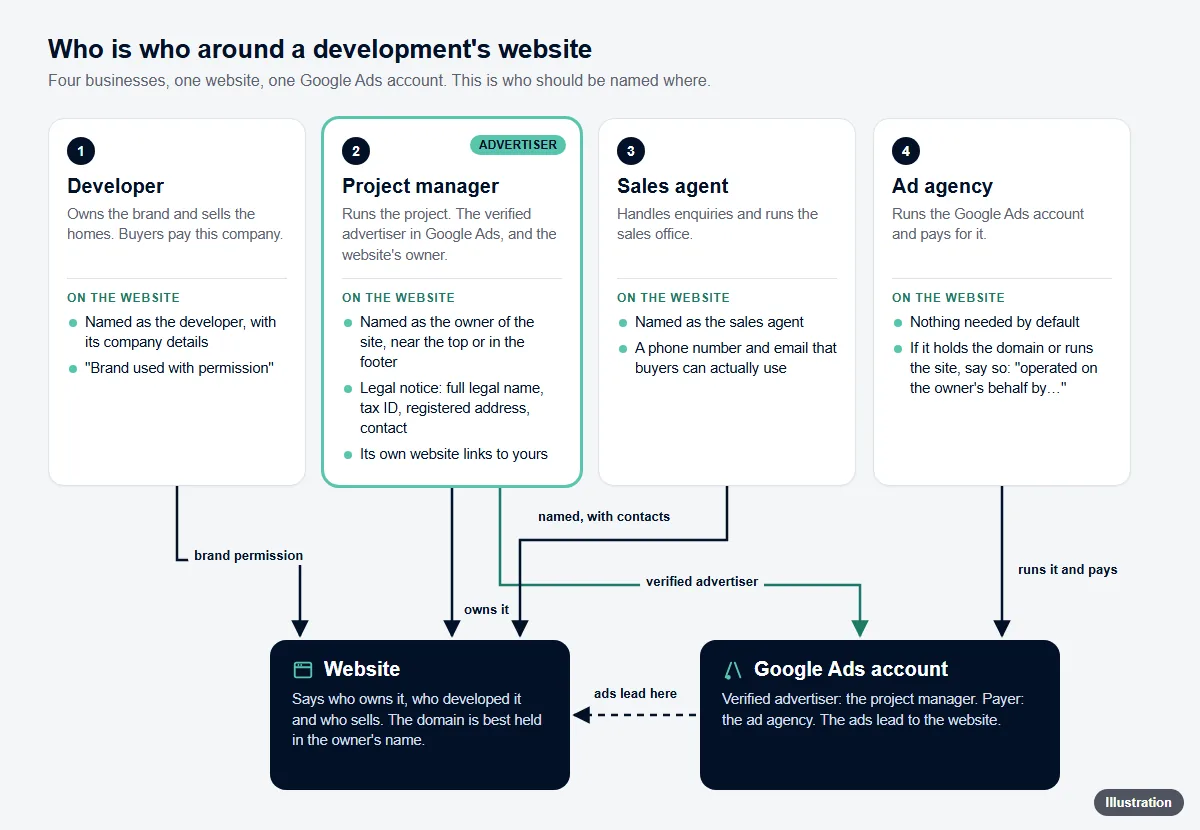
Why does that matter? Once you’re verified, Google’s ad disclosure will include your name or organisation’s name and location: here, the developer group’s. The homepage named the companies only in role labels near the bottom and left the agency out. Google’s Misleading representation policy doesn’t allow omitting material information about your identity or affiliations.
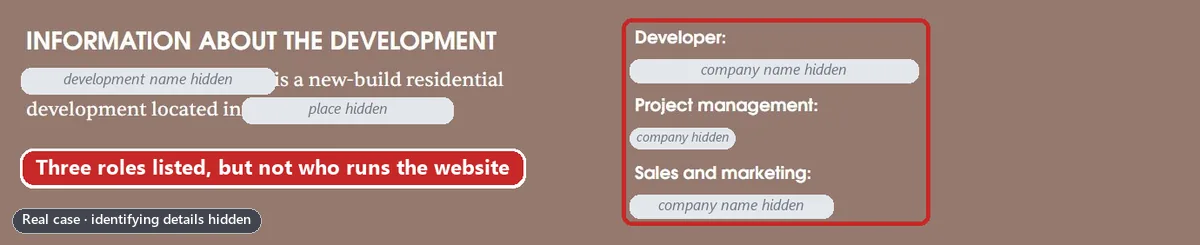
What to put on the site. One block in the footer of every page, in every language: the company that operates the website first, with its full legal name, tax ID, address, a phone number that’s answered and an email address on the site’s own domain, then the partner companies listed with their roles. Don’t put a notice naming several companies at the top of the homepage: in our reading, one footer block is easier for a reviewer to check. Use the same names and role labels everywhere, appeal included. In the case, the developer group’s name appeared in four forms, and the roles didn’t match its own website or brochure. Google’s best practice is to describe your business on your website.
Example footer block
In the footer of every page: “This website is operated by [Company Ltd], [tax ID], [address]. Phone: [a number that’s answered]. Email: [name]@[the site’s own domain].”
Then the partners: “Developer: [Developer Ltd]. Exclusive sales: [Agent Ltd].”
Nothing naming several companies at the top of the homepage.
For a UK company this is also the law. A company must disclose its registered name on its websites, plus its registered number, the part of the UK it’s registered in and its registered office address. The Electronic Commerce (EC Directive) Regulations 2002 add a geographic address, an email address and, where they apply, trade register and VAT numbers. In the Spanish case, the equivalent is article 10 of the LSSI.
Does the developer’s own website link to yours?
This is the test we’d run first. Google’s best practice is direct: if you’re an official or authorised partner of another brand, ask them to mention you on their website, as well as making the relationship clear on your own website and ads. In its phishing appeal tips, on the same page, Google lists as proof a link to the brand’s official website where your business is listed as a partner.
In the case, the developer group’s website has a page for each development, each with a sales box. For its other developments, that box lists and links the development’s microsite. For this one it doesn’t, and the sales agent’s page doesn’t link it either. So nothing official confirms the microsite is the developer group’s: in our reading, the gap Google’s example describes.
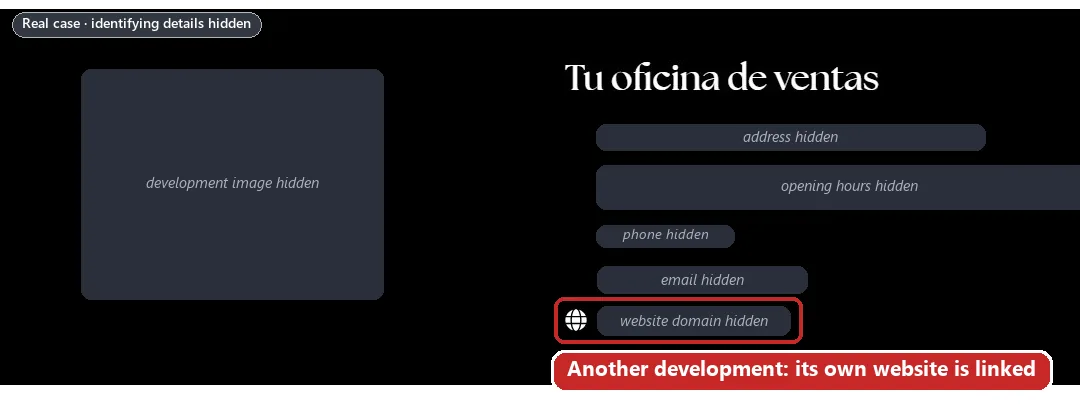
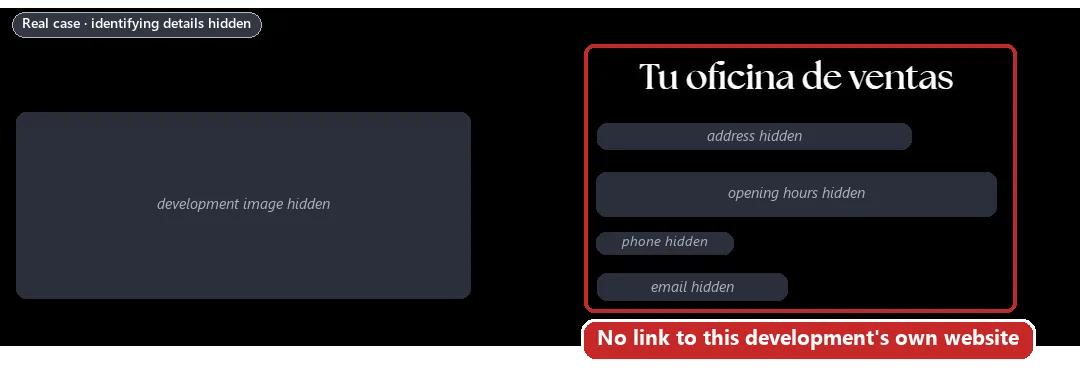
The fix is something the developer already does. Add a visible line with a link on its page for the development, in every language, and on the sales agent’s page. Then keep the URL and a dated full-page screenshot with the address bar showing, so the reviewer can check.
A line the developer can add
“Official website of the development: www.[development].com, operated by [Company Ltd].”
If an agency runs it: “Official website of the development: www.[development].com, operated on our behalf by [Agency Ltd].”
Make sure the line is true on the day it goes live: if it says the developer owns the site, the domain record should agree (see the agency section below). Link back to the developer’s and the sales agent’s pages. If the developer won’t add the link, the honest alternative is to send the ads to its own page for the development.
Are your property claims honest?
Prices and claims fall under other parts of Google’s Misrepresentation policy, such as Dishonest pricing practices and Unreliable claims, which Google says won’t lead to immediate account suspension without prior warning. In our experience they still add to the trust issues that build up across a site, as our guide to the suspension notice explains.
“From” prices: say whether VAT is included
The site showed a “from” price in five languages with no word on VAT. The developer group’s own mortgage calculator added VAT at 10% on top, and the sales agent’s published payment terms quoted every stage “+ I.V.A.” (plus VAT). So the price was most likely before VAT, and a buyer budgeting from it could come up short.
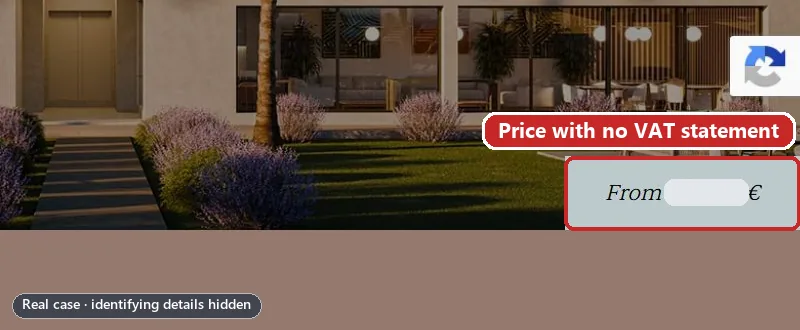
Spanish law is explicit. Article 10.1.f of the LSSI says a website that refers to prices must give clear and exact price information, “indicando si incluye o no los impuestos aplicables” (stating whether or not it includes the applicable taxes). Google’s Dishonest pricing practices policy lists not disclosing the total price, including all taxes, fees and surcharges as an example of what isn’t allowed.
In the UK, the Electronic Commerce (EC Directive) Regulations 2002 say prices on a website “shall indicate whether they are inclusive of tax and delivery costs”. The CAP Code goes further. It covers paid ads aimed at people in the UK, sites on .uk domains and the websites of businesses with a UK-registered address. Its rule 3.18 says quoted prices must include non-optional taxes that apply to all or most buyers, and the ASA’s advice on VAT says that for consumers, “It is not sufficient to state a VAT-exclusive price accompanied by information that VAT is payable.”
A price line for a development sold before VAT
“From €[price] + VAT. Price of the lowest-priced available [type of home]. VAT, purchase taxes and costs not included. Subject to availability.”
Confirm with the developer first. Where the CAP Code applies, quote consumer prices with VAT included.
Renders of a building that isn’t built yet
Every image on the site showed a finished building and furnished interiors, while the developer group’s own website said construction had only just started. No page said the images were computer-generated or not contractual, although the developer group’s brochure, on the same server, carried exactly that disclaimer.
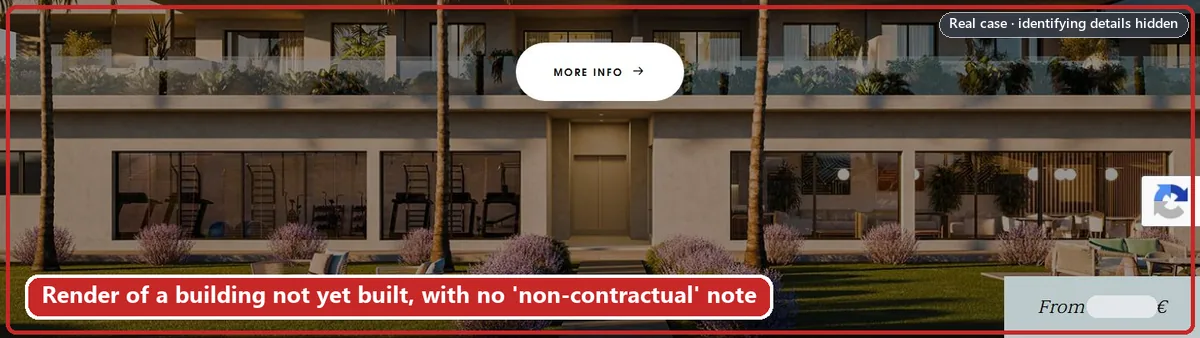
Google’s Misrepresentation policy covers ads or destinations that deceive users by excluding relevant product information. In our reading, whether a home exists yet is relevant product information, so put a short note under the hero image and the gallery, in every language.
For ads under the CAP Code, the ASA’s advice on new build and off-plan homes covers a related case: where a home sold off-plan at a “from” price has no images of its own, an image with optional upgrades can be used only with “image includes optional upgrades at additional cost” next to it, as prominent as the price.
A note for renders
“Images are computer-generated, for illustration only and not contractual. Furniture, decoration and finishes shown may differ from the final home.”
Company statistics that contradict your own brochure
Under the developer group’s logo, counters gave its number of developments, homes, money invested and cities, with no source or date. Its brochure on the same server, its main website and the sales agent’s site each gave different figures. Google’s Unreliable claims policy covers making inaccurate claims. Remove the counters, or keep one figure the company publishes itself, with its source and date.

Translations that promise more
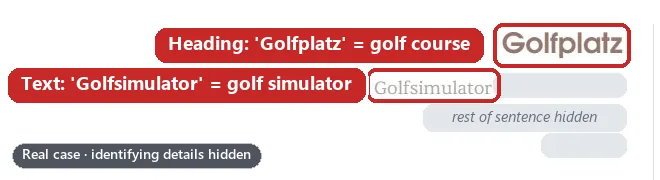
The amenities included a golf simulator. On the German and Dutch landing pages its heading read “Golfplatz” and “Golfbaan”: golf course. Check every amenity in every language, starting with the pages your ads point to.
Listings for homes that aren’t in the development
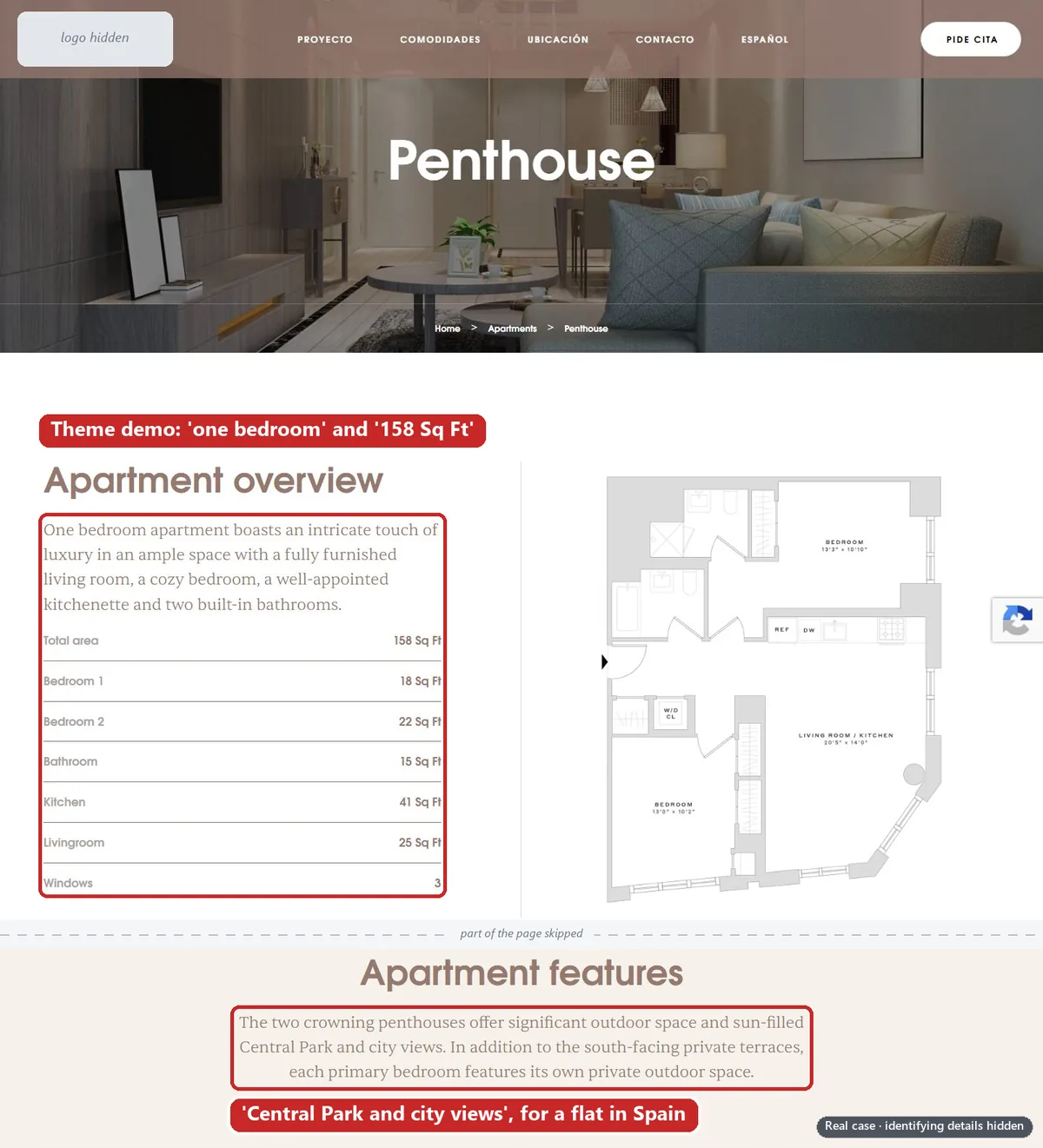
The theme’s demo flats, with lorem ipsum text, were still published under the developer group’s branding: a “one bedroom” penthouse of “158 Sq Ft” with “Central Park and city views”, on a development in Spain. Google’s policy says you can’t offer products or services that you don’t have. How to find and remove leftovers like these is in our guide to theme demo content.
Do you have permission to use the development’s brand?
In the case, the development’s brand is a registered trademark of the developer company: not of the advertiser (the developer group), and not of the agency. So both were using another company’s brand on the website, in the domain name and in the ads.
Google’s best practices for this policy are to use your own branding, to avoid using another brand’s identity in a misleading way and, when you reference another brand, to follow Google’s policy on trademarks. That policy says that if a trademark owner submits a complaint to Google about the use of their trademark in ads, Google will review it and may restrict its use. If the website is a group company’s own microsite on a separate domain, see why a parent company’s logo on a separate website can look like a copycat.
What to get. A signed letter from the trademark owner saying the advertiser and its agents may use the brand on this website, in this domain and in ads, plus the registry record: in the UK, from the IPO’s trade mark search; in Spain, from the OEPM. Our guide to website ownership, relationships and brand association covers the letter and the registry extracts.
A line for the website
“[Development name] is a registered trade mark of [Developer Ltd], used with its permission.”
Running ads for a developer? The agency’s two risks
In the case, the agency ran the ads, paid for them and registered the domain. Two of those choices tied it to the problem.
- The domain was registered to the agency, while the site’s legal notice said the developer group owned the website. In our reading, a reviewer who checks sees an agency-held site that calls itself the developer’s: the shape of Google’s example. Put the domain in the website owner’s name, or get the owner’s signed letter saying the agency runs it on its behalf, and say so on the site.
- One shared payer. The agency paid for this client’s ads, and many others’, from one payments profile. On its billing-suspensions help page, Google gives accounts using the same email or payment method as an example of accounts related to a suspended one, and says those will be suspended. In our reading, that’s how one development’s suspension reached 53 accounts.
More in our ownership and brand association guide, the agency case study, how Google links related accounts and what Google asks agencies about who pays.
What should you change before you appeal?
Google says accounts are only reinstated in compelling circumstances, so do the work first, in this order.
Stop appealing.
Google says that if you file too many appeals for the same account suspension it may not process them, and that submitting one appeal at a time ensures timely review.
Freeze the accounts.
No new accounts, payments profiles, payment methods or manager links while the suspension stands.
Put who’s who on every page.
Each company’s legal name, registration number and role, worded the same on the site, in every language and in the appeal.
Get the developer to link the site.
An “official website” line on its page for the development, then a dated screenshot.
Fix the claims.
VAT next to every price, a note under every render, sourced statistics or none, and accurate translations.
Remove the template leftovers properly.
Delete demo listings and posts so their addresses return 404 or 410, and take them out of the sitemap. Our guide to theme demo content shows how.
Sort out the domain and the brand.
Put the domain in the website owner’s name, or get a signed letter explaining who holds it, plus written permission from the trademark owner.
Check the related accounts.
Before appealing, Google asks you to make sure that all related accounts comply with Google’s policies, linked or previously linked ones included. In the case, that means the developer group’s other development sites too.
Then appeal once, with proof.
Explain the relationships and attach the proof (see the appeal route below).
For every check a reviewer might run, not just the property ones, use our Unacceptable Business Practices website checklist.
Don’t open a new account or payments profile to get round this.
In the case, the second account, opened two days after the first was suspended, was suspended too. Google says any new accounts that the advertiser tries to create may also be suspended, and its Circumventing Systems policy lists creating new accounts to re-enter the system after a previous suspension as a violation. Read why a new account makes things worse and our guide to the Circumventing Systems policy.
Can it be fixed, and which cases don’t we take?
Google says accounts are only reinstated in compelling circumstances, such as in the case of a mistake. In a case like this the business is real: what’s missing is proof a reviewer can check, and what shouldn’t be there is uncleaned template content. Both can be put right, but whether the account comes back is Google’s decision.
Some cases we don’t take. As our Unacceptable Business Practices service page says, if your account is genuinely in violation, or has a fatal flaw that makes it unredeemable, we tell you on the free call and don’t take your money. Real Unacceptable Business Practices is when a business is actually misrepresenting itself. For example:
- something “advertised by Elon Musk or any public figure” when it isn’t;
- a health and wellness reseller selling products for a margin while presenting itself as the brand, with “an obvious connection between the branding, the name and the product”;
- in property, presenting another company’s development as your own, with no agreement with the developer to show for it.
Gianluca has turned one down for that reason: “I’ve rejected one before because I was like, this is not, they’re doing this on purpose.” If you’re the developer, or act for one and can prove it, that’s a different case.
The appeal route
- Where: the Contact us link in the notification at the top of your screen in the suspended account. Google says you’ll receive an email with the outcome.
- What to say: Google’s tips are to follow the best practices, describe your partnership and share any information that shows how you’re connected, and share proof such as contracts, written agreements, a credible news article or a public statement from the brand. In our reading, the developer’s page naming your site as the official one is that public statement.
- Your history: if there was a second account or a change of agency, say so. In its phishing appeal tips on the same page, Google asks advertisers who have a new account or recently switched ad agencies to share their past experience with Google Ads.
- Time: Google gives every advertiser at least six months from the date of account suspension to submit an appeal, so fix the site first.
Before you write it, read what the appeal form asks and why appeals get rejected.
Frequently asked questions
Can an estate agent advertise a developer’s new development on Google Ads?
Google’s policy doesn’t ban it. It bans seeming to be the official site, or affiliated with the developer, when you’re not. If you’re an authorised agent, say so and ask the developer to mention you on its website. If you aren’t, Google suggests you consider a disclaimer on your website and in your ads.
Does the developer have to link to our website?
Google doesn’t say it must. Its best practice is to ask the brand to mention you on its website, and its phishing appeal tips list a link from the brand’s official website as proof. In our reading, it’s the simplest proof a reviewer can check.
Do property prices on a website have to say whether VAT is included?
In Spain, yes: article 10.1.f of the LSSI requires it. In the UK, the Electronic Commerce (EC Directive) Regulations 2002 say prices must indicate whether they include tax, and where the CAP Code applies, prices quoted to consumers should include VAT.
Can we use the development’s name in our domain and ads?
If the name is a registered trademark, get the owner’s written permission first. In our case it belonged to the developer company, not the advertiser or the agency. Google’s best practice for this policy is to use your own branding.
Are computer-generated images allowed on an off-plan development’s website?
Google’s Misrepresentation policy doesn’t mention renders as such. It does cover destinations that deceive users by excluding relevant product information, so in our reading, say clearly that the images are computer-generated and not contractual.
Can we open a new Google Ads account for the development?
No. Google says new accounts a suspended advertiser tries to create may also be suspended, and its Circumventing Systems policy lists creating new accounts to re-enter the system as a violation. In our case, the second account was suspended after five days.














